HREN


Copilot’s Assisted permissions let clearly safe requests proceed automaticallyCopilot, 안전하다고 판단한 요청은 자동 승인
A large language model evaluates requests to run commands, access file paths or open URLs. Assisted permissions are now generally available in Copilot CLI, the GitHub Copilot app and VS Code.명령 실행·파일 접근·URL 열기 요청을 언어 모델이 먼저 검토합니다. Assisted permissions가 Copilot CLI·앱·VS Code에 정식 제공됐습니다.
- Source published원문 게시일
- Checked확인일
- Posted게시일
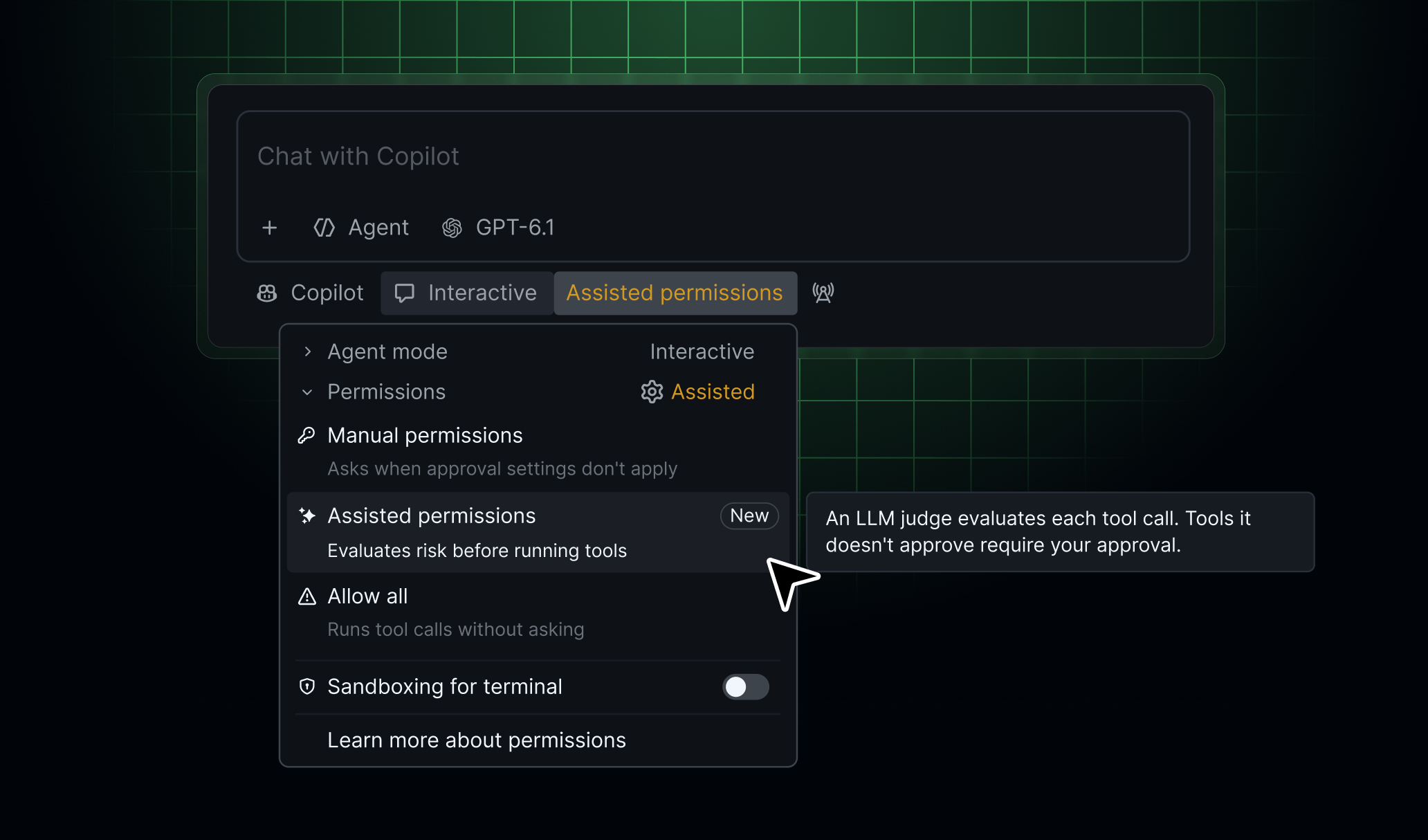
GitHub has announced that Assisted permissions, a permission mode for GitHub Copilot, are now generally available. When Copilot asks for permission, a language model evaluates the request first.GitHub이 GitHub Copilot의 권한 모드 Assisted permissions를 정식 제공한다고 발표했습니다. Copilot이 권한을 요청하면 그 요청을 언어 모델이 먼저 평가하는 모드입니다.
According to GitHub, the requests evaluated are those to run a command, access a file system path or open a URL, and the evaluation is done by a large language model. Requests classified as clearly safe proceed automatically; other requests require the user’s approval.GitHub에 따르면 평가 대상은 명령 실행, 파일 시스템 경로 접근, URL 열기 요청이고, 평가는 대규모 언어 모델이 맡습니다. 분명히 안전하다고 분류된 요청은 자동으로 진행되고, 그 밖의 요청은 사용자의 승인을 받아야 합니다.
How to turn it on differs by product. In Copilot CLI, it is turned on by running /permissions and choosing assisted. In the GitHub Copilot app, it is chosen by opening the mode picker, clicking Tool permissions and choosing Assisted. In Visual Studio Code, it is chosen from the permissions picker as Assisted permissions.켜는 방법은 제품마다 다릅니다. Copilot CLI에서는 /permissions를 실행한 뒤 assisted를 고르면 켜집니다. GitHub Copilot 앱에서는 모드 선택 메뉴를 열고 Tool permissions를 누른 뒤 Assisted를 고릅니다. Visual Studio Code에서는 권한 선택 메뉴를 열고 Assisted permissions를 고릅니다.
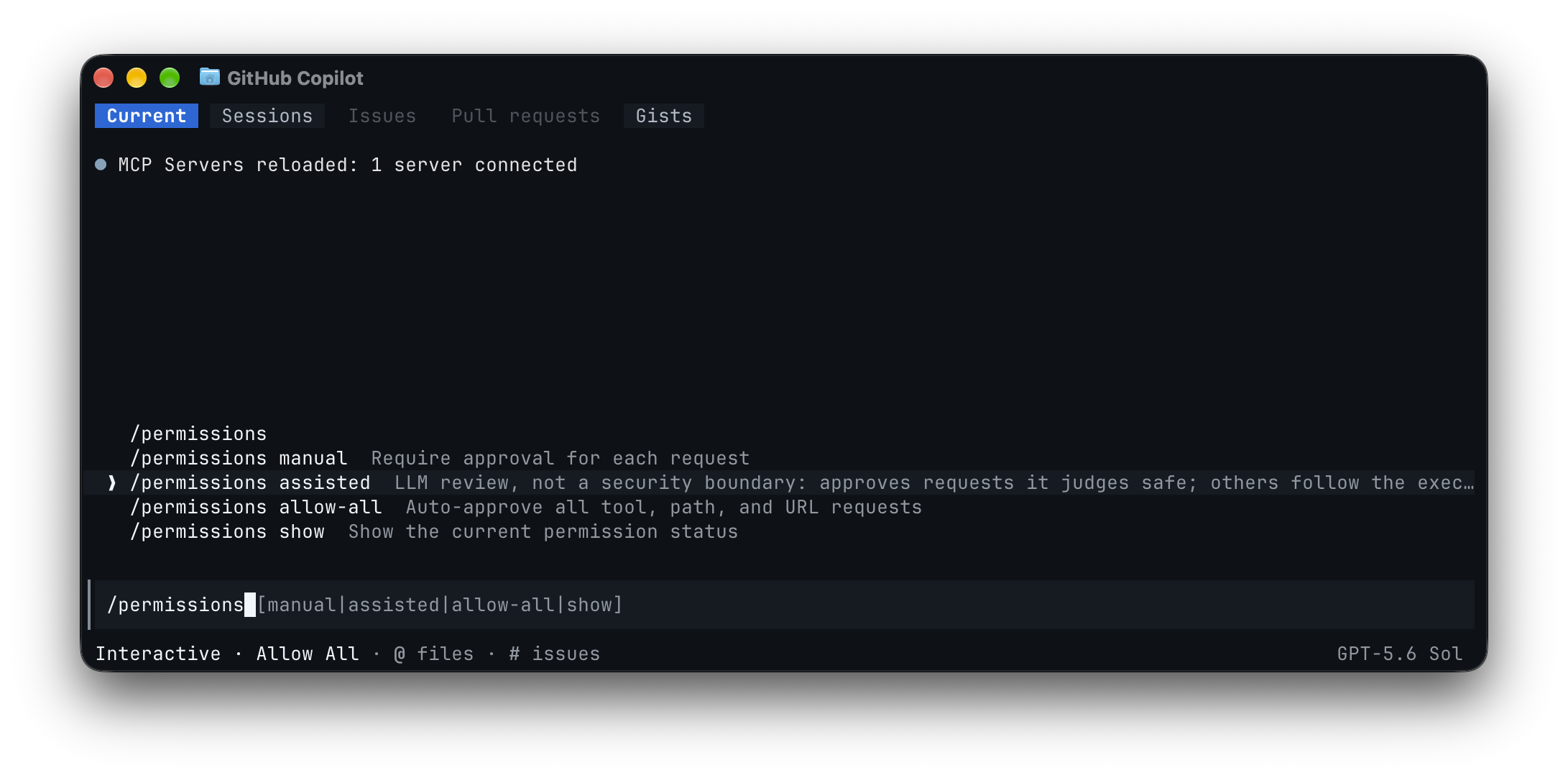
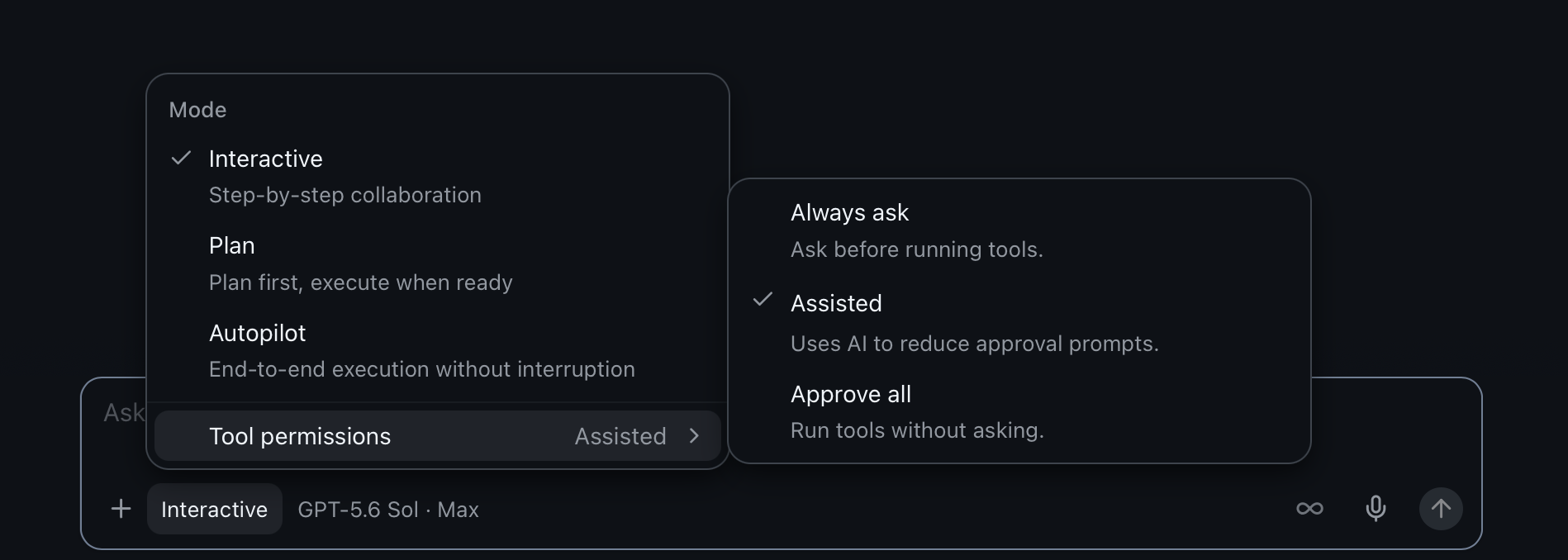
It is available in three places, Copilot CLI, the GitHub Copilot app and Visual Studio Code, according to a GitHub Changelog entry dated October 26, 2026. The changelog does not say which Copilot plans include it, whether it costs extra, or whether it is limited by country.쓸 수 있는 곳은 Copilot CLI, GitHub Copilot 앱, Visual Studio Code 세 곳이고, GitHub 변경 기록은 2026년 10월 26일 자로 이를 알렸습니다. 어떤 Copilot 요금제에서 쓸 수 있는지, 따로 드는 비용이 있는지, 나라별 제한이 있는지는 변경 기록에 나와 있지 않습니다.
Enterprise administrators can use enterprise-managed settings to block Allow All while keeping Assisted available, or to disable Assisted separately. Administrators can also choose the default permission mode for new sessions, and developers can still choose another mode permitted by policy. If the default is unavailable or prohibited by policy, the session starts with manual approval. The changelog does not name the language model used for evaluation or spell out what counts as clearly safe. GitHub says details on how requests are evaluated and when approval is required are covered in a separate document, ‘Allowing safe commands to run without manual approval’.기업 관리자는 기업 관리 설정(enterprise-managed settings)으로 Allow All을 막으면서 Assisted는 남겨 두거나, Assisted만 따로 끌 수 있습니다. 관리자는 새 세션의 기본 권한 모드도 정할 수 있고, 개발자는 정책이 허용하는 범위에서 다른 모드를 고를 수 있습니다. 기본 모드를 쓸 수 없거나 정책이 막으면 세션은 수동 승인으로 시작합니다. 평가에 쓰는 언어 모델의 이름과 ‘분명히 안전하다’고 가르는 기준은 변경 기록에 나와 있지 않습니다. GitHub은 요청을 평가하는 방식과 승인이 필요한 경우의 세부 내용을 별도 문서 ‘Allowing safe commands to run without manual approval’에서 다룬다고 밝혔습니다.
Sources & references원문과 참고 자료
Keep reading더 읽기
All articles전체 글TencentTencent
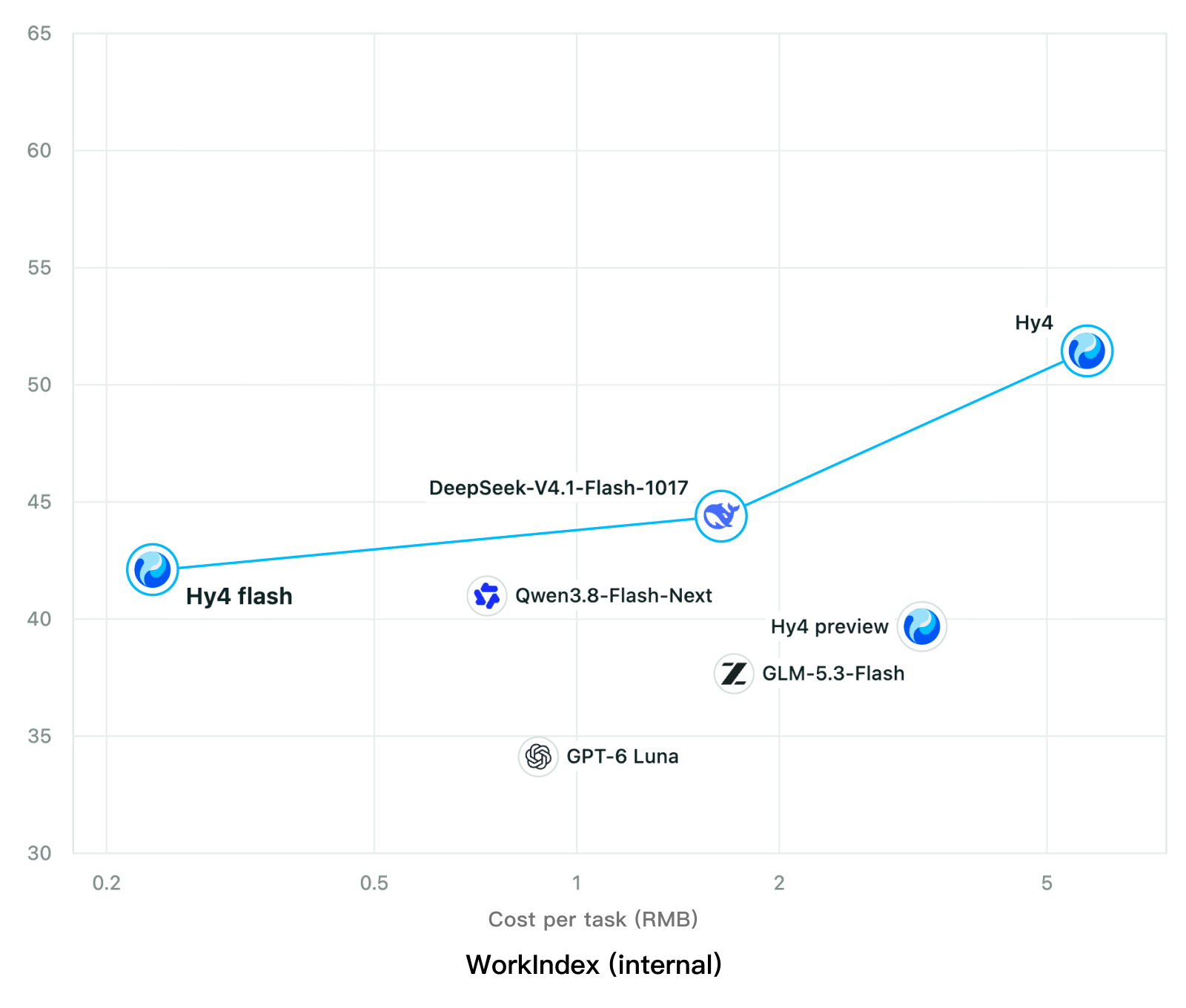
Tencent releases Hy4 flash as open weights, with FP8 and base versions, under the Tencent Hy LicenseTencent, Hy4 flash 가중치 공개 — FP8 · base 모델 포함, Tencent Hy License
Checked확인일
Chart: Tencent Hy4 flash model card. Tencent internal testing.그림: Tencent Hy4 flash 모델 카드. Tencent 내부 시험 결과입니다.
ElevenLabsElevenLabs
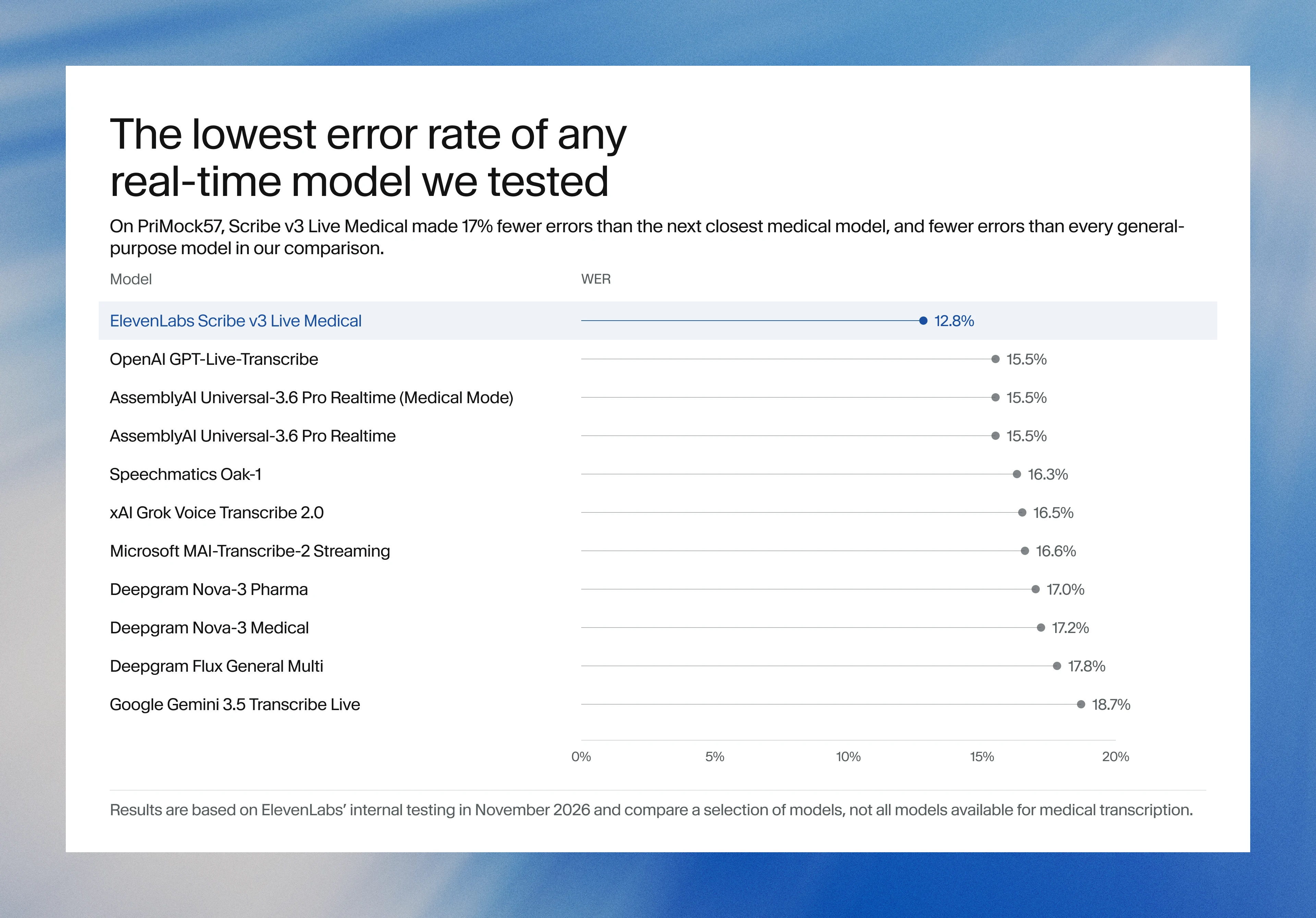
ElevenLabs releases Scribe v3 Live Medical, real-time medical transcription for voice agents in ElevenAgentsElevenLabs, ElevenAgents 음성 에이전트용 실시간 의료 전사 Scribe v3 Live Medical 공개
Checked확인일
Image: ElevenLabs blog.그림: ElevenLabs 블로그.
GoogleGoogle
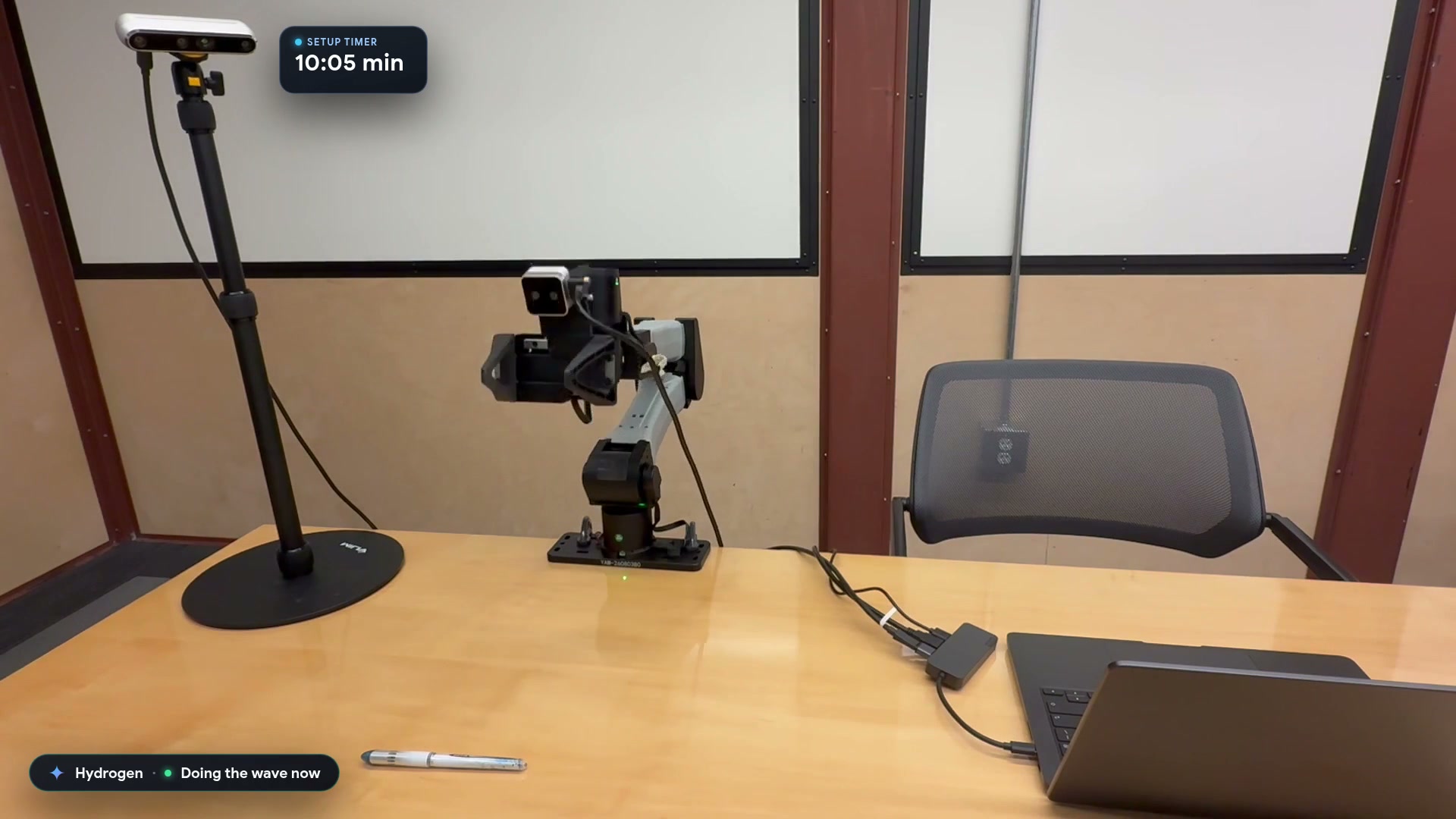
Google launches a Robotics plugin for Google Antigravity that sets up, simulates and controls robot arms with Gemini 4 HydrogenGoogle, Gemini 4 Hydrogen으로 로봇 팔을 준비·시뮬레이션·제어하는 Google Antigravity용 Robotics 플러그인 공개
Checked확인일
Video still: Google Developers Blog.영상 장면: Google Developers 블로그.