HREN


Google launches a Robotics plugin for Google Antigravity that sets up, simulates and controls robot arms with Gemini 4 HydrogenGoogle, Gemini 4 Hydrogen으로 로봇 팔을 준비·시뮬레이션·제어하는 Google Antigravity용 Robotics 플러그인 공개
Google has released a Robotics plugin for Google Antigravity, which is for paid Google AI Pro or Ultra subscribers, so that Gemini 4 Hydrogen can handle robot arm bring-up and calibration, MuJoCo simulation and real-arm control through conversation. In Google’s demo, an I2RT YAM arm and an external depth camera were plugged into a laptop, and the arm was calibrated and ready for tasks in about 10 minutes. The official README warns that a moving robot can injure people, and says to stay next to the robot, keep the workspace clear and keep a way to cut power within reach.Google이 유료 Google AI Pro·Ultra 구독자용인 Google Antigravity에 Robotics 플러그인을 내놓아, Gemini 4 Hydrogen이 로봇 팔 연결과 보정, MuJoCo 시뮬레이션, 실제 팔 제어를 대화로 맡게 했습니다. Google 시연에서는 I2RT YAM 팔과 외부 깊이 카메라를 노트북에 꽂은 뒤 약 10분 만에 팔 보정이 끝나 작업 준비가 됐습니다. 공식 README는 움직이는 로봇이 사람을 다치게 할 수 있다며 로봇 곁을 지키고 작업 공간을 비우고 전원을 끊을 수단을 손 닿는 곳에 두라고 적었습니다.
- Source published원문 게시일
- Checked확인일
Google has released a Robotics plugin for Google Antigravity, in a post on the Google Developers Blog. The post comes from Google’s Gemini Robotics team, and the plugin is a set of skills for hardware onboarding, simulation and robot control that Gemini 4 Hydrogen, introduced last week, uses to bring up and move robot arms. The plugin is installed from Customizations in Antigravity by searching for Robotics on the Build With Google shelf, and Google says Google Antigravity is for paid Google AI Pro or Ultra subscribers. Google describes the goal as taking a robot from the box to a working application in an afternoon.Google이 Google Developers 블로그에서 Google Antigravity용 Robotics 플러그인을 공개했습니다. 글을 쓴 곳은 Google의 Gemini Robotics 팀이고, 플러그인은 하드웨어 연결, 시뮬레이션, 로봇 제어를 위한 스킬 묶음으로 지난주 나온 Gemini 4 Hydrogen이 이 스킬을 써서 로봇 팔을 준비하고 움직입니다. 설치는 Antigravity의 Customizations에서 Build With Google 칸의 Robotics를 찾는 방식이며, Google Antigravity는 유료 Google AI Pro 또는 Ultra 구독자용이라고 Google은 밝혔습니다. Google은 상자에서 막 꺼낸 로봇이 오후 한나절 만에 실제로 일하는 애플리케이션을 돌리게 하는 것을 목표로 들었습니다.
The official README warns that a moving robot can injure people and damage equipment, says to stay next to the robot, keep the workspace clear and keep a way to cut power within reach when using a real arm, and states that the user is responsible for operating the robot safely. Some skills download third-party software and robot models, or call third-party services such as the Gemini API, at run time, and these are licensed by their owners under their own terms. Skills that call Gemini perception models need GEMINI_API_KEY set in the environment before running. The plugin can also be used in simulation only, with no robot hardware.공식 README는 움직이는 로봇이 사람을 다치게 하고 장비를 망가뜨릴 수 있다며, 실제 팔을 쓸 때는 로봇 곁을 지키고 작업 공간을 비우고 전원을 끊을 수단을 손 닿는 곳에 두라고 적었고, 로봇을 안전하게 다룰 책임은 사용자에게 있다고 밝혔습니다. 일부 스킬은 실행 중에 다른 회사의 소프트웨어와 로봇 모델을 내려받거나 Gemini API 같은 외부 서비스를 부르며, 이것들은 각 권리자의 조건을 따릅니다. Gemini 인식 모델을 부르는 스킬은 실행 전에 GEMINI_API_KEY를 환경에 넣어 두어야 합니다. 로봇 하드웨어 없이 시뮬레이션만으로도 쓸 수 있습니다.
The skills fall into four groups: robot bring-up, which starts from a USB cable, installs drivers, discovers cameras, calibrates the arm and verifies safe motion; MuJoCo in Antigravity, which builds and previews simulated scenes and assets; perception and control, which uses Gemini’s spatial understanding to find objects, plan grasps and control the robot in a closed loop; and application building, which generates the controller and simulation for a full Real-to-Sim-to-Real workflow. In Google’s demo, a developer plugs an I2RT YAM arm and an external depth camera into a laptop and asks Hydrogen in Antigravity to bring it up, and after software installation, camera discovery, calibration and test motions the arm is ready for tasks in about 10 minutes. Google says a similar flow brings up a low-cost SO-ARM101 arm and an industrial-grade FR3 Duo from scratch to live waving.스킬은 네 갈래입니다. USB 케이블 연결에서 시작해 드라이버를 깔고 카메라를 찾고 팔을 보정한 뒤 안전한 동작을 확인하는 로봇 준비, Antigravity 안에서 시뮬레이션 장면과 자산을 만들고 미리 보는 MuJoCo, Gemini의 공간 이해로 물체를 찾고 잡는 법을 계획해 닫힌 고리로 로봇을 제어하는 인식·제어, 제어 코드와 시뮬레이션을 만들어 실제에서 시뮬레이션을 거쳐 다시 실제로 가는 애플리케이션 개발입니다. Google 시연에서는 개발자가 I2RT YAM 팔과 외부 깊이 카메라를 노트북에 꽂고 Antigravity의 Hydrogen에 준비를 맡기자, 소프트웨어 설치와 카메라 찾기, 팔 보정, 시험 동작이 이어졌고 약 10분 만에 팔이 작업 준비를 마쳤습니다. 비슷한 흐름으로 값싼 SO-ARM101 팔과 산업용 FR3 Duo도 처음부터 손을 흔드는 데까지 준비했다고 Google은 적었습니다.
Once the arm is live, shapes, positions and physical properties in the simulation can be adjusted through chat to verify reaching and grasping before anything runs on hardware, which Google calls “vibe sim.” In Google’s snack-sorting conveyor demo, a developer starts from a whiteboard sketch, Hydrogen builds a MuJoCo simulation from one prompt with images of the real scene, and the grasping policy verified in simulation is deployed to the real robot, which sorts snacks off the moving belt within about an hour end to end. The post also shows a soap store where two YAM Pro arms pack orders as they come in, and an FR3 Duo that plays chess.팔이 준비되면 시뮬레이션 속 도형과 위치, 물리 속성을 채팅으로 고쳐 가며 팔이 물체에 닿고 잡는지를 실제 하드웨어에 올리기 전에 확인할 수 있고, Google은 이를 “vibe sim”이라고 불렀습니다. Google 시연의 과자 분류 컨베이어는 화이트보드 스케치에서 출발해, 실제 장면 사진을 곁들인 프롬프트 하나로 MuJoCo 시뮬레이션을 만들고 거기서 검증한 잡기 정책을 실제 로봇에 올려, 처음부터 끝까지 약 1시간 만에 움직이는 벨트에서 과자를 골라냈습니다. 주문이 들어오면 YAM Pro 팔 두 대가 비누를 상자에 담는 가게 예와 FR3 Duo가 체스를 두는 예도 함께 실렸습니다.
Outside Antigravity, gemini-4-hydrogen is available in the Interactions API of the Gemini API, with day-one support in the google-genai SDKs, and Google AI Studio lets spatial prompts, live camera streams and structured tool calls be tried in the browser. The plugin repository is copyright Google LLC and licensed under the Apache License 2.0, and examples and use cases can be shared on the repository’s GitHub Discussions page.Antigravity 밖에서는 Gemini API의 Interactions API에서 gemini-4-hydrogen을 쓸 수 있고 google-genai SDK가 첫날부터 지원하며, Google AI Studio에서는 공간 프롬프트와 실시간 카메라 스트림, 구조화된 도구 호출을 브라우저에서 시험할 수 있습니다. 플러그인 저장소의 저작권은 Google LLC에 있고 Apache License 2.0으로 공개됐으며, 만든 예시와 쓰임은 저장소의 GitHub Discussions에 올릴 수 있습니다.
The post does not give a full list of supported robot arms or the cost of Gemini API calls. The times of about 10 minutes and about an hour are figures from Google’s own demos.플러그인이 지원하는 로봇 팔의 전체 목록과 Gemini API 호출 비용은 원문에 나와 있지 않습니다. 약 10분, 약 1시간이라는 시간은 Google이 자기 시연에서 보여 준 값입니다.
Keep reading더 읽기
All articles전체 글TencentTencent
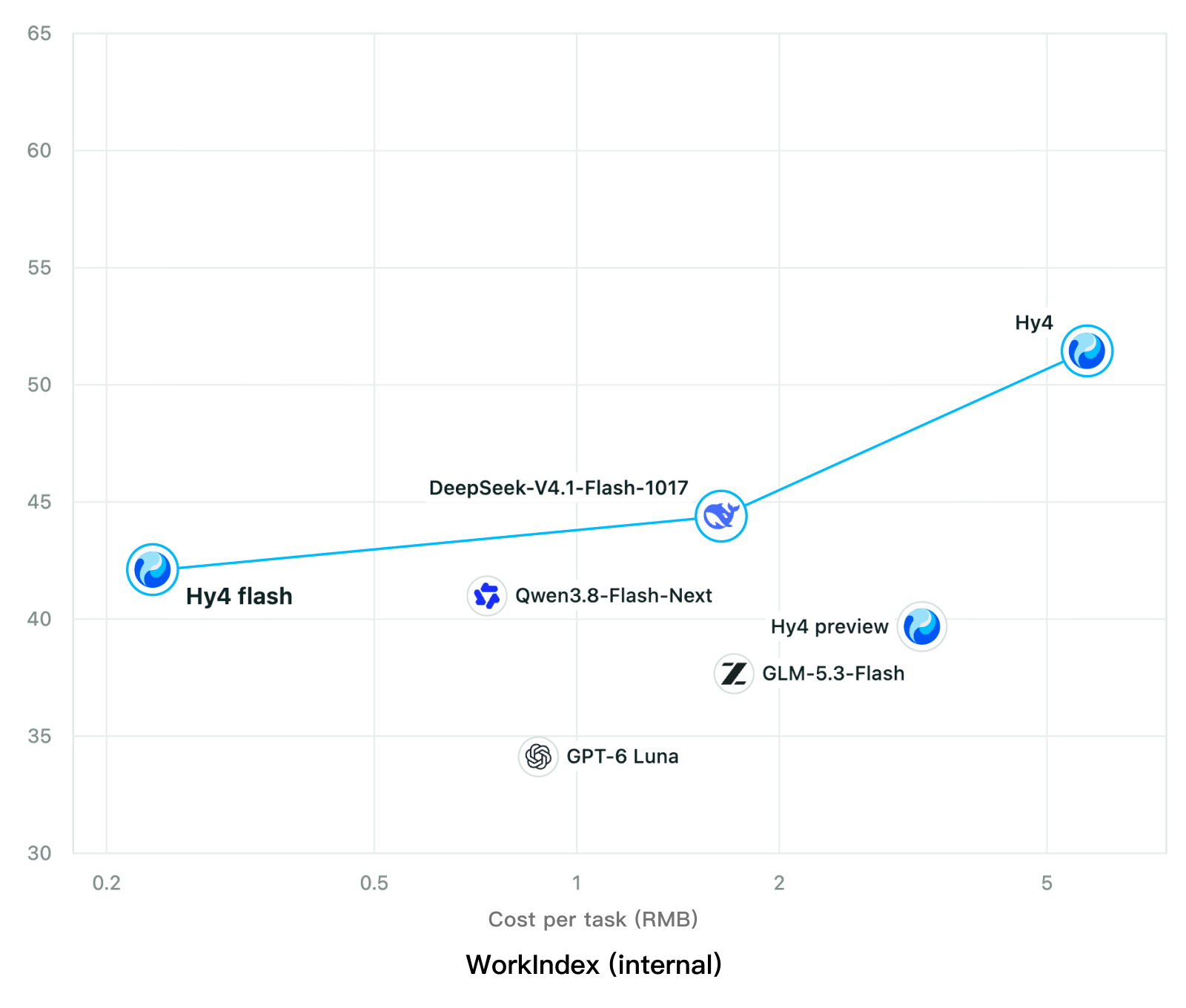
Tencent releases Hy4 flash as open weights, with FP8 and base versions, under the Tencent Hy LicenseTencent, Hy4 flash 가중치 공개 — FP8 · base 모델 포함, Tencent Hy License
Checked확인일
Chart: Tencent Hy4 flash model card. Tencent internal testing.그림: Tencent Hy4 flash 모델 카드. Tencent 내부 시험 결과입니다.
ElevenLabsElevenLabs
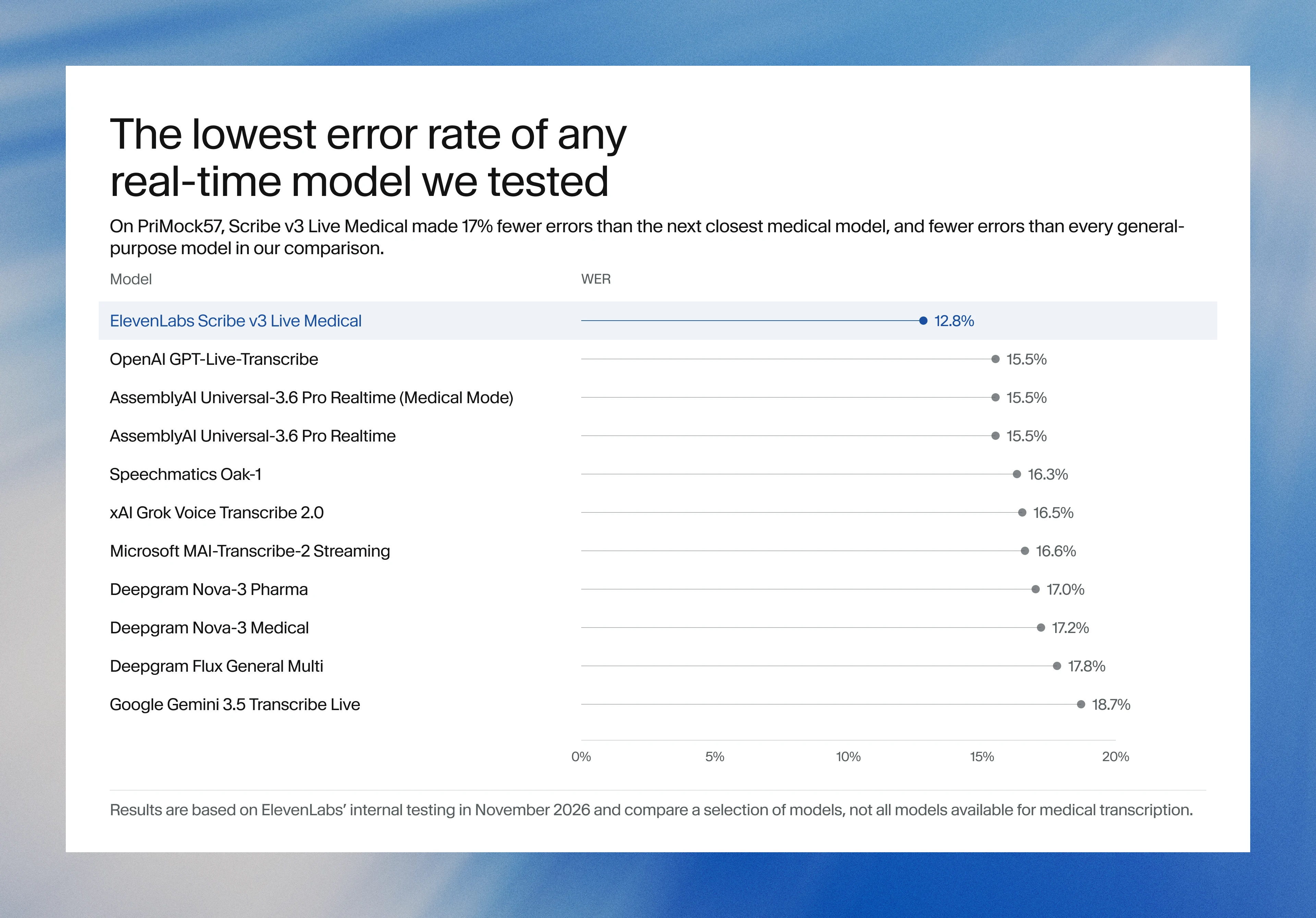
ElevenLabs releases Scribe v3 Live Medical, real-time medical transcription for voice agents in ElevenAgentsElevenLabs, ElevenAgents 음성 에이전트용 실시간 의료 전사 Scribe v3 Live Medical 공개
Checked확인일
Image: ElevenLabs blog.그림: ElevenLabs 블로그.
GoogleGoogle
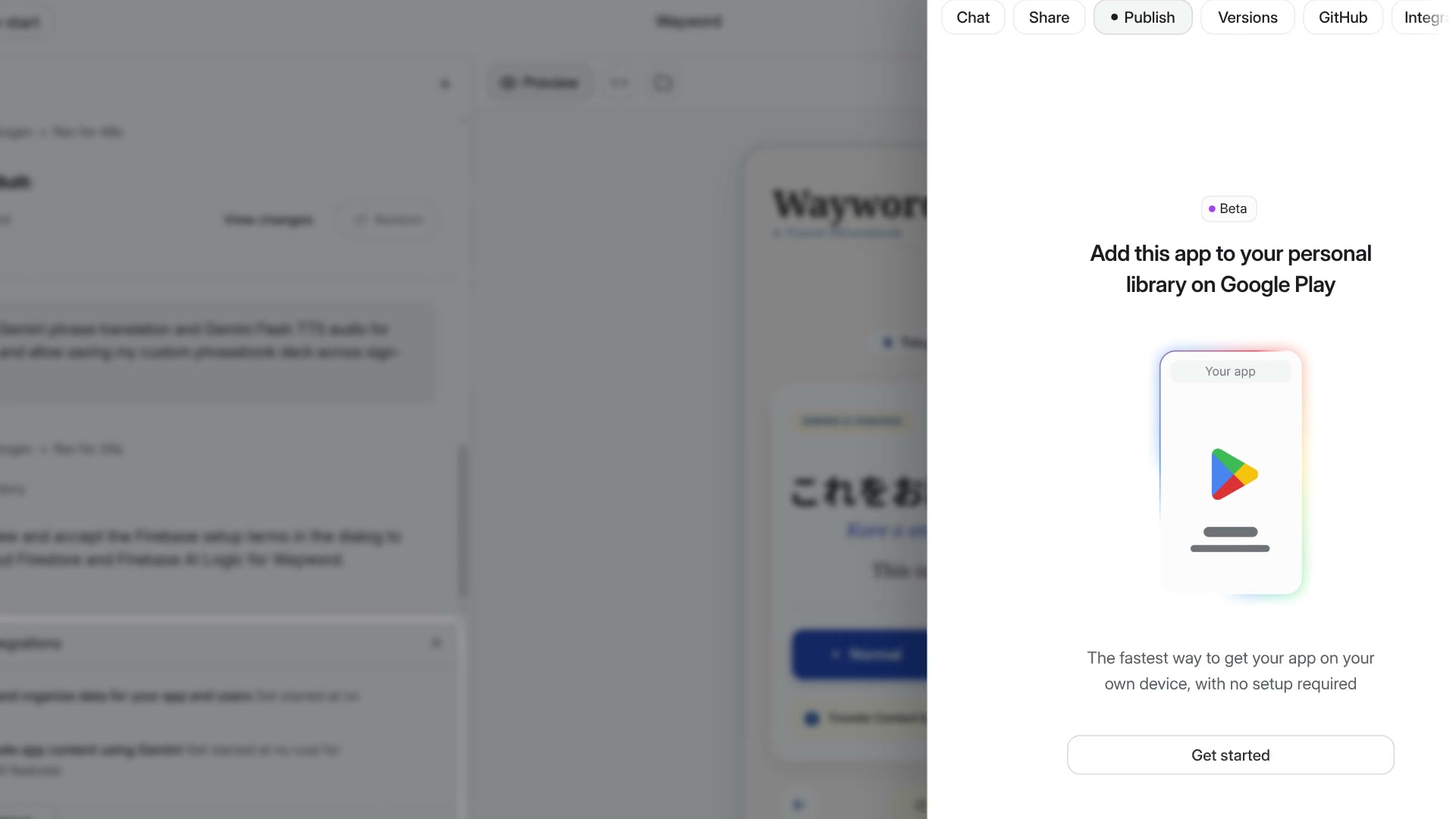
Google AI Studio now builds full-stack Android apps with Firebase and publishes them to a personal Google Play libraryGoogle AI Studio, Firebase를 붙인 풀스택 Android 앱을 만들고 개인 Google Play 라이브러리에 올리는 기능 추가
Checked확인일
Video still: Google Developers Blog.영상 장면: Google Developers 블로그.