HREN


Higgsfield releases Inside AI film with its prompts and assetsHiggsfield, ‘Inside AI’ 제작 프롬프트·에셋 공개
Higgsfield released an AI short film together with the materials used to make it. The official project page shows the prompts and reference assets.AI 단편 영화와 함께 제작에 쓴 자료를 공개했습니다. 공식 프로젝트에서 프롬프트와 참고 자료를 살펴볼 수 있습니다.
- Source published원문 게시일
- Checked확인일
- Posted게시일
Higgsfield has released Inside AI, an AI short film. In an official post on X on October 27, the company introduced Inside AI as its latest AI short film and said it is now "100% open source," with every prompt and asset public. A follow-up post from the same account linked to the project page with all the prompts and assets.Higgsfield가 AI 단편 영화 Inside AI를 공개했습니다. 회사는 10월 27일 공식 X 글에서 Inside AI를 자사의 최신 AI 단편 영화로 소개하고, 모든 프롬프트와 에셋을 공개해 ‘100% 오픈소스(100% open source)’가 됐다고 밝혔습니다. 같은 계정의 이어진 글은 프롬프트와 에셋을 모두 담은 프로젝트 페이지 주소를 걸었습니다.
According to the project brief, the film opens with a nervous student asking AI how to ask a girl out. Inside his assistant, a whole workforce turns that small request into an increasingly elaborate production. Higgsfield said it depicts computing as physical labor, memory as a paper archive, image generation as a painter, and a connected tool as a door onto a film set. The video runs 1 minute 47 seconds.프로젝트 소개에 따르면 영화는 긴장한 한 학생이 AI에게 여학생에게 데이트를 신청하는 법을 묻는 데서 시작합니다. 학생의 AI 비서 안에서는 한 조직 전체가 그 작은 요청을 점점 더 정교한 제작물로 키워 갑니다. Higgsfield는 계산을 육체노동으로, 메모리를 종이 서류 보관소로, 이미지 생성을 화가로, 연결된 도구를 영화 촬영장으로 그렸다고 설명했습니다. 영상 길이는 1분 47초입니다.
The project page's model stack begins with Seedance 2.5, Seedream 5.0 Pro, Soul Cinematic, Soul Cinema 1.5 and Higgsfield Soul V2, and its "Powered by" field lists Cinema Studio. Higgsfield said it planned the dance scene with a video previs, then used Higgsfield Genjutsu during production before editing. It said reusable character references, carrying the student's face and clothing, and location references, fixing the lecture hall's layout, give independently generated shots a shared identity. GENKONG 2.7.2 was used to help write the video prompts; the company described it as organizing scene decisions into shot-by-shot instructions covering references, geography, acting, camera placement, framing, lighting, dialogue, props, physics and sound, and checking the specification and prompt for contradictions and missing details. In post-production, separate generations were assembled into one continuous comic escalation, the company said.프로젝트 페이지의 모델 목록(Stack)은 Seedance 2.5, Seedream 5.0 Pro, Soul Cinematic, Soul Cinema 1.5, Higgsfield Soul V2 순으로 시작하고, ‘Powered by’ 칸에는 Cinema Studio가 적혀 있습니다. Higgsfield는 춤 장면을 영상 사전 시각화(previs)로 먼저 짠 뒤 제작 단계에서 Higgsfield Genjutsu를 쓰고 편집했다고 밝혔습니다. 따로 생성한 장면들이 하나로 이어지도록 학생의 얼굴과 옷차림을 담은 인물 참고 이미지와 강의실 구조를 고정하는 장소 참고 이미지를 되풀이해 썼다고 설명합니다. 영상 프롬프트 작성에는 GENKONG 2.7.2를 썼고, 이 스킬이 장면 결정을 참고 자료·공간·연기·카메라 위치·구도·조명·대사·소품·물리·소리에 대한 컷별 지시로 정리하고 지시와 프롬프트의 모순과 빠진 부분을 점검한다고 소개했습니다. 후반 작업에서는 따로 만든 생성 결과를 점점 커지는 하나의 코미디로 엮었다고 밝혔습니다.
The project is listed in the Higgsfield community as "Inside AI (Commercial)," posted by the higgsfield.commercials account, which carries a Higgsfield Team badge. Whether viewing or downloading the materials requires an account or payment is not stated on the project page or in the X posts.프로젝트는 Higgsfield 커뮤니티에 ‘Inside AI (Commercial)’라는 이름으로 올라 있고, 올린 계정 higgsfield.commercials에는 Higgsfield Team 표시가 붙어 있습니다. 자료를 보거나 내려받는 데 계정이나 요금이 필요한지는 프로젝트 페이지와 공식 X 글에 나와 있지 않습니다.
Higgsfield called the project open source on X, but the project page shows no license. The page footer reads "© 2026 Higgsfield, Inc. All rights reserved." Whether the published prompts and assets may be reused in other works or for commercial purposes, and under what conditions, is not stated on the project page or in the X posts.Higgsfield는 X 글에서 ‘오픈소스’라고 밝혔지만, 프로젝트 페이지에는 라이선스 표시가 없습니다. 페이지 바닥글에는 ‘© 2026 Higgsfield, Inc. All rights reserved.’ 문구가 있습니다. 공개된 프롬프트·에셋을 다른 작품이나 상업 용도로 다시 써도 되는지, 쓸 때 어떤 조건이 붙는지는 프로젝트 페이지와 X 글에 나와 있지 않습니다.
The higgsfield.commercials account describes itself as showing what is possible with Higgsfield AI, from product visuals to brand stories, and its profile links to the official X account @higgsfield_ai.프로젝트를 올린 higgsfield.commercials 계정은 자신을 제품 비주얼부터 브랜드 이야기까지 Higgsfield AI로 할 수 있는 것을 보여 주는 곳으로 소개하고, 프로필에 공식 X 계정 @higgsfield_ai를 함께 걸고 있습니다.
Inside the production공개 제작자료
Official example. Images: Higgsfield.Higgsfield 공식 예제 요약입니다. 이미지: Higgsfield.
Example settings · Seedream 5 Pro · 21:9 · 2K이 예제의 설정 · Seedream 5 Pro · 21:9 · 2K
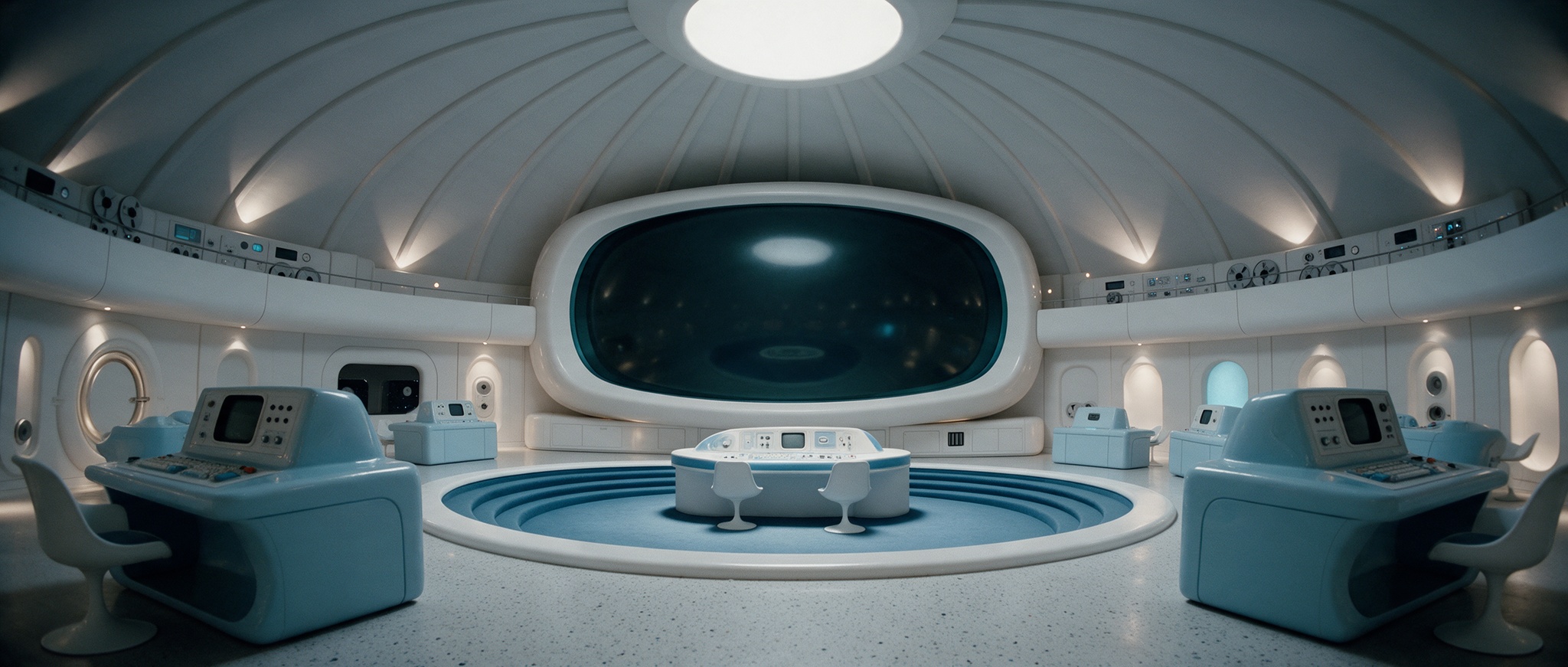
Input 1 · Room geometry, dome and steps.입력 1 · 공간 구조·돔·계단의 기준.
Open original원본 보기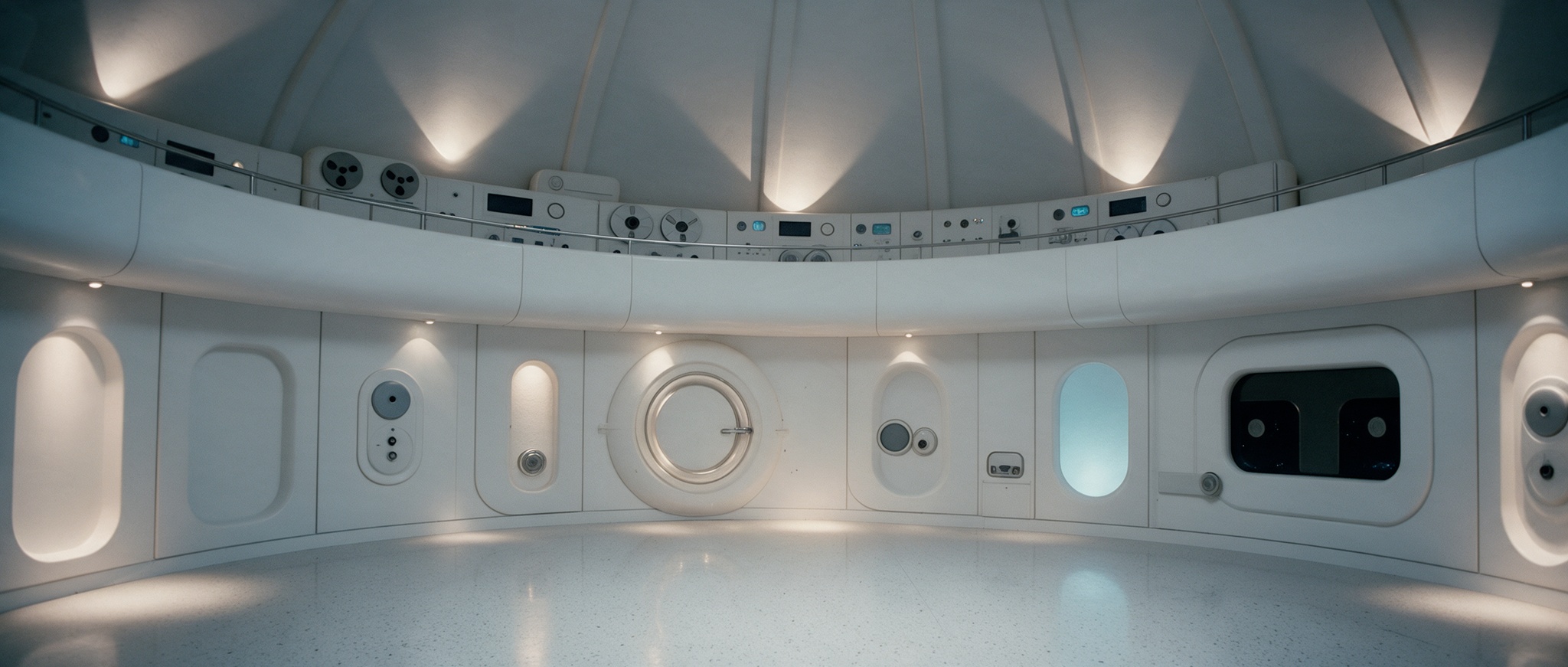
Input 2 · Rear-wall hatch and instruments.입력 2 · 뒤벽의 해치·계기 배치 기준.
Open original원본 보기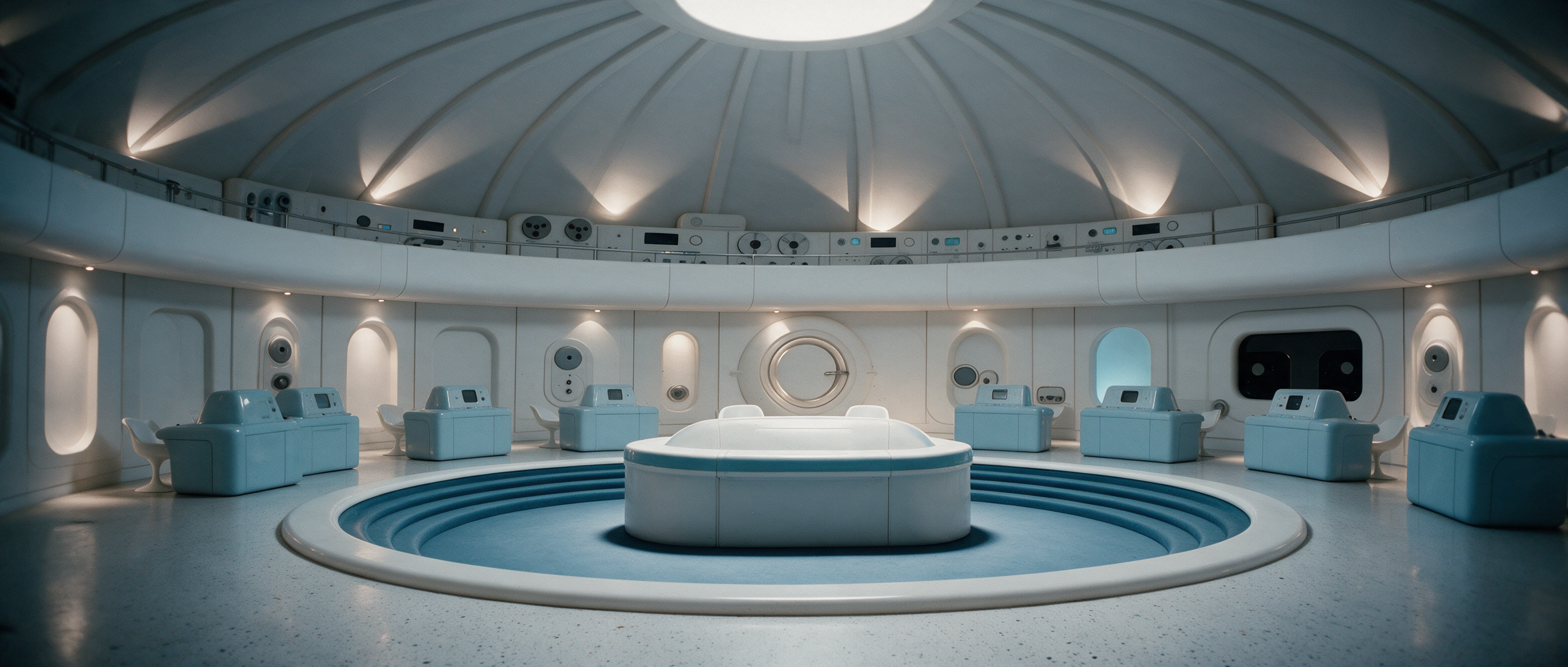
Result · The same room viewed from the opposite direction.공식 결과 · 같은 공간을 반대 방향에서 본 장면.
Open original원본 보기Three prompt decisions프롬프트의 세 가지 조건
- Assign a separate role to each reference.각 참고 이미지의 역할을 분리합니다.
- Specify a reverse view, approximately 1.6 m camera height and 26 mm lens.역방향 시점·카메라 높이 약 1.6m·26mm 렌즈를 지정합니다.
- Fix furniture order; exclude people and extra doors.가구 배치 순서를 고정하고 사람·추가 문은 제외합니다.
The project also shares GENKONG 2.7.2 ZIP/MD files and a production Canvas.공식 페이지에는 GENKONG 2.7.2 ZIP·MD와 제작 Canvas도 공개돼 있습니다.
Sources & references원문과 참고 자료
Keep reading더 읽기
All articles전체 글TencentTencent
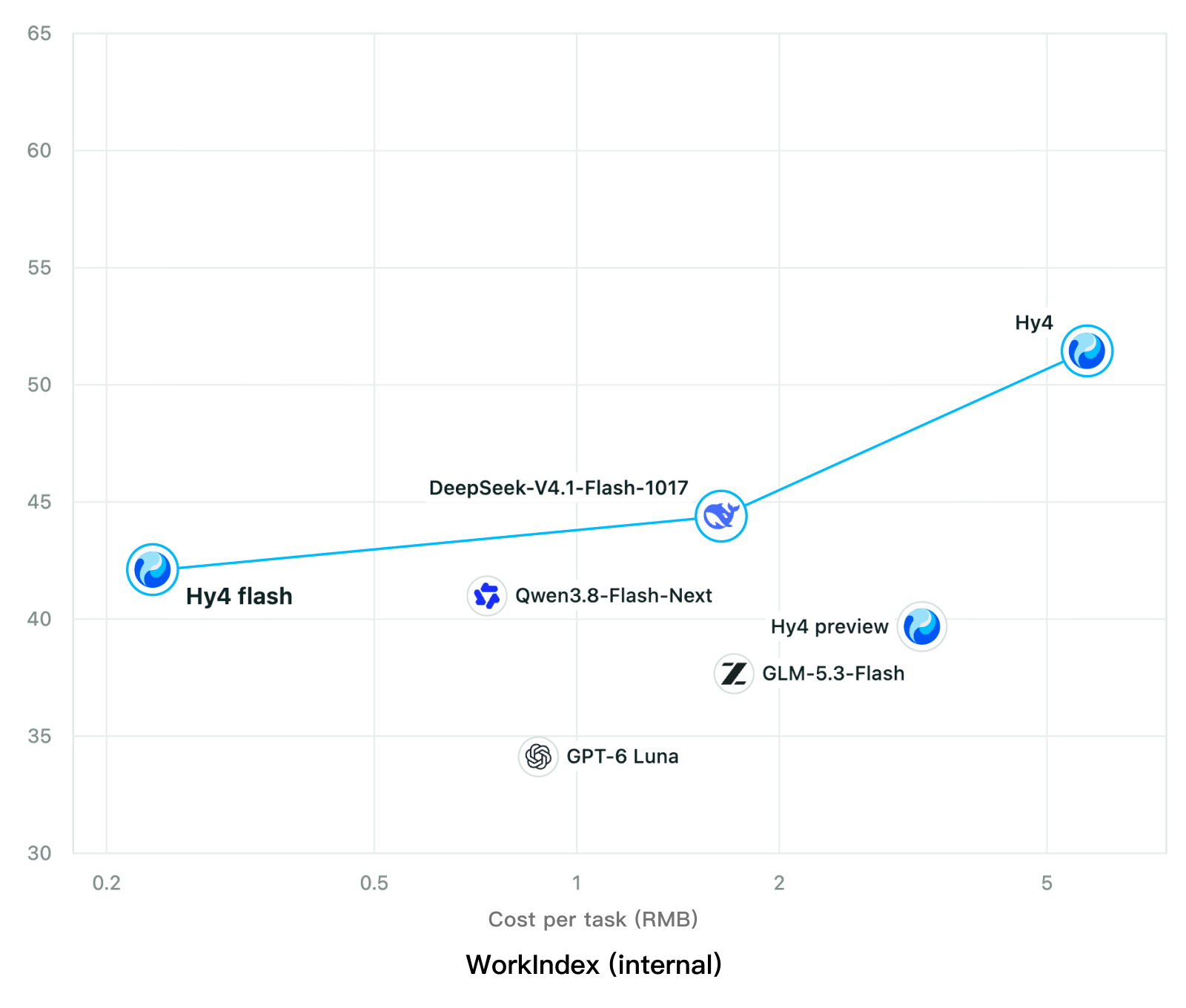
Tencent releases Hy4 flash as open weights, with FP8 and base versions, under the Tencent Hy LicenseTencent, Hy4 flash 가중치 공개 — FP8 · base 모델 포함, Tencent Hy License
Checked확인일
Chart: Tencent Hy4 flash model card. Tencent internal testing.그림: Tencent Hy4 flash 모델 카드. Tencent 내부 시험 결과입니다.
ElevenLabsElevenLabs
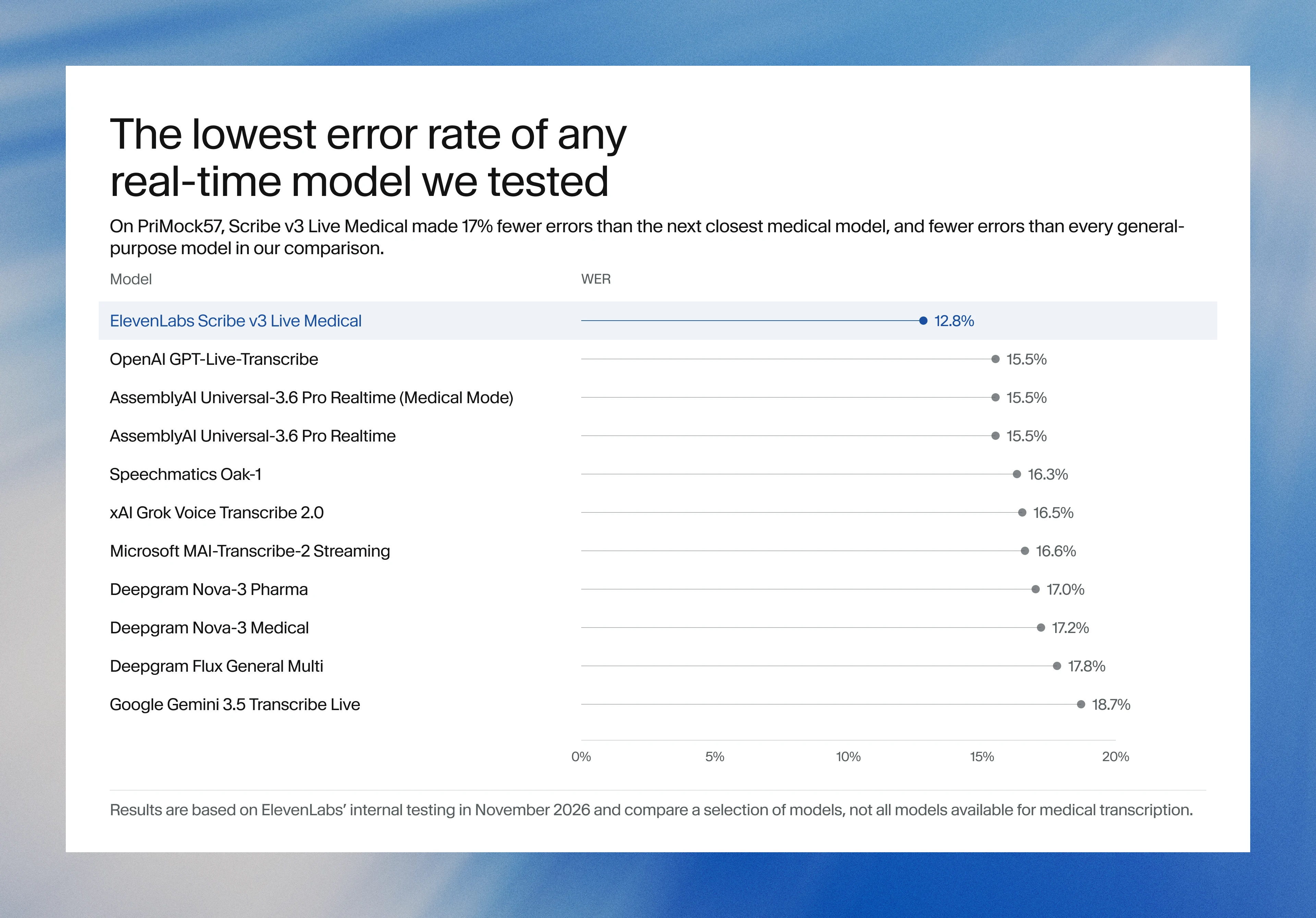
ElevenLabs releases Scribe v3 Live Medical, real-time medical transcription for voice agents in ElevenAgentsElevenLabs, ElevenAgents 음성 에이전트용 실시간 의료 전사 Scribe v3 Live Medical 공개
Checked확인일
Image: ElevenLabs blog.그림: ElevenLabs 블로그.
GoogleGoogle
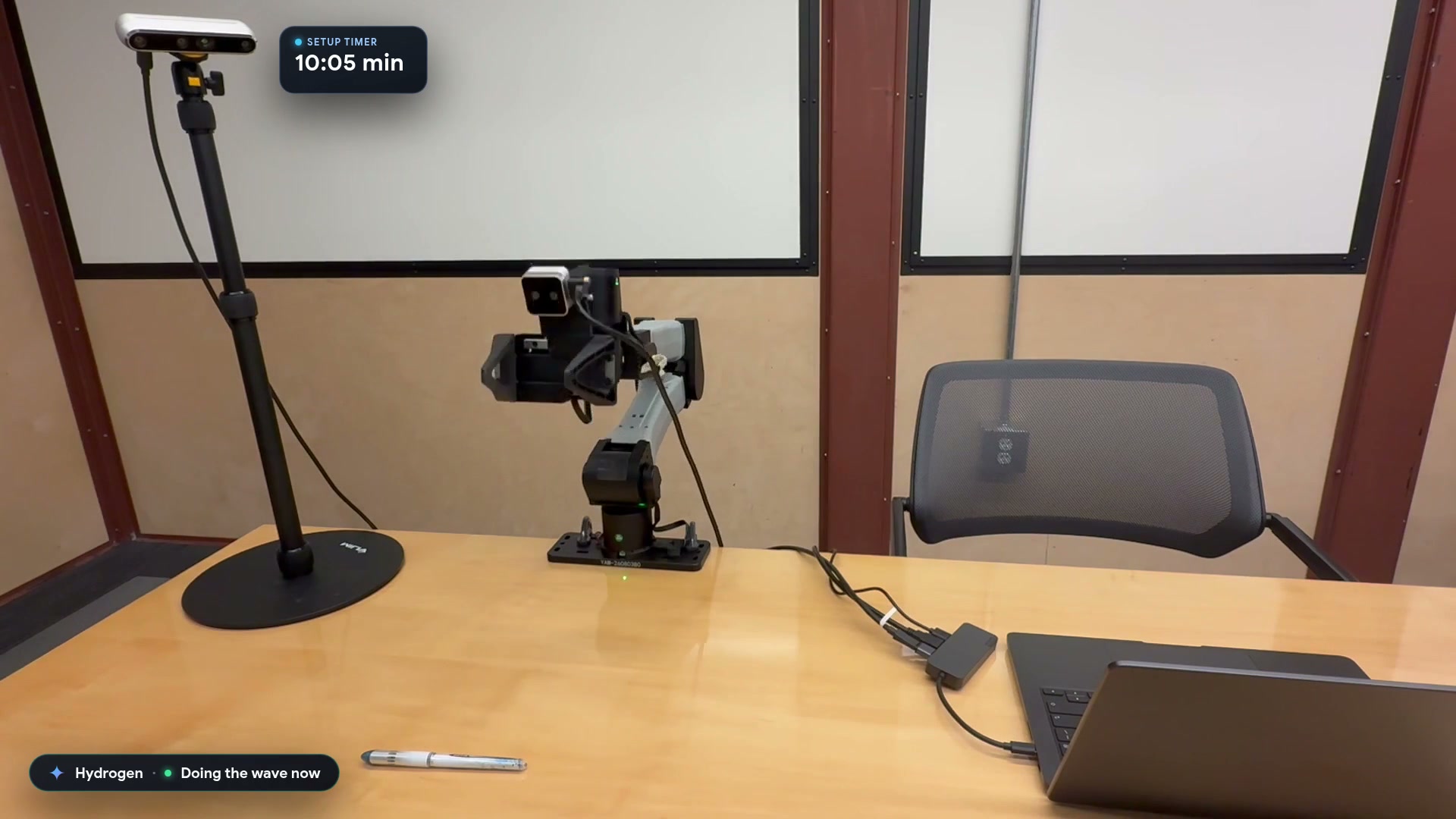
Google launches a Robotics plugin for Google Antigravity that sets up, simulates and controls robot arms with Gemini 4 HydrogenGoogle, Gemini 4 Hydrogen으로 로봇 팔을 준비·시뮬레이션·제어하는 Google Antigravity용 Robotics 플러그인 공개
Checked확인일
Video still: Google Developers Blog.영상 장면: Google Developers 블로그.