HREN


GitHub Copilot Fusion picks the models and execution pattern for each taskGitHub Copilot Fusion 정식 제공, 작업마다 모델을 골라 실행
When Copilot Fusion is chosen in the model picker, it decides the models and execution pattern for each task and returns a single response. Fusion Standard is included in every Copilot plan.모델 선택기에서 Copilot Fusion을 고르면 작업마다 모델과 실행 방식을 정해 답 하나를 돌려줍니다. Fusion Standard는 모든 Copilot 요금제에 들어 있습니다.
- Source published원문 게시일
- Checked확인일
- Posted게시일
GitHub introduced Copilot Fusion at GitHub Universe 2026. The official documentation defines Copilot Fusion as an intelligent runtime model router and orchestrator. It picks the models and execution pattern for each task and returns a single response; for example, it can have one model draft a solution and a separate model review it, the company explains. Copilot Fusion is generally available in Visual Studio Code, Copilot CLI, the GitHub Copilot app and JetBrains IDEs.GitHub이 GitHub Universe 2026에서 Copilot Fusion을 소개했습니다. 공식 문서는 Copilot Fusion을 지능형 런타임 모델 라우터이자 오케스트레이터라고 정의합니다. 작업마다 모델과 실행 방식을 골라 답 하나를 돌려주는 기능으로, 예를 들어 한 모델이 해법 초안을 쓰고 다른 모델이 검토하게 할 수 있다고 설명했습니다. Visual Studio Code, Copilot CLI, GitHub Copilot 앱, JetBrains IDE에서 정식 제공 상태입니다.
Users select Copilot Fusion in the model picker, but they are not selecting a specific model, GitHub explains. For each request, Copilot Fusion decides the execution pattern, the level of reasoning effort and the models that run it. There are three patterns: single, where one model completes the task; cascade, where an efficient model drafts and a judge accepts the draft or escalates to a stronger model; and critique, where several models critique one model's draft in parallel and the original model revises it from the combined feedback. Different prompts in the same session can use different patterns, and the documentation says cascade and critique take longer because they add model calls for review.사용자는 모델 선택기에서 Copilot Fusion을 고르지만 특정 모델을 고르는 것은 아니라고 GitHub은 설명합니다. 요청마다 Fusion이 실행 방식, 추론 노력 수준, 실행할 모델을 정합니다. 실행 방식은 셋입니다. 한 모델이 끝내는 single, 효율적인 모델의 초안을 심사 모델이 받아들이거나 더 강한 모델로 넘기는 cascade, 한 모델의 초안을 여러 모델이 따로 비평하고 그 의견을 모아 원래 모델이 고치는 critique입니다. 같은 세션에서도 프롬프트마다 다른 방식이 쓰일 수 있고, cascade와 critique는 검토 호출이 더해져 더 오래 걸린다고 문서에 적혀 있습니다.
There are four effort levels. Fusion Standard balances cost, quality and latency and selects one model for each task; Fusion High is for substantial, well-scoped coding tasks such as a change across several files; and Fusion Max is for tasks that need the deepest reasoning. Fusion Fast cannot be chosen by users and is only used in Visual Studio Code inline chat. If MAI Code 1.1 Flash is installed on a Windows computer with the required specifications, or Qwen3.8 Flash Next is installed locally in Copilot CLI and Copilot identifies it as qwen3.8-flash-next-local, Copilot Fusion can choose that model from the Fusion Standard effort level. While this is in public preview, experimental features must be turned on to use it.노력 수준은 넷입니다. Fusion Standard는 비용·품질·지연의 균형을 맞추며 작업마다 모델 하나를 고르고, Fusion High는 여러 파일에 걸친 변경처럼 범위가 분명한 큰 코딩 작업, Fusion Max는 가장 깊은 추론이 필요한 작업에 쓰입니다. Fusion Fast는 사용자가 고를 수 없고 Visual Studio Code 인라인 채팅에서만 쓰입니다. Fusion은 필요한 사양의 Windows에 설치한 MAI Code 1.1 Flash나, Copilot CLI에서 qwen3.8-flash-next-local로 잡힌 로컬 Qwen3.8 Flash Next도 Fusion Standard 수준부터 고를 수 있습니다. 공개 미리보기 동안은 실험 기능을 켜야 합니다.
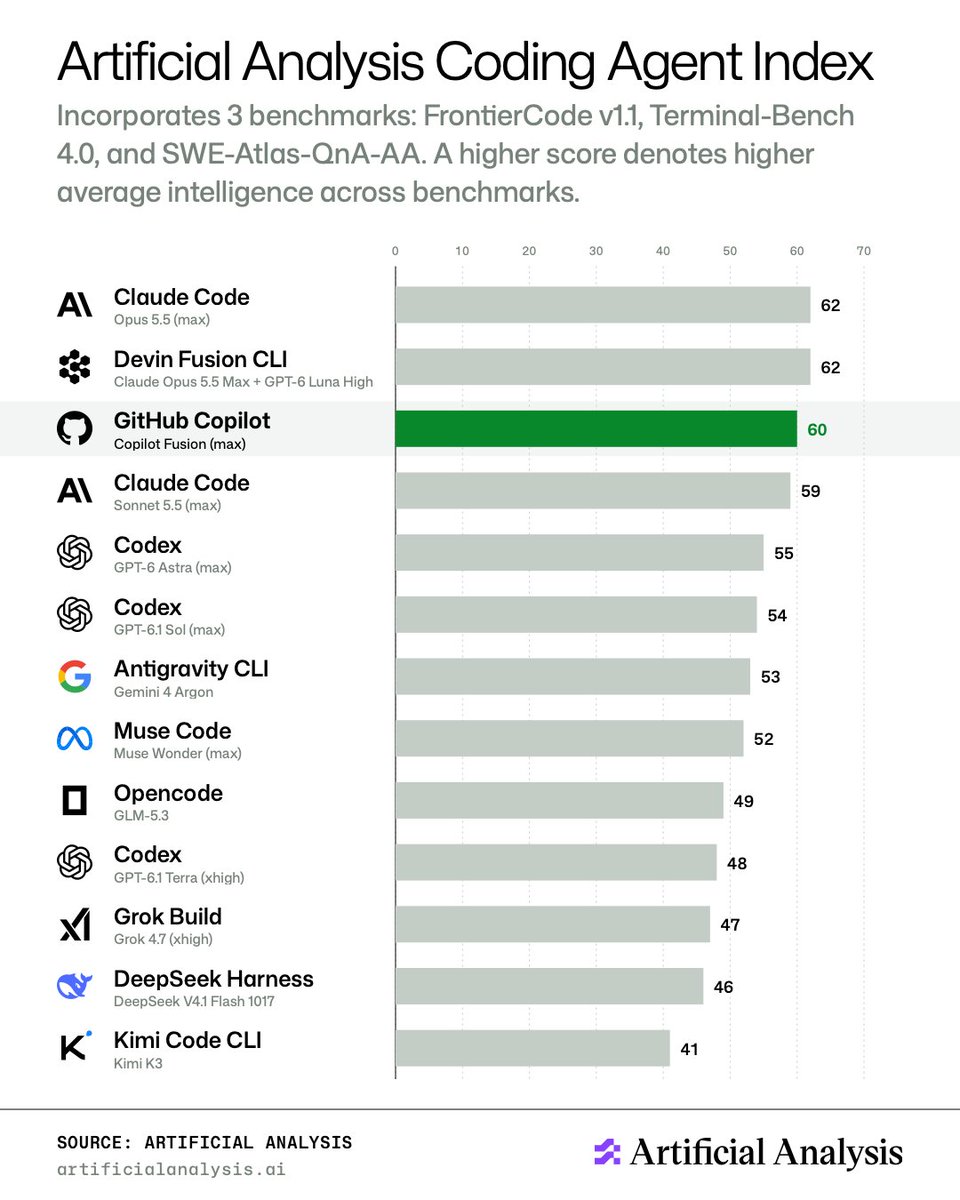
GitHub says in its blog that, on the Artificial Analysis Coding Agent Index, Fusion Max scored within two points of Opus 5.5 Max at half the cost and 40% less time per task. In a reply in its official X thread, GitHub says it commissioned and funded this evaluation. The chart in the thread's first post shows Claude Code (Opus 5.5 max) at 62 and GitHub Copilot (Copilot Fusion max) at 60.GitHub은 블로그에서 Artificial Analysis Coding Agent Index 기준으로 Fusion Max가 Opus 5.5 Max와 2점 안쪽 차이의 점수를 내면서 비용은 절반, 작업당 시간은 40% 적었다고 밝혔습니다. 공식 X 타래 답글에서는 이 평가를 GitHub이 의뢰하고 비용을 댔다고 밝혔습니다. 타래 첫 글의 그림에는 Claude Code(Opus 5.5 max) 62점, GitHub Copilot(Copilot Fusion max) 60점으로 나옵니다.
Copilot Fusion is available with all GitHub Copilot plans, but effort levels differ by plan. Fusion Standard is included in Free, Student, Pro, Pro+, Max, Business and Enterprise, while Fusion High and Fusion Max are included only in Pro+, Max, Business and Enterprise. There is no separate charge for Copilot Fusion; each model it uses is billed at that model's standard rate. Through November 30, 2026, users on paid Copilot plans receive a 30% discount on model costs when using Copilot Fusion. Availability by country is not stated in the documentation.Copilot Fusion은 모든 Copilot 요금제에서 쓸 수 있지만 노력 수준마다 다릅니다. Fusion Standard는 Free, Student, Pro, Pro+, Max, Business, Enterprise에 모두 들어 있고, Fusion High와 Fusion Max는 Pro+, Max, Business, Enterprise에만 들어 있습니다. Copilot Fusion에 따로 붙는 요금은 없고, 쓴 모델마다 그 모델의 표준 요율로 청구됩니다. 2026년 11월 30일까지는 유료 Copilot 요금제 사용자가 Copilot Fusion을 쓸 때 모델 비용을 30% 할인받습니다. 나라별 제공 여부는 문서에 나와 있지 않습니다.
GitHub says Fusion High and Fusion Max can use more than one model for a task, so a task may consume more AI credits than with Fusion Standard. Copilot Fusion does not use models that are not in the user's plan, models excluded by administrator policies, or models excluded by data-residency, FedRAMP or Evaluation-model policies, and if none of its models are available, Copilot Fusion does not appear in the model picker. It works separately from subagents and does not start them, and the documentation notes that changes a discarded draft already made in the workspace, such as file edits, are not undone automatically. The execution patterns and model pool may change over time.GitHub은 Fusion High와 Fusion Max가 한 작업에 모델을 여럿 쓸 수 있어 Fusion Standard보다 AI 크레딧을 더 쓸 수 있다고 밝혔습니다. 요금제에 없는 모델, 관리자 정책으로 뺀 모델, 데이터 거주·FedRAMP 정책이나 평가 모델 제한으로 빠진 모델은 쓰지 않고, 쓸 모델이 하나도 없으면 모델 선택기에 Copilot Fusion이 나오지 않습니다. 서브에이전트와는 따로 실행되고 서브에이전트를 시작하지 않으며, 버린 초안이 작업 공간에 이미 만든 파일 수정 같은 변경은 자동으로 되돌려지지 않는다고 문서는 적었습니다. 실행 방식과 모델 묶음은 바뀔 수 있습니다.
Sources & references원문과 참고 자료
- GitHub Docs: About GitHub Copilot FusionGitHub 공식 문서: Copilot Fusion
- GitHub Universe 2026 announcementGitHub Universe 2026 공식 블로그
- GitHub post on X with the Artificial Analysis chart (first post of the thread)GitHub 공식 X 타래 첫 글(Artificial Analysis 그림)
- GitHub reply on X about the evaluation's fundingGitHub 공식 X 타래 답글(평가 의뢰 · 비용)
Keep reading더 읽기
All articles전체 글TencentTencent
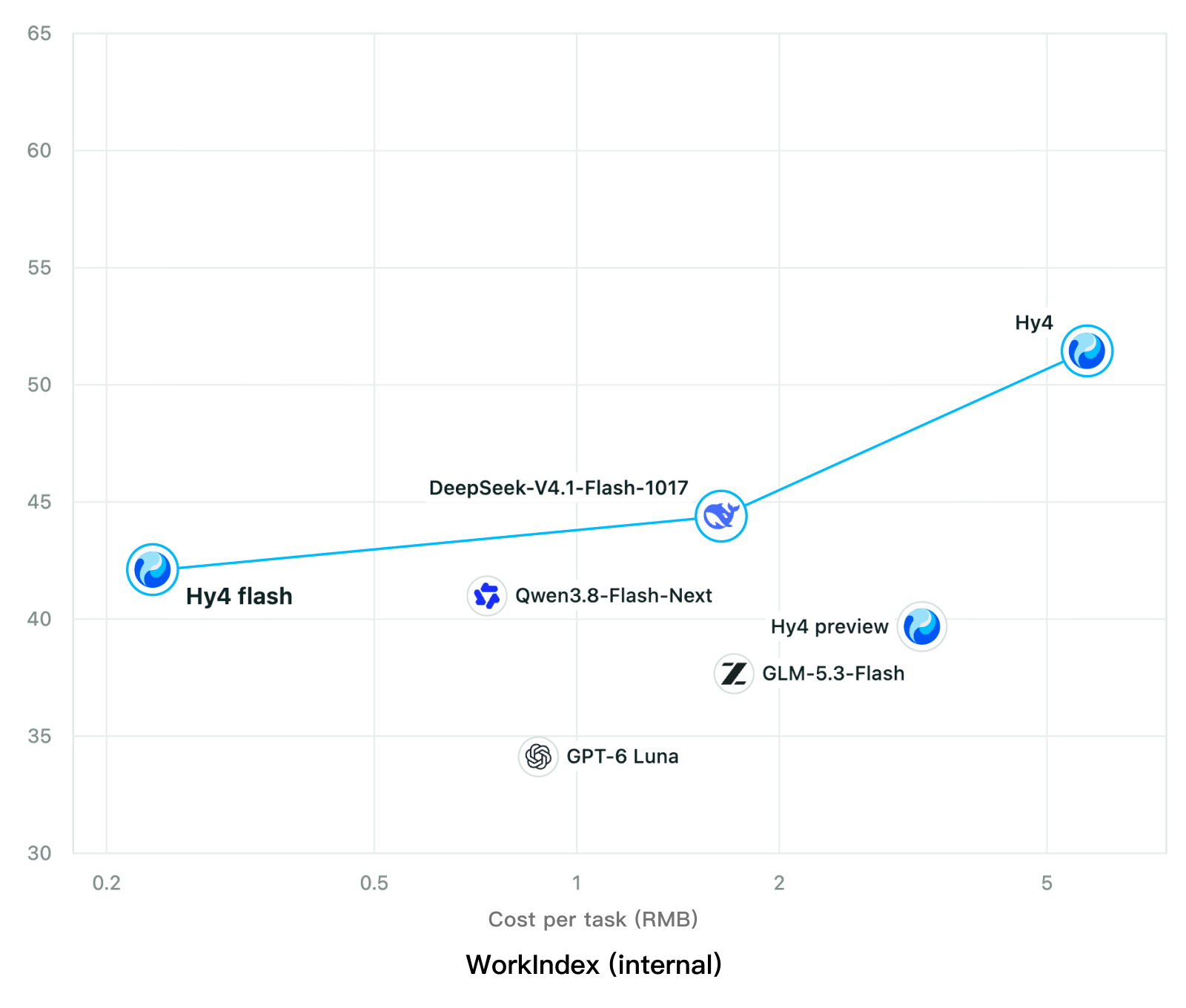
Tencent releases Hy4 flash as open weights, with FP8 and base versions, under the Tencent Hy LicenseTencent, Hy4 flash 가중치 공개 — FP8 · base 모델 포함, Tencent Hy License
Checked확인일
Chart: Tencent Hy4 flash model card. Tencent internal testing.그림: Tencent Hy4 flash 모델 카드. Tencent 내부 시험 결과입니다.
ElevenLabsElevenLabs
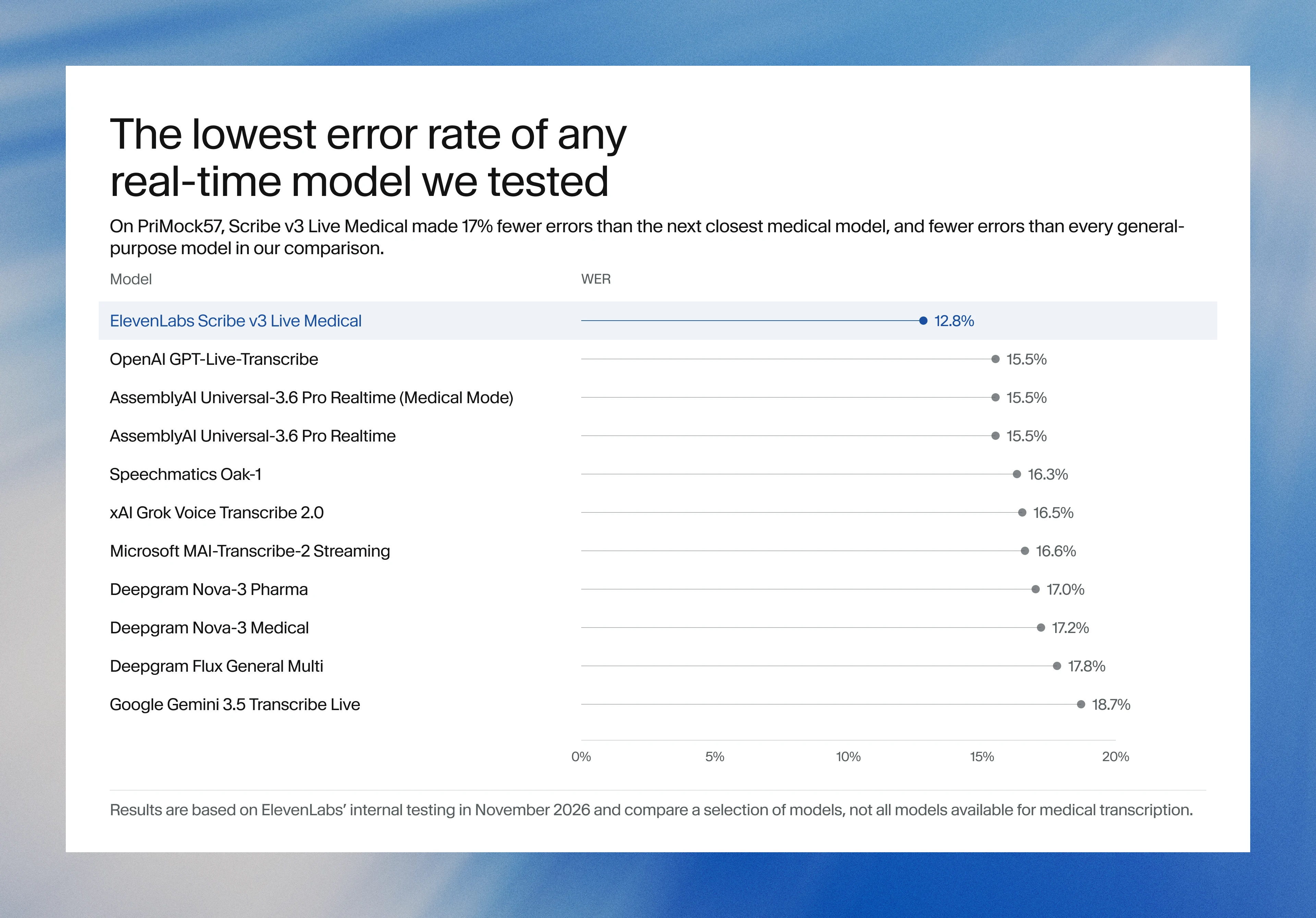
ElevenLabs releases Scribe v3 Live Medical, real-time medical transcription for voice agents in ElevenAgentsElevenLabs, ElevenAgents 음성 에이전트용 실시간 의료 전사 Scribe v3 Live Medical 공개
Checked확인일
Image: ElevenLabs blog.그림: ElevenLabs 블로그.
GoogleGoogle
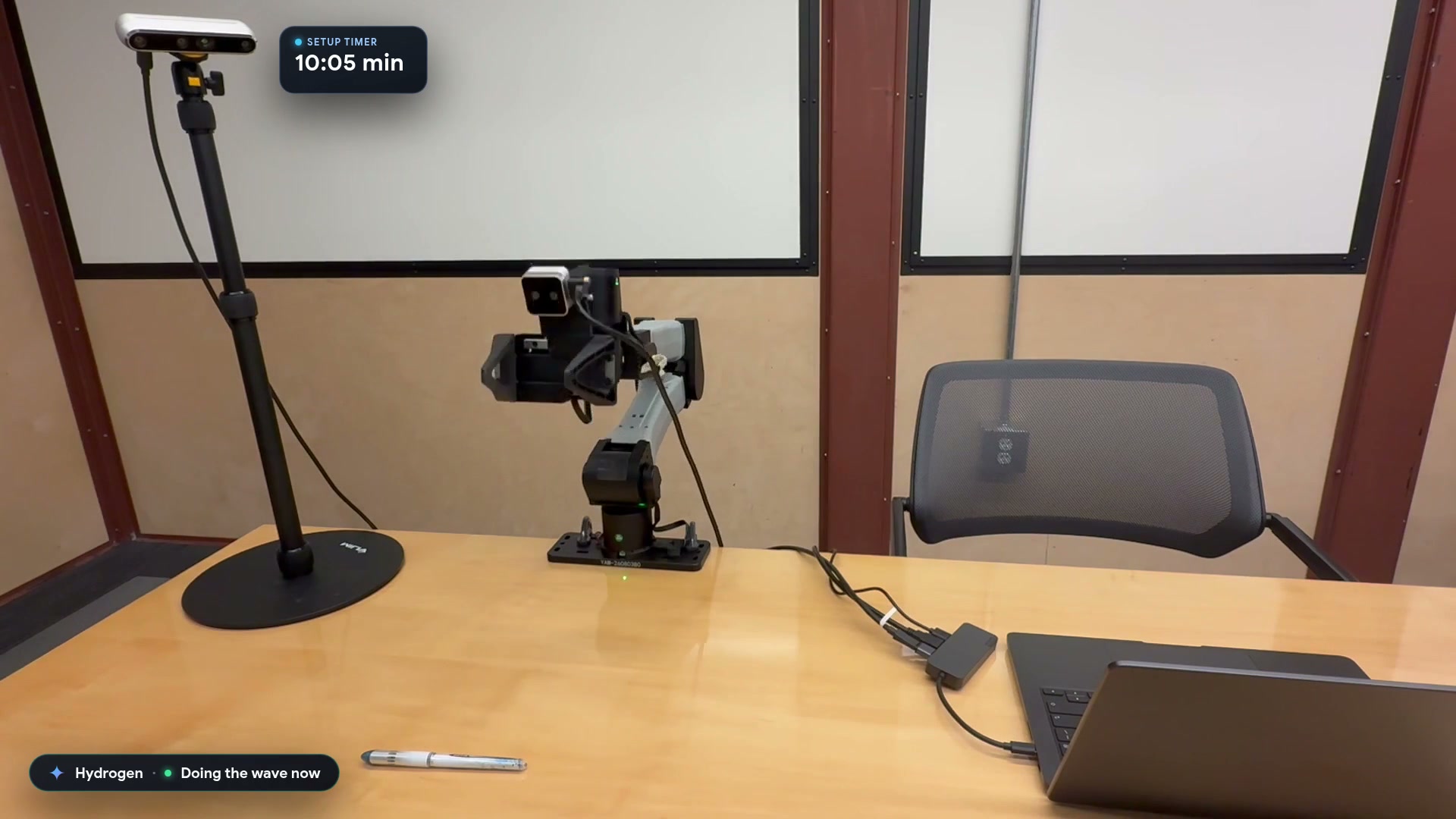
Google launches a Robotics plugin for Google Antigravity that sets up, simulates and controls robot arms with Gemini 4 HydrogenGoogle, Gemini 4 Hydrogen으로 로봇 팔을 준비·시뮬레이션·제어하는 Google Antigravity용 Robotics 플러그인 공개
Checked확인일
Video still: Google Developers Blog.영상 장면: Google Developers 블로그.