HREN


Ideogram adds a context window to Precise Edit, editing part of an image at its original pixelsIdeogram Precise Edit에 컨텍스트 창, 이미지 일부를 원래 픽셀로 편집
Only the marked region is edited at its original pixels, and everything outside the window comes back as sent. It is available in the app and the API, where it costs $0.008 to $0.22 per image.표시한 영역만 원래 픽셀로 고치고 창 밖은 보낸 그대로 돌려줍니다. 앱과 API에서 쓸 수 있고, API 가격은 이미지 한 장에 0.008~0.22달러입니다.
- Source published원문 게시일
- Checked확인일
- Posted게시일
Ideogram announced on X that it has added a context window to Precise Edit, its image editing feature. The official page describes it as surgical editing with a context window in images up to 8K. The company explains that there is no longer a need to downscale an image to edit it, or to stitch edited crops back in with border and color artifacts.Ideogram이 이미지 편집 기능 Precise Edit에 컨텍스트 창(context window)을 더했다고 공식 X에서 발표했습니다. 공식 페이지는 최대 8K 이미지를 컨텍스트 창으로 정밀하게 고치는 기능이라고 소개합니다. 편집하려고 이미지를 줄이거나, 잘라 고친 조각을 다시 붙이며 경계와 색이 어긋나는 일을 더는 겪지 않아도 된다고 회사는 설명했습니다.
According to Ideogram, any area up to 2K can be edited at its original pixels, and everything outside the context window stays untouched, so the image keeps its original resolution with no seam and no color mismatch. In a comparison on the official page, editing without a context window scales the 4K original down and the result comes back at 2K, while with a context window only the window is edited and the result keeps the original 4K resolution. The company says Precise Edit recolors products, repairs logos, replaces objects and removes them, and lists ecommerce, real estate, detail fixes, interior design and architecture as uses.Ideogram에 따르면 최대 2K 크기의 영역을 원래 픽셀 그대로 고칠 수 있고, 컨텍스트 창 밖은 손대지 않아 이미지가 원래 해상도를 유지하며 이음매나 색 차이가 생기지 않습니다. 공식 페이지의 비교 예에서는 컨텍스트 창 없이 고치면 4K 원본이 줄어든 뒤 편집돼 결과가 2K로 돌아오고, 컨텍스트 창을 쓰면 창 안만 고쳐 원래 4K 해상도를 유지합니다. 회사는 Precise Edit로 제품 색 바꾸기, 로고 고치기, 물체 바꾸기와 지우기를 할 수 있다고 설명했고, 쓰임새로 전자상거래, 부동산, 세부 고치기, 실내 디자인, 건축을 들었습니다.
In the API, the image and a prompt are sent to the Precise Edit endpoint for Ideogram 4.5 with a mask, a context_window value, or both. The default, none, edits the whole image and scales it down when its area is over 2048 × 2048 pixels. Auto fits the window around the mask so the edit keeps the full resolution, and the window can also be set by its coordinates. The mask is the same size as the image, black over the area to change and white everywhere else. The mask says which pixels may change, and the context window is the region read around it to make the change fit, the company explains.API에서는 Ideogram 4.5용 Precise Edit 엔드포인트에 이미지와 프롬프트를 보내면서 마스크나 context_window 값, 또는 둘 다를 넣습니다. 기본 모드 none은 이미지 전체를 고치고, 면적이 2048 × 2048 픽셀을 넘으면 줄여서 돌려줍니다. auto는 마스크 둘레에 창을 맞춰 원래 해상도를 유지하고, 좌표로 창을 직접 정할 수도 있습니다. 마스크는 이미지와 같은 크기로 바꿀 곳은 검정, 나머지는 흰색입니다. 마스크는 바뀌어도 되는 픽셀을, 컨텍스트 창은 그 변화를 맞추려고 읽는 둘레를 정한다는 것이 회사 설명입니다.
Ideogram says Precise Edit runs on Ideogram 4.5 and is available in the app and through the API. The official page lists API prices per image by quality: Very low $0.008, Low $0.03, Medium $0.06 and High $0.22. The plan needed in the app and availability by country are not stated on the official page.Ideogram은 Precise Edit가 Ideogram 4.5에서 작동하고 앱과 API에서 쓸 수 있다고 밝혔습니다. 공식 페이지의 API 가격은 이미지 한 장에 품질 단계별로 Very low 0.008달러, Low 0.03달러, Medium 0.06달러, High 0.22달러입니다. 앱에서 쓰는 데 필요한 요금제와 나라별 제공 여부는 공식 페이지에 나와 있지 않습니다.
The working region has limits: at least 256 pixels on each side, no more than 4,194,304 pixels in area, and an aspect ratio between 1:6 and 6:1. Area is the constraint rather than shape, so 2048 × 2048 and 1024 × 4096 both fit. Even a very small painted area needs a window that meets the minimum size, so a small mask does not mean a small window, the company explains. Editing a large image with the default none mode returns an image smaller than the one sent.작업 영역에는 제한이 있습니다. 각 변은 256픽셀 이상, 면적은 4,194,304픽셀 이하, 가로세로 비율은 1:6에서 6:1 사이여야 하며, 모양이 아니라 면적이 기준이라 2048 × 2048과 1024 × 4096이 모두 들어갑니다. 칠한 영역이 아주 작아도 창은 이 최소 크기를 채워야 해서, 작은 마스크가 작은 창을 뜻하지는 않는다고 회사는 설명했습니다. 기본 모드 none으로 큰 이미지를 고치면 보낸 것보다 작은 이미지가 돌아옵니다.
Sources & references원문과 참고 자료
Keep reading더 읽기
All articles전체 글TencentTencent
Tencent releases Hy4 flash as open weights, with FP8 and base versions, under the Tencent Hy LicenseTencent, Hy4 flash 가중치 공개 — FP8 · base 모델 포함, Tencent Hy License
Checked확인일
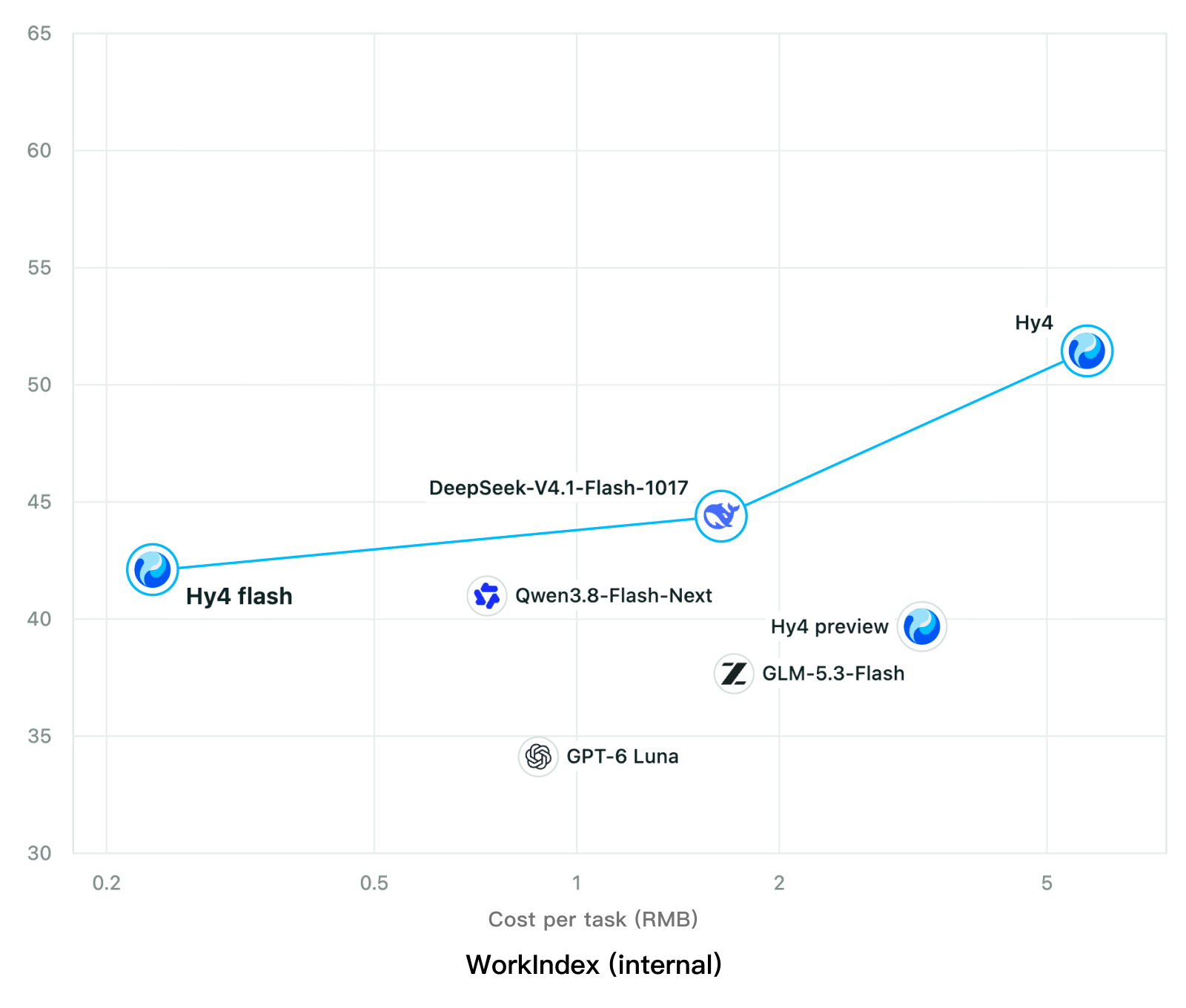
Chart: Tencent Hy4 flash model card. Tencent internal testing.그림: Tencent Hy4 flash 모델 카드. Tencent 내부 시험 결과입니다.
ElevenLabsElevenLabs
ElevenLabs releases Scribe v3 Live Medical, real-time medical transcription for voice agents in ElevenAgentsElevenLabs, ElevenAgents 음성 에이전트용 실시간 의료 전사 Scribe v3 Live Medical 공개
Checked확인일
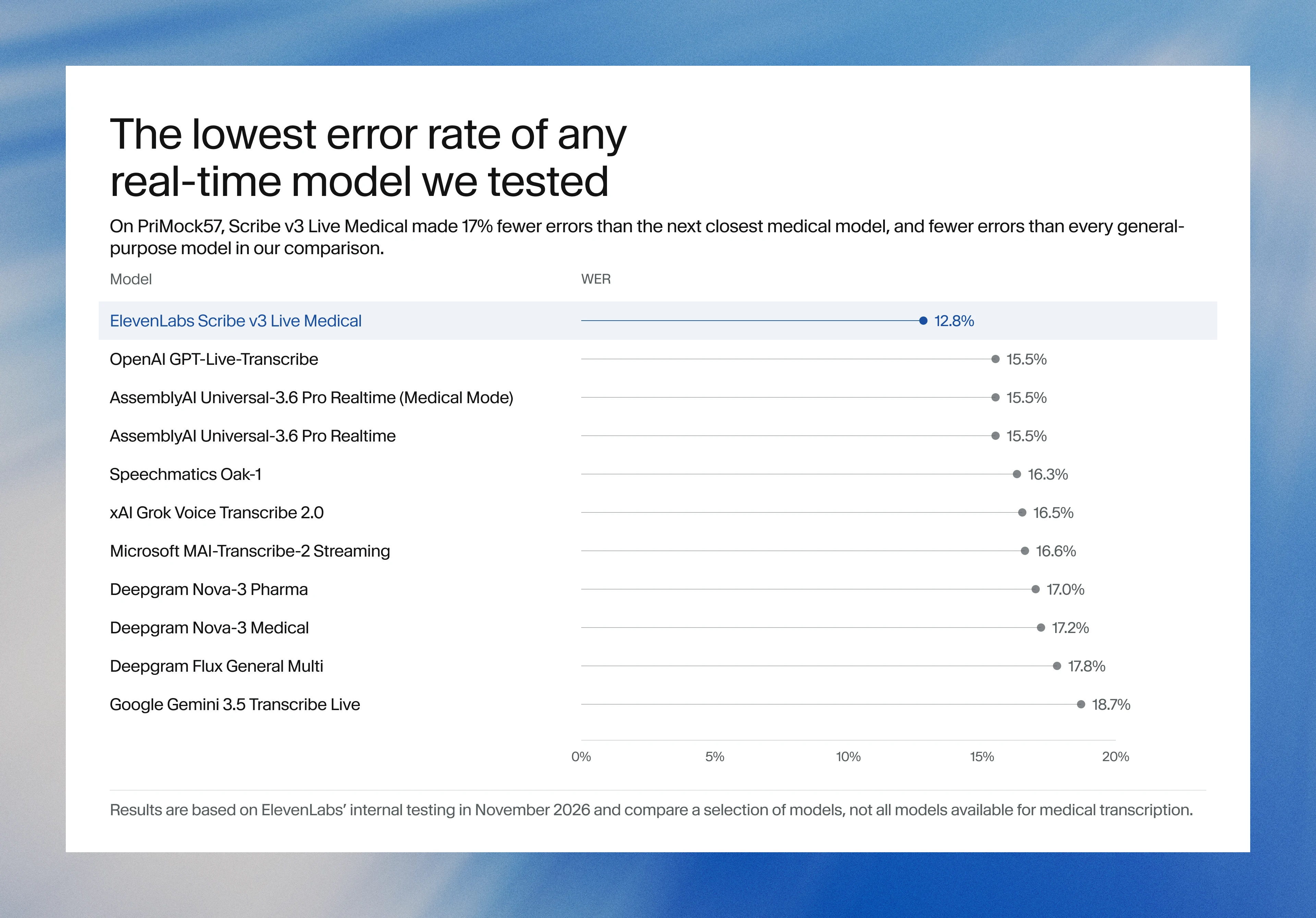
Image: ElevenLabs blog.그림: ElevenLabs 블로그.
GoogleGoogle
Google launches a Robotics plugin for Google Antigravity that sets up, simulates and controls robot arms with Gemini 4 HydrogenGoogle, Gemini 4 Hydrogen으로 로봇 팔을 준비·시뮬레이션·제어하는 Google Antigravity용 Robotics 플러그인 공개
Checked확인일
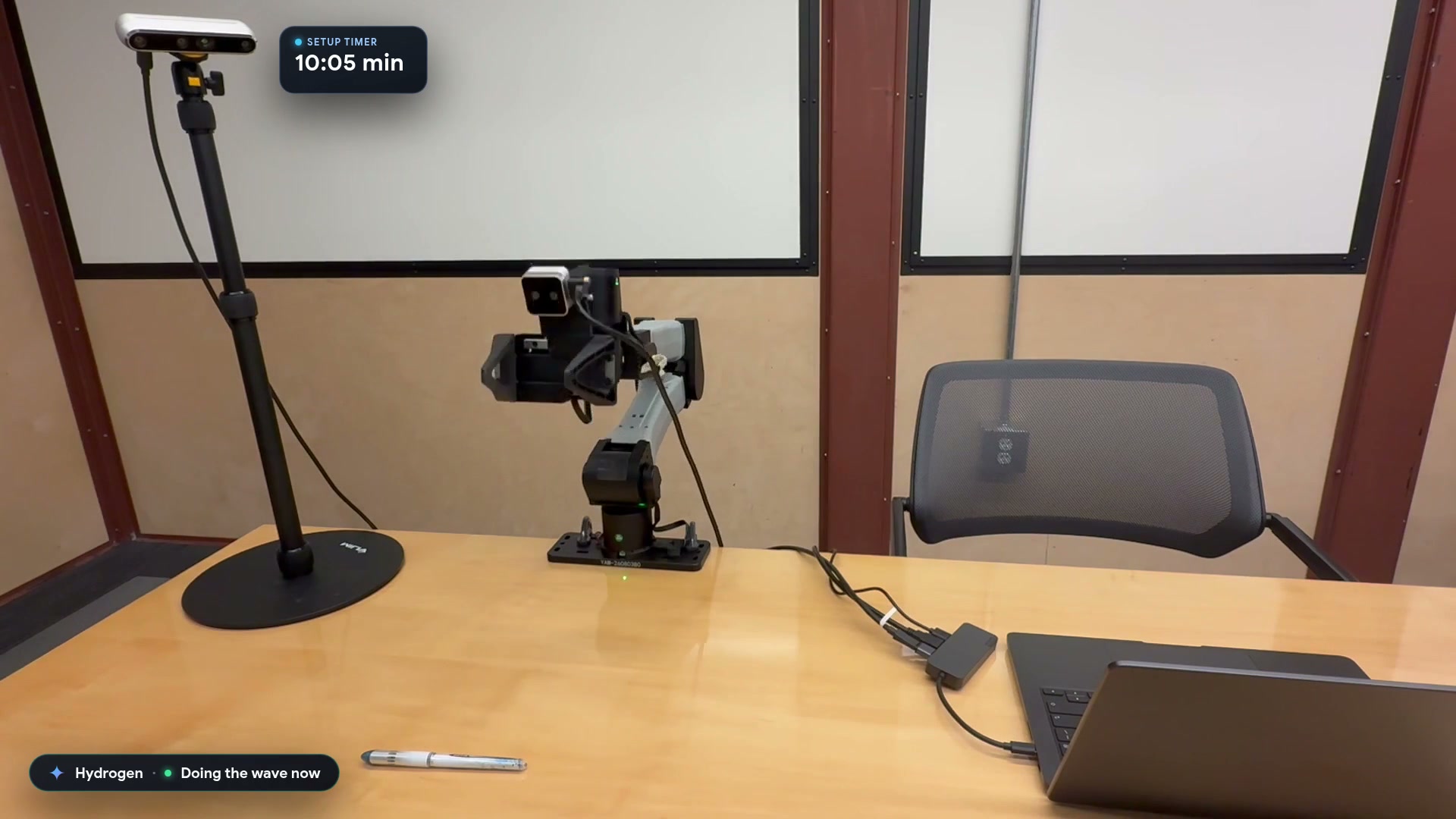
Video still: Google Developers Blog.영상 장면: Google Developers 블로그.