HREN


Runway's Dev plugin for Cursor adds an MCP and seven skills for building media generation into appsRunway, Cursor용 Runway Dev 플러그인으로 앱에 영상·이미지·오디오 생성 연동
The plugin adds the Runway Dev MCP and seven skills to Cursor for building video, image and audio generation into apps. Installing it is free, and generations the app runs use credits.Cursor에 Runway Dev MCP와 스킬 일곱 개를 붙여 앱에 영상, 이미지, 오디오 생성을 넣습니다. 플러그인 설치는 무료이고, 앱이 실행하는 생성은 크레딧을 씁니다.
- Source published원문 게시일
- Checked확인일
- Posted게시일
Runway says that with the Runway Dev plugin installed, Cursor can build, debug and maintain a video, image, audio or real-time avatar generation integration end to end. The guide that covers this was last updated on November 2.Runway는 Cursor에 Runway Dev 플러그인을 깔면 영상, 이미지, 오디오, 실시간 아바타 생성 연동을 Cursor가 처음부터 끝까지 만들고 고치고 유지할 수 있다고 밝혔습니다. 이 내용을 담은 안내 문서의 최신 수정일은 11월 2일입니다.
The plugin bundles two parts. The Runway Dev MCP lets Cursor read the account's projects, the models each can call with their prices and input limits, the credit balance, Model Routers, Characters and the record behind any task. Seven Runway Dev skills show Cursor how to integrate the API with the official SDKs before it writes anything. Runway says this lets Cursor pick models against current prices and input limits and configure what the integration needs.플러그인은 두 부분으로 이뤄져 있습니다. Runway Dev MCP는 계정의 프로젝트, 프로젝트별로 부를 수 있는 모델과 가격, 입력 한도, 크레딧 잔액, Model Router, Characters, 각 작업의 기록을 Cursor가 읽게 합니다. Runway Dev 스킬 일곱 개는 코드를 쓰기 전에 공식 SDK로 API를 연결하는 방법을 Cursor에 알려 줍니다. Runway는 이 구성으로 Cursor가 현재 가격과 입력 한도에 맞춰 모델을 고르고, 연동에 필요한 설정을 한다고 설명했습니다.
The guide separates four routes by job. A Model Router picks the best model for each request, with code passing a config ID instead of a model name. A use case Runway has already built takes one Recipe call, a multi-step pipeline of your own is a Workflow built in the Runway Creative App and published as an endpoint, and a known model is called directly. When a generation fails, Runway says Cursor looks the task up and reads the actual cause, such as a moderation rejection, an asset over a size limit or a malformed request body.문서는 쓰임에 따라 네 길을 나눴습니다. 요청마다 맞는 모델을 쓰려면 Model Router를 쓰며, 코드에는 모델 이름 대신 설정 ID를 넘깁니다. Runway가 이미 만들어 둔 용도는 Recipe 호출 한 번으로, 여러 단계로 된 자기 파이프라인은 Runway Creative App에서 만들어 엔드포인트로 게시한 Workflow로, 쓸 모델을 이미 알면 모델 직접 호출로 처리합니다. 생성이 실패하면 Cursor가 작업을 조회해 검열 거부, 크기 초과 자산, 잘못된 요청 본문 같은 실제 원인을 읽는다고 밝혔습니다.
Installation is by typing /add-plugin runway-api in Cursor's Agent chat, or by searching for Runway Dev in Customize in the sidebar and choosing user or project scope. The plugin is listed in the Cursor Marketplace. The plugin is free to install, and generations the app runs through Runway's API use credits at each model's price. A Runway Dev account is required, and on first use the user signs in to it in a browser.설치는 Cursor의 Agent 채팅에 /add-plugin runway-api를 입력하거나, 사이드바 Customize에서 Runway Dev를 찾아 사용자 또는 프로젝트 범위를 고르는 방식입니다. 플러그인은 Cursor Marketplace에도 올라 있습니다. 플러그인 설치는 무료이고, 앱이 Runway API로 실행하는 생성은 모델별 가격에 따라 크레딧을 씁니다. Runway Dev 계정이 필요하며, 처음 쓸 때 사용자가 브라우저에서 그 계정에 로그인합니다.
The plugin does not generate media itself. The Runway Dev MCP does not generate media, create API keys or create projects, and the app runs each generation with its own API key. The connection is OAuth, and no API key goes into the plugin or mcp.json. Runway says its setup brief tells the agent to treat a billable test call as optional unless asked for one, and to ask before creating or changing anything live in the account. Available models depend on what each project allows.플러그인이 미디어를 만들어 주는 것은 아닙니다. Runway Dev MCP는 미디어 생성, API 키 생성, 프로젝트 생성을 하지 않고, 앱이 자기 API 키로 각 생성을 실행합니다. 연결은 OAuth이고 플러그인이나 mcp.json에는 API 키가 들어가지 않습니다. Runway는 설정 안내가 에이전트에게 비용이 드는 시험 호출을 요청이 없으면 선택 사항으로 다루고, 계정의 실제 항목을 만들거나 바꾸기 전에 묻게 한다고 밝혔습니다. 쓸 수 있는 모델은 프로젝트마다 다릅니다.
Runway offers plugins of the same makeup for Claude Code, Codex and Grok Bot. It says a coding agent with no plugin can add the Runway Dev MCP from the MCP guide and then install the skills with npx skills add runwayml/skills.Runway는 같은 구성의 플러그인을 Claude Code, Codex, Grok Bot에도 내놓았습니다. 플러그인이 없는 코딩 에이전트는 MCP 안내에 따라 Runway Dev MCP를 붙인 뒤 npx skills add runwayml/skills로 스킬을 깔 수 있다고 적었습니다.
Keep reading더 읽기
All articles전체 글TencentTencent
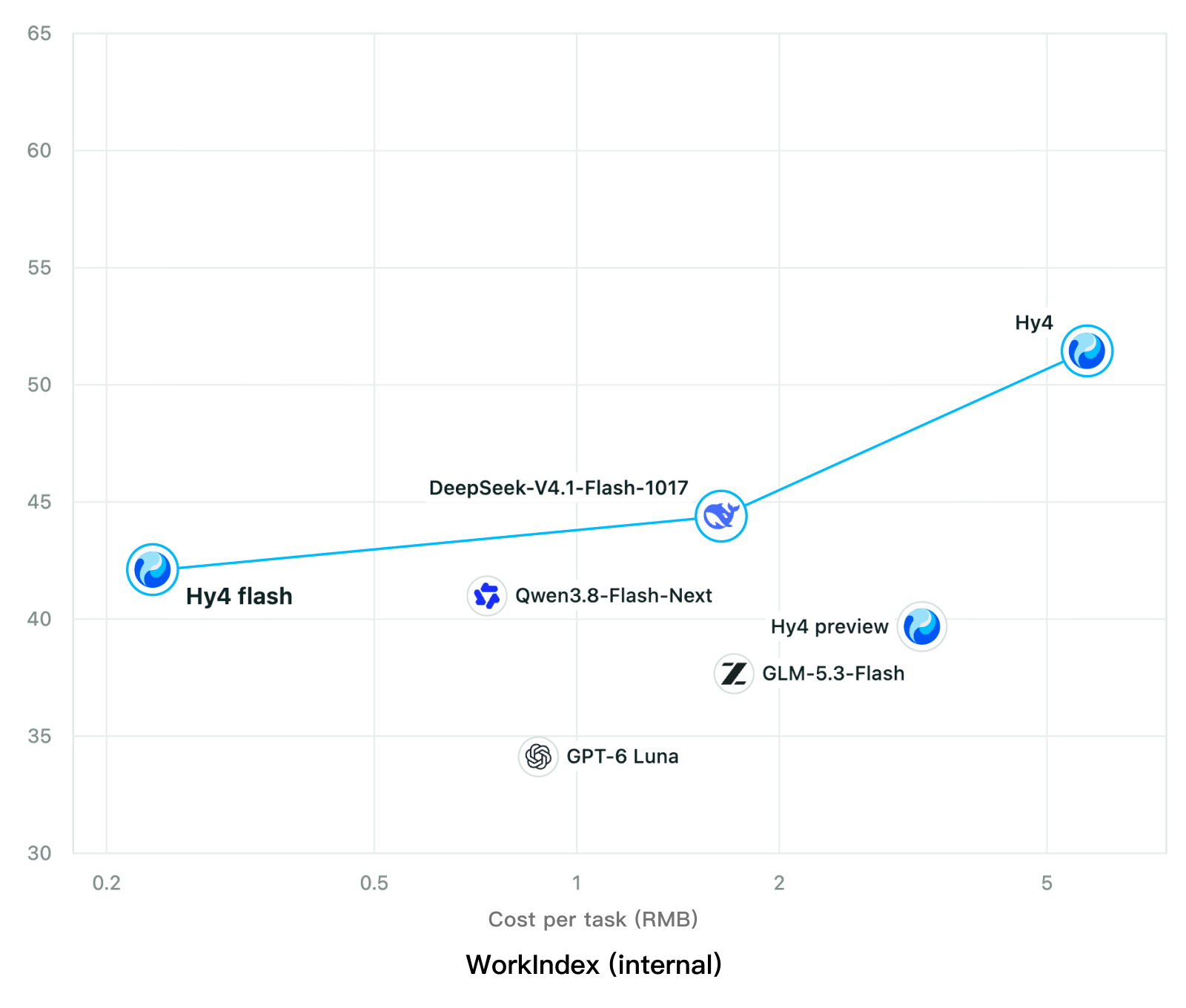
Tencent releases Hy4 flash as open weights, with FP8 and base versions, under the Tencent Hy LicenseTencent, Hy4 flash 가중치 공개 — FP8 · base 모델 포함, Tencent Hy License
Checked확인일
Chart: Tencent Hy4 flash model card. Tencent internal testing.그림: Tencent Hy4 flash 모델 카드. Tencent 내부 시험 결과입니다.
ElevenLabsElevenLabs
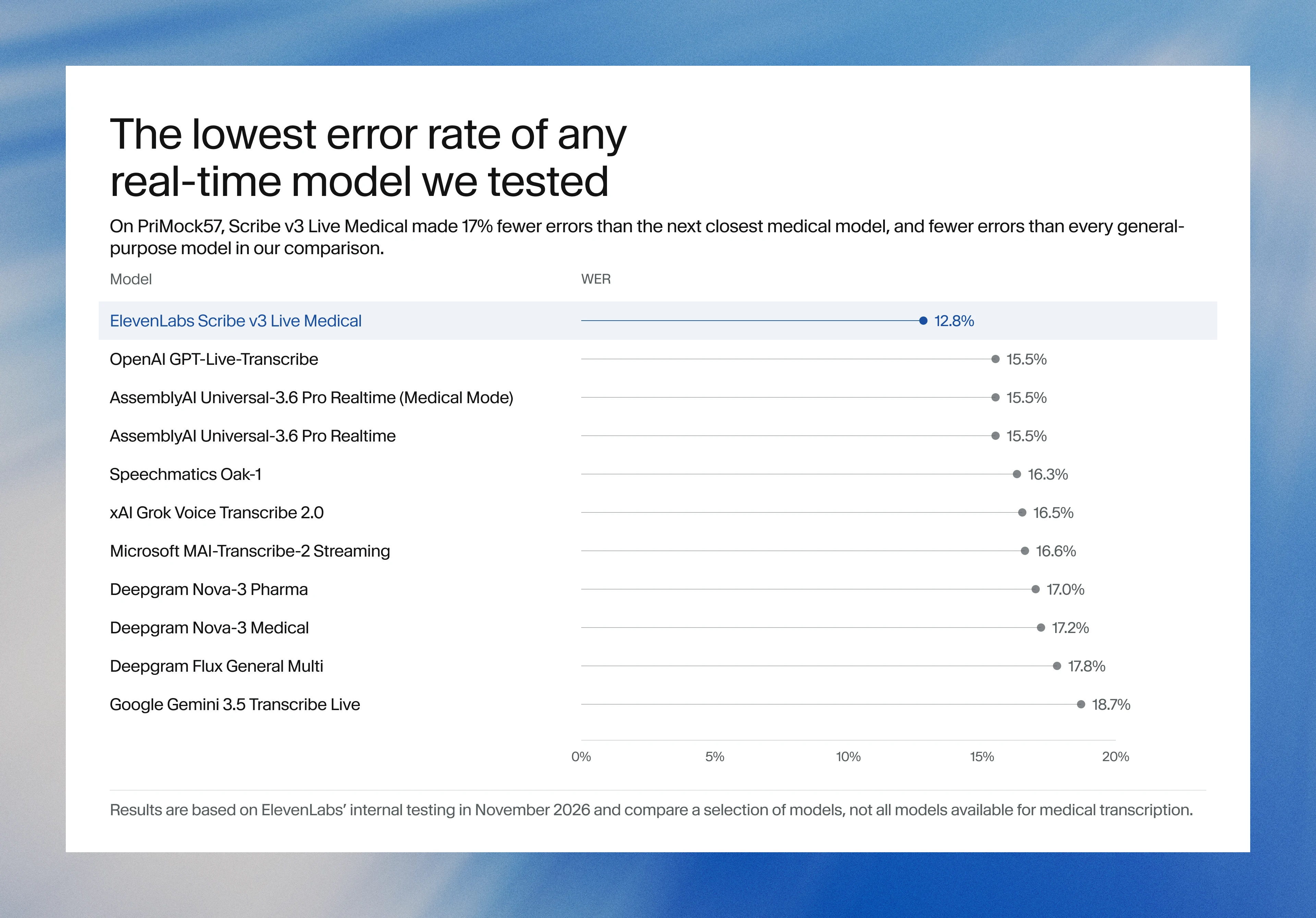
ElevenLabs releases Scribe v3 Live Medical, real-time medical transcription for voice agents in ElevenAgentsElevenLabs, ElevenAgents 음성 에이전트용 실시간 의료 전사 Scribe v3 Live Medical 공개
Checked확인일
Image: ElevenLabs blog.그림: ElevenLabs 블로그.
GoogleGoogle
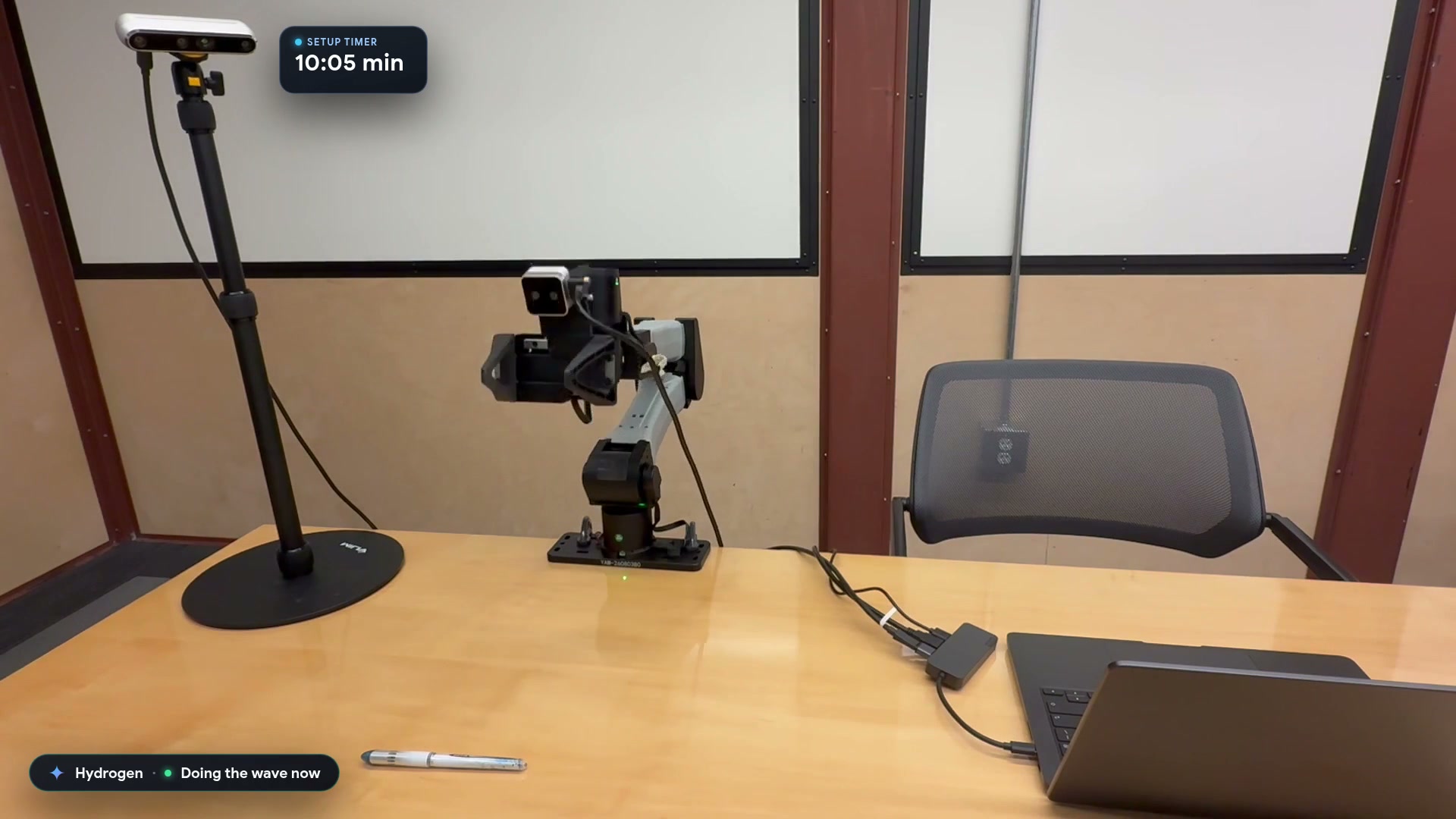
Google launches a Robotics plugin for Google Antigravity that sets up, simulates and controls robot arms with Gemini 4 HydrogenGoogle, Gemini 4 Hydrogen으로 로봇 팔을 준비·시뮬레이션·제어하는 Google Antigravity용 Robotics 플러그인 공개
Checked확인일
Video still: Google Developers Blog.영상 장면: Google Developers 블로그.