HREN


VS Code 1.145 previews mixed agent harnesses in one session and adds cron schedules for local automationsVS Code 1.145, 한 세션에서 에이전트 하니스를 섞어 쓰는 미리보기와 로컬 자동화 cron 일정
Nested sessions can use a different harness from their parent as a preview, and local automations gain five-field cron schedules. Cron schedules are not available for cloud automations.중첩 세션이 부모 세션과 다른 하니스를 쓰는 기능이 미리보기로 들어갔고, 로컬 자동화에는 다섯 칸 cron 일정이 붙었습니다. cron 일정은 클라우드 자동화에서는 쓸 수 없습니다.
- Source published원문 게시일
- Checked확인일
- Posted게시일
VS Code released version 1.145 to Stable on November 4, with a preview that lets different agent harnesses work within one main session. Local automations gain cron schedules and a choice of workspace custom agents. App previews and canvases from remote agent sessions, a chat verbosity setting and file exclusions are also among the release highlights.VS Code는 11월 4일 Stable로 1.145를 내면서, 메인 세션 하나 안에서 서로 다른 에이전트 하니스를 함께 쓰는 기능을 미리보기로 넣었습니다. 로컬 자동화에는 cron 일정과 작업 공간 커스텀 에이전트 선택이 더해졌습니다. 원격 에이전트 세션의 앱 미리보기와 캔버스, 채팅 표시량 설정, 파일 제외 기능도 이번 버전의 주요 항목으로 꼽혔습니다.
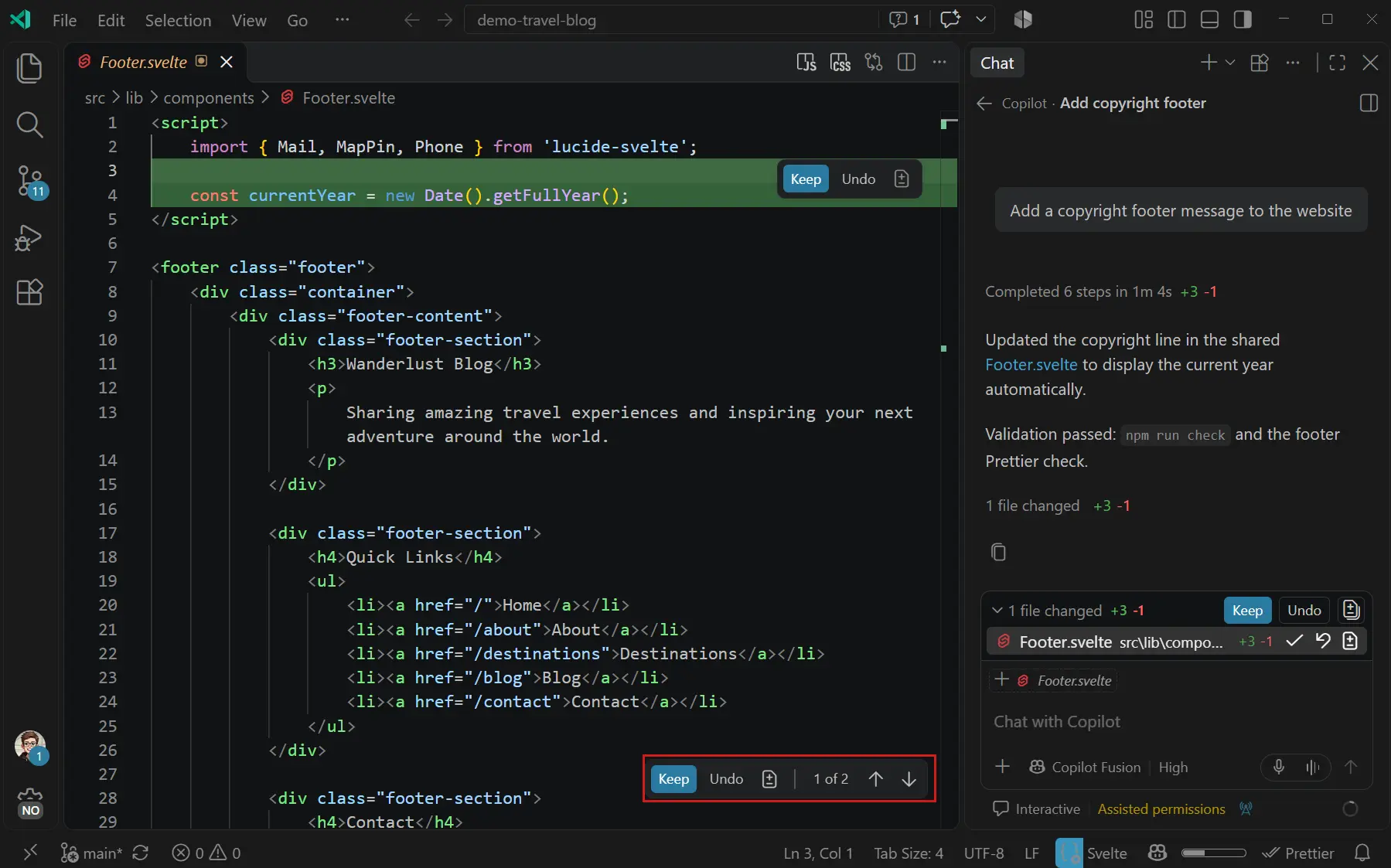
Nested sessions keep related conversations together within a single main chat session. Until now every nested session inherited its parent's harness, so a second opinion from another agent meant a separate session and a lost grouping. In 1.145 the harness picker switches a new nested session to a different harness. The release notes give two examples: Claude reviewing a plan that a Copilot chat wrote, and Codex taking the same task side by side in the same session. Each chat has its own model, agent and permission levels, and changing them in one chat does not affect the others. A moved chat keeps its history and chosen harness, and a forked nested session continues with the same configuration.중첩 세션은 관련 대화를 메인 채팅 세션 하나에 묶어 두는 기능입니다. 지금까지는 중첩 세션이 부모 세션의 하니스를 그대로 물려받아, 다른 에이전트의 의견을 들으려면 별도 세션을 열어야 했고 묶음도 끊겼습니다. 1.145에서는 새 중첩 세션을 만들 때 하니스 선택기에서 다른 하니스로 바꿀 수 있습니다. VS Code가 든 예는 Copilot 채팅이 쓴 계획을 Claude에게 검토시키거나, 같은 일을 Codex에게도 맡겨 같은 세션에서 나란히 두는 경우입니다. 채팅마다 모델, 에이전트, 권한 수준을 따로 가지며 한 채팅에서 바꿔도 다른 채팅에는 영향이 없습니다. 채팅을 옮기면 기록과 선택한 하니스가 유지되고, 중첩 세션을 포크하면 같은 구성으로 이어집니다.
In automations, selecting Cron takes a five-field cron expression when the other schedule presets are not precise enough. The dialog validates the expression and describes the resulting schedule. Creating or editing a local automation offers custom agents from the chosen workspace, and disabled automations move to a collapsed Disabled automations section so they do not obscure run history and active automations.자동화에서는 기본 일정이 모자랄 때 Cron을 골라 다섯 칸짜리 cron 식을 넣습니다. 입력 창은 식을 검증하고 어떤 일정이 되는지 문장으로 풀어 줍니다. 로컬 자동화를 만들거나 고칠 때 선택한 작업 공간의 커스텀 에이전트를 고를 수 있고, 꺼 둔 자동화는 접힌 Disabled automations 구역으로 들어가 실행 기록과 켜진 자동화를 가리지 않습니다.

Version 1.145 is offered for Windows (x64, Arm64), macOS (Universal, Intel, Apple silicon) and Linux (.deb, .rpm, .tar.gz, Arm, Snap). Existing installs update through Check for Updates in VS Code. The setting for mixed harnesses is chat.agentHost.multipleChatProviders.enabled.1.145는 Windows(x64, Arm64), macOS(Universal, Intel, Apple silicon), Linux(.deb, .rpm, .tar.gz, Arm, Snap)용으로 제공됩니다. 이미 설치한 경우 VS Code 안의 Check for Updates로 올립니다. 하니스를 섞어 쓰는 기능의 설정 이름은 chat.agentHost.multipleChatProviders.enabled입니다.
Mixed harnesses are still a preview. Cron schedules are for local automations and are not available for cloud automations. The release notes do not state any subscription or price needed for the Claude or Codex harnesses.하니스를 섞어 쓰는 기능은 아직 미리보기입니다. cron 일정은 로컬 자동화에서만 쓸 수 있고 클라우드 자동화에는 제공되지 않습니다. Claude나 Codex 하니스를 쓰는 데 필요한 구독이나 요금은 이 릴리스 노트에 나와 있지 않습니다.
The Copilot harness remains the default for new sessions. Built on the Copilot SDK, its sessions run through the Agent Host, can keep running in the background, and open from both the VS Code editor window and the Agents window. VS Code also added a Local-to-Copilot harness transition guide for existing workflows.새 세션의 기본 하니스는 계속 Copilot 하니스입니다. Copilot SDK 위에 만든 이 하니스의 세션은 Agent Host에서 실행되며, 백그라운드로 두고 VS Code 편집기 창과 Agents 창 양쪽에서 열 수 있습니다. VS Code는 기존 작업 방식에서 옮겨 오는 사용자를 위해 로컬에서 Copilot 하니스로 넘어가는 안내서도 더했습니다.
Keep reading더 읽기
All articles전체 글TencentTencent
Tencent releases Hy4 flash as open weights, with FP8 and base versions, under the Tencent Hy LicenseTencent, Hy4 flash 가중치 공개 — FP8 · base 모델 포함, Tencent Hy License
Checked확인일
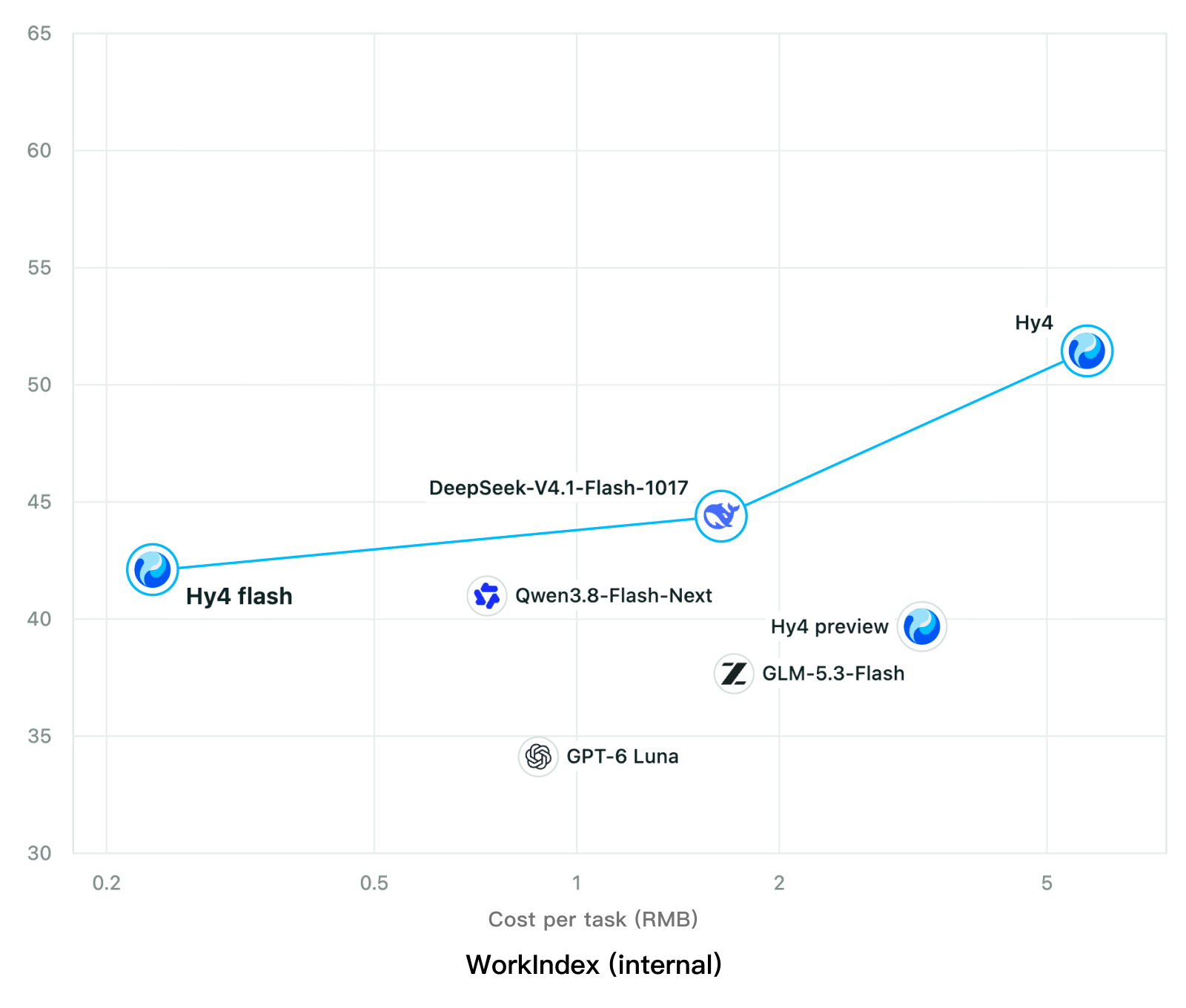
Chart: Tencent Hy4 flash model card. Tencent internal testing.그림: Tencent Hy4 flash 모델 카드. Tencent 내부 시험 결과입니다.
ElevenLabsElevenLabs
ElevenLabs releases Scribe v3 Live Medical, real-time medical transcription for voice agents in ElevenAgentsElevenLabs, ElevenAgents 음성 에이전트용 실시간 의료 전사 Scribe v3 Live Medical 공개
Checked확인일
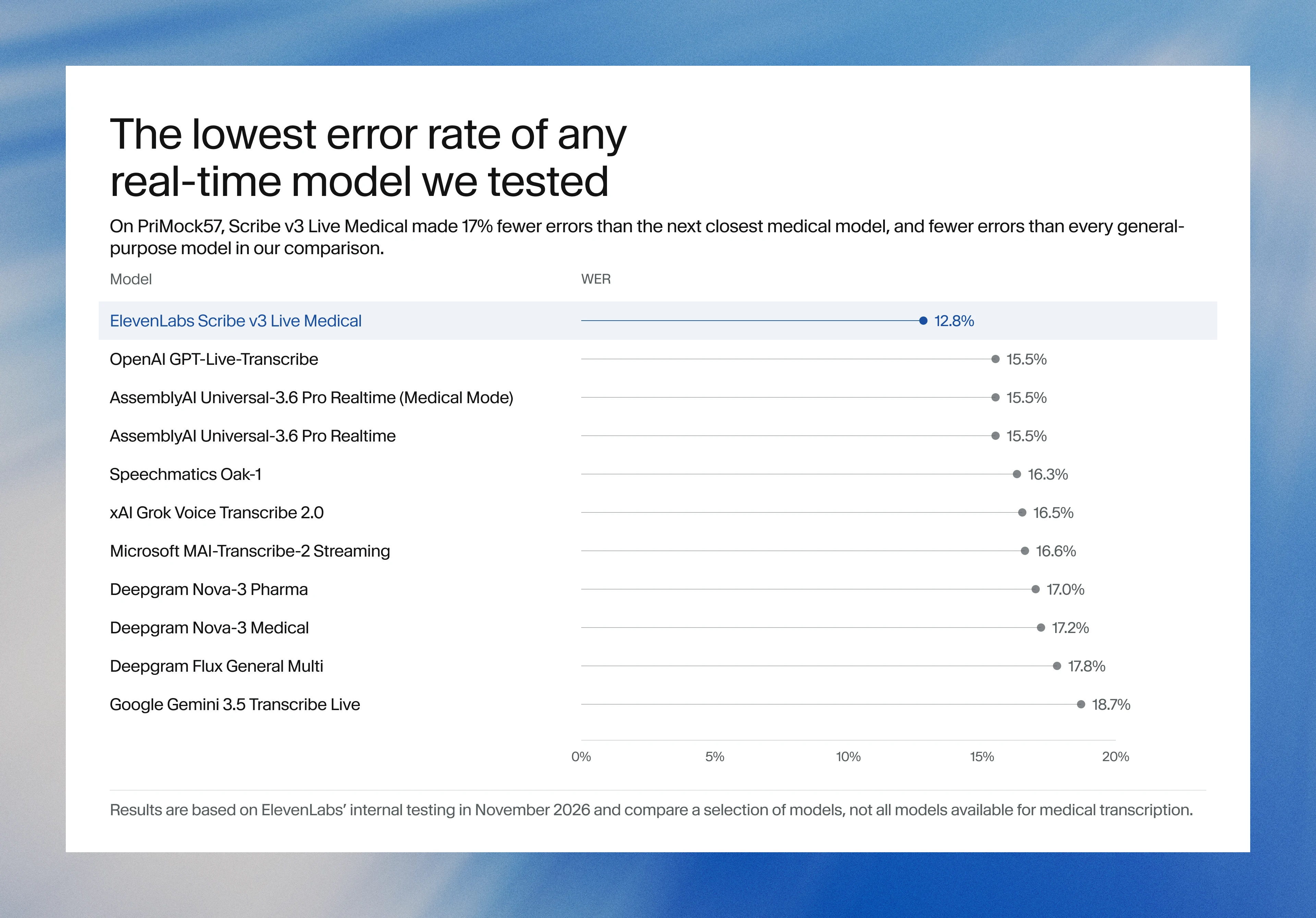
Image: ElevenLabs blog.그림: ElevenLabs 블로그.
GoogleGoogle
Google launches a Robotics plugin for Google Antigravity that sets up, simulates and controls robot arms with Gemini 4 HydrogenGoogle, Gemini 4 Hydrogen으로 로봇 팔을 준비·시뮬레이션·제어하는 Google Antigravity용 Robotics 플러그인 공개
Checked확인일
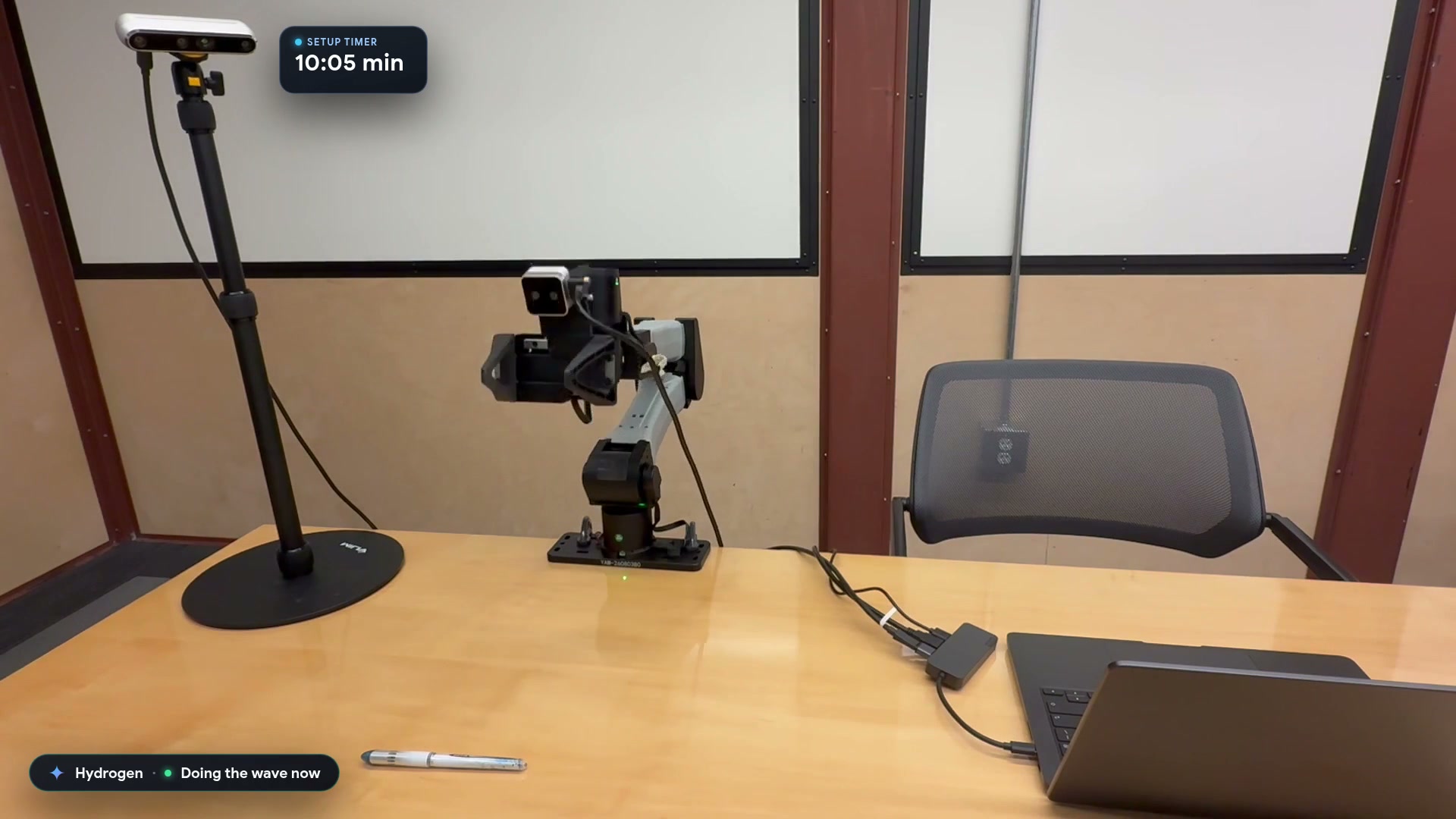
Video still: Google Developers Blog.영상 장면: Google Developers 블로그.