HREN


BytePlus presents Seedream 5.5 around multi-turn edits that keep subjects and layouts, and assets with native transparencyBytePlus Seedream 5.5, 여러 번 이어 고쳐도 대상과 배치를 지키는 편집과 투명 레이어 소재를 앞세웠다
BytePlus says Seedream 5.5 keeps subjects, styles and layouts across 80+ rounds of edits and creates transparent assets with up to 100 layers. Both figures are BytePlus's own, the Enterprise API is arranged through a contact form, and the page lists no price.BytePlus가 Seedream 5.5 공식 페이지에서 80번 넘는 반복 편집에서도 대상 · 스타일 · 배치를 지키고, 레이어 최대 100개의 투명 소재를 만든다고 밝혔습니다. 두 숫자는 BytePlus가 밝힌 값이고, 기업용 API는 문의 양식으로 상담을 신청하며 가격은 페이지에 없습니다.
- Source published원문 게시일
- Checked확인일
BytePlus has put up an official page for Seedream 5.5 and is taking enquiries for its Enterprise API. The page leads with three things: precise editing that holds up over many rounds, layered assets with transparency built in, and studio-grade photorealism. The page opens with a call to scale visual production.BytePlus가 Seedream 5.5 공식 페이지를 열고 기업용 API 상담 신청을 받고 있습니다. 페이지가 앞세운 것은 세 가지입니다. 여러 번 이어 고쳐도 결과가 유지되는 정밀 편집, 투명도를 처음부터 갖춘 레이어 소재, 스튜디오 사진 수준의 사실감입니다. 페이지 첫머리는 시각물 제작 규모를 키우라는 말로 시작합니다.
The first is editing. BytePlus says Seedream 5.5 makes targeted edits across 80+ iterations while preserving subjects, styles and layouts. The edits are given as written instructions. After the heading Multi-Turn Editing, the official video shows the instruction ‘Replace yellow pear with red tomato with green calyx.’ on screen, followed by instructions that change the hairstyle, the sunglasses and the jacket. Instructions like these are applied one after another to a single picture of a person, changing only the parts they name.첫째는 편집입니다. BytePlus는 Seedream 5.5가 80번이 넘는 반복 편집에서도 대상과 스타일, 배치를 지키면서 원하는 부분만 고친다고 밝혔습니다. 고칠 내용은 글로 지시합니다. 공식 영상 화면에는 Multi-Turn Editing이라는 제목이 나온 뒤 ‘Replace yellow pear with red tomato with green calyx.’라는 지시가 나오고, 이어서 머리 모양과 선글라스, 재킷을 바꾸는 지시가 나옵니다. 인물 그림 한 장에 이런 지시를 이어 가며 지시한 부분만 바꾸는 방식입니다.
The second is layers. BytePlus says Seedream 5.5 creates fully and semi-transparent RGBA assets with up to 100 layers and editable text. RGBA is a format that adds a transparency value to colour. The company names localization and reuse as the uses. The third is realism: lifelike portraits with natural skin texture, detailed hands and realistic lighting. No figure is attached to that item.둘째는 레이어입니다. 완전히 투명하거나 반투명한 RGBA 소재를 만들 수 있고, 레이어는 최대 100개, 글자는 다시 고칠 수 있는 상태로 나온다고 BytePlus는 설명합니다. RGBA는 색에 투명도 값을 더한 형식입니다. 쓰임새로는 현지화와 재사용을 들었습니다. 셋째는 사실감입니다. 자연스러운 피부 질감, 세밀한 손, 실제 같은 조명을 갖춘 인물 이미지를 만든다는 설명이고, 이 항목에는 숫자가 붙어 있지 않습니다.
The route the page offers is the Enterprise API. That section tells readers to discuss API capacity, integration and volume pricing with the BytePlus team, and a contact form sits on the same screen. The form asks for a full name, company email, country or region, phone number, the name of the company, studio or creator brand, industry, job role and the request itself. Three steps follow. BytePlus reviews the use case, concurrency needs and integration requirements, holds a technical consultation on the integration and technical questions, and then, in the PoC and API onboarding step, aligns on evaluation, integration support and a commercial plan for the use case.쓰는 길로 페이지가 안내하는 것은 기업용 API입니다. Enterprise API 항목은 API 용량과 연동, 물량에 따른 가격을 BytePlus 팀과 상의하라고 적고, 같은 화면에 문의 양식을 두었습니다. 양식에는 이름, 회사 이메일, 국가 · 지역, 전화번호, 회사 · 스튜디오 · 크리에이터 브랜드 이름, 업종, 직무, 문의 내용을 적습니다. 신청 뒤 절차는 세 단계입니다. BytePlus가 쓰임새와 동시 처리 수요, 연동 요건을 검토하고, 기술 상담에서 연동과 기술 질문을 다룬 뒤, PoC와 API 온보딩 단계에서 평가와 연동 지원, 쓰임새에 맞는 상업 조건을 맞춥니다.
The page gives no price. Pricing is left to the conversation with the team, and the page does not describe a way to sign up and start without the form, the regions served or the image sizes on offer. The only figures are the 80+ iterations and the 100 layers, both stated by BytePlus, with no explanation of the conditions behind them. Submitting the form counts as agreeing to the BytePlus Terms of Service and acknowledging its Privacy Policy. A separate item signs the sender up for marketing messages, which the page says can be stopped at any time.페이지에는 가격이 적혀 있지 않습니다. 가격은 팀과 상의하도록 되어 있고, 양식을 내지 않고 바로 가입해 쓰는 길이나 지원 지역, 만들 수 있는 이미지 크기는 이 페이지에 나와 있지 않습니다. 숫자로 나온 것은 80번 넘는 반복 편집과 레이어 최대 100개 두 가지인데, 둘 다 BytePlus가 밝힌 값이고 어떤 조건에서 나온 값인지는 설명이 없습니다. 양식을 보내면 BytePlus 서비스 약관에 동의하고 개인정보 처리방침을 읽은 것으로 봅니다. 마케팅 연락을 받겠다는 항목은 따로 있고, 받은 뒤에도 언제든 끊을 수 있다고 적혀 있습니다.
Sources & references원문과 참고 자료
Keep reading더 읽기
All articles전체 글TencentTencent
Tencent releases Hy4 flash as open weights, with FP8 and base versions, under the Tencent Hy LicenseTencent, Hy4 flash 가중치 공개 — FP8 · base 모델 포함, Tencent Hy License
Checked확인일
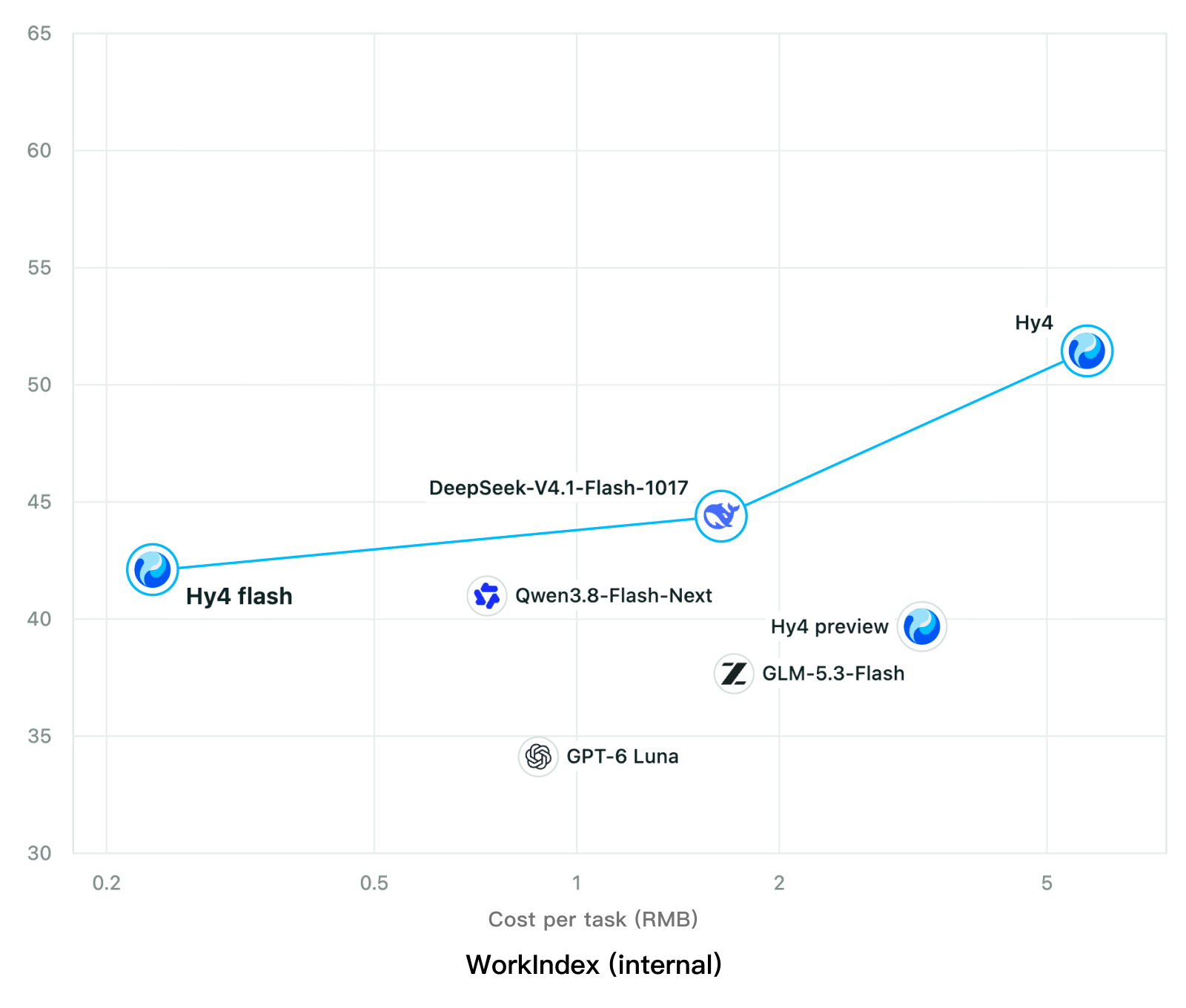
Chart: Tencent Hy4 flash model card. Tencent internal testing.그림: Tencent Hy4 flash 모델 카드. Tencent 내부 시험 결과입니다.
ElevenLabsElevenLabs
ElevenLabs releases Scribe v3 Live Medical, real-time medical transcription for voice agents in ElevenAgentsElevenLabs, ElevenAgents 음성 에이전트용 실시간 의료 전사 Scribe v3 Live Medical 공개
Checked확인일
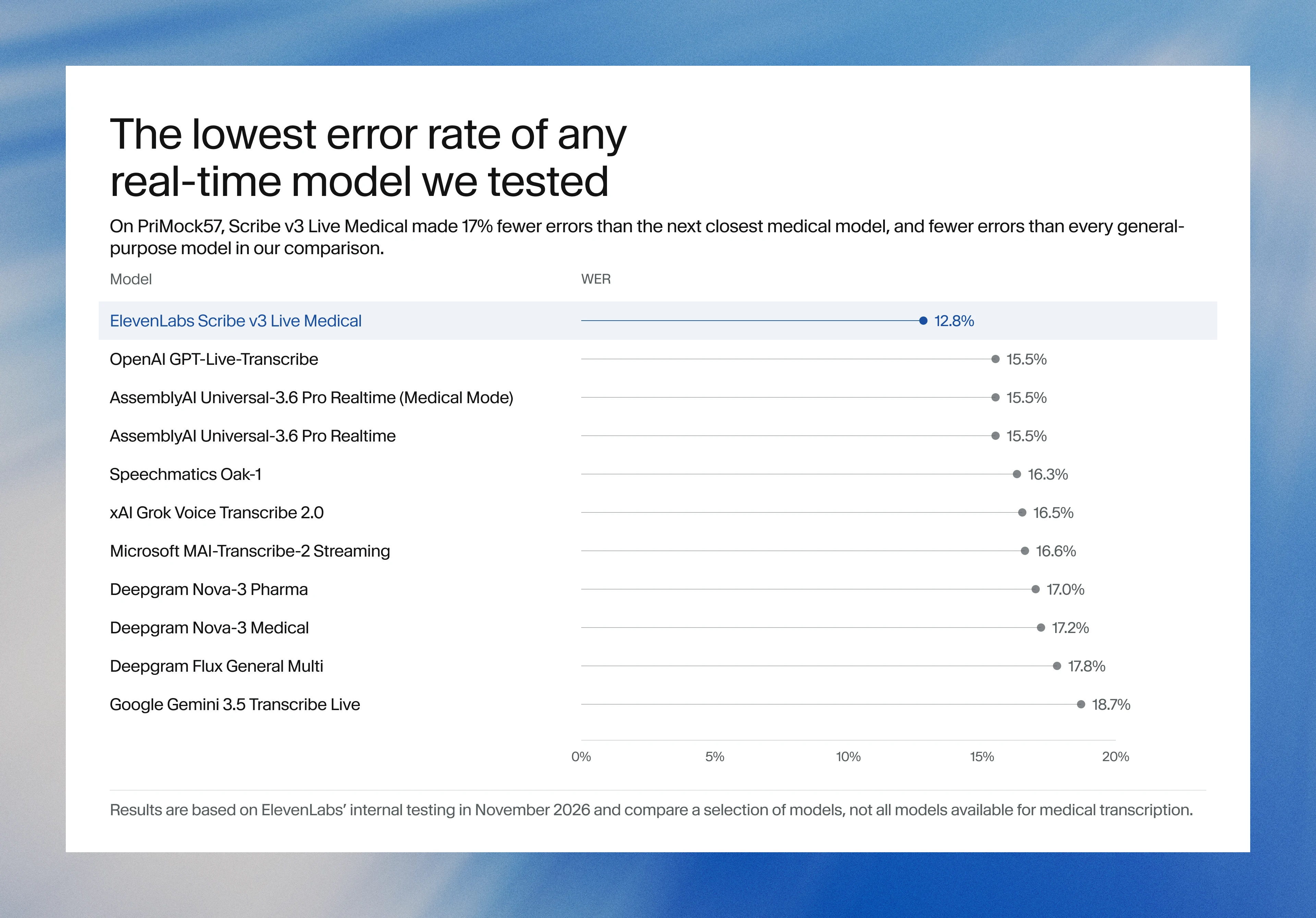
Image: ElevenLabs blog.그림: ElevenLabs 블로그.
GoogleGoogle
Google launches a Robotics plugin for Google Antigravity that sets up, simulates and controls robot arms with Gemini 4 HydrogenGoogle, Gemini 4 Hydrogen으로 로봇 팔을 준비·시뮬레이션·제어하는 Google Antigravity용 Robotics 플러그인 공개
Checked확인일
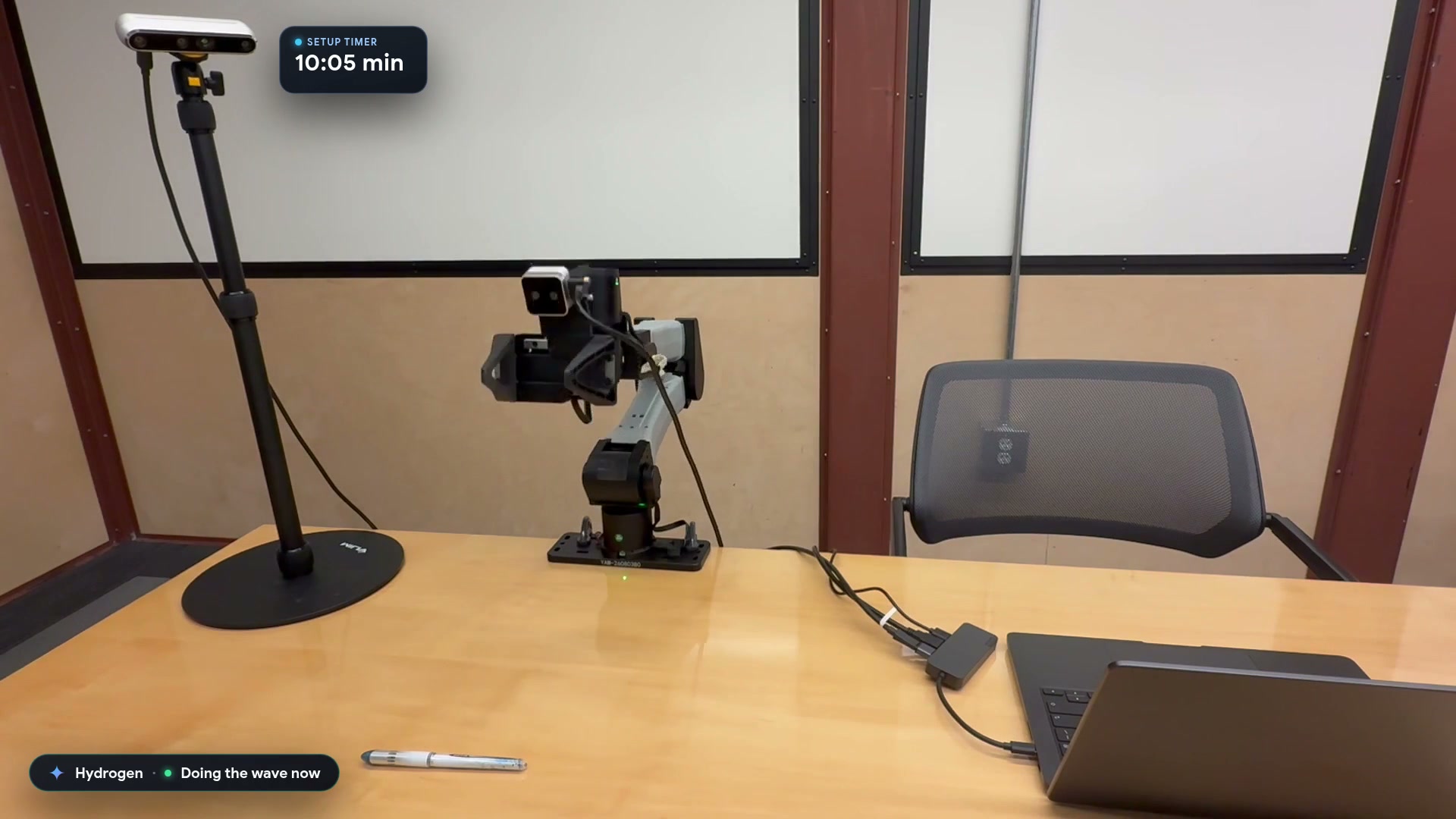
Video still: Google Developers Blog.영상 장면: Google Developers 블로그.