HREN


Anthropic launches Claude Whiteboards and Claude Sheets in beta and makes Claude Data generally availableAnthropic, Claude Whiteboards와 Claude Sheets 베타 공개, Claude Data 정식 출시
Anthropic has launched Claude Whiteboards, a shared board for brainstorming with Claude, and Claude Sheets, a spreadsheet Claude builds and edits with you, in beta, and made Claude Dashboards, which launched in beta in October, generally available as Claude Data. All three are available on all paid plans on web, desktop and mobile.Anthropic이 팀과 Claude가 함께 쓰는 보드 Claude Whiteboards와 Claude가 만들고 고치는 스프레드시트 Claude Sheets를 베타로 내고, 10월에 베타로 나온 Claude Dashboards를 Claude Data라는 이름으로 정식 출시했습니다. 모든 유료 요금제에서 웹, 데스크톱, 모바일로 쓸 수 있습니다.
- Source published원문 게시일
- Checked확인일
Anthropic has launched Claude Whiteboards and Claude Sheets in beta and made Claude Dashboards generally available as Claude Data. Whiteboards is a shared board where a team brainstorms with Claude, Sheets is a spreadsheet Claude builds and edits with the user, and Claude Data adds data stories, certified queries and live sharing. Anthropic says work with Claude often had to be moved to another tool, where Claude had no live access to follow progress and changes. Now documents, boards, sheets and dashboards can stay in Claude, where a team can keep editing them together.Anthropic이 Claude Whiteboards와 Claude Sheets를 베타로 내고, Claude Dashboards를 Claude Data라는 이름으로 정식 출시했습니다. Whiteboards는 팀이 Claude와 함께 아이디어를 내는 공유 보드이고, Sheets는 Claude가 사용자와 함께 만들고 고치는 스프레드시트이며, Claude Data는 데이터 스토리, 인증된 쿼리, 실시간 공유를 더했습니다. Anthropic은 그동안 Claude와 만든 결과물을 다른 도구로 옮겨야 했고, 그곳에서는 Claude가 진행과 변경을 따라갈 수 없었다고 설명했습니다. 이제 문서, 보드, 시트, 대시보드를 Claude 안에 두고 팀이 함께 고칠 수 있습니다.
In Whiteboards, a user can talk through a messy plan out loud and Claude turns it into a board with a timeline, owners and dates that the team works on in real time. In a retro meeting, everyone can add notes while Claude groups them by theme and drafts action items for each person. Users can drag a box around any part of the board to ask Claude about it, and when they are done, Claude can turn the board into a doc or deck or bring it into Lucid, Miro or Vani by Zoho. Sheets generates spreadsheets with tabs, formulas, formatting and drop-downs, often from a single prompt such as a campaign tracker or a hiring budget, and outlines each edit it makes in the cells so changes can be tracked. Sheets can be shared with a team and edited together with Claude.Whiteboards에서는 어수선한 계획을 Claude에게 말로 풀어 놓으면 Claude가 담당자와 날짜가 붙은 타임라인 보드로 바꾸고, 팀이 실시간으로 함께 작업합니다. 회고 회의라면 모두가 메모를 붙이고 Claude가 주제별로 묶어 사람마다 할 일 초안을 씁니다. 보드의 한 부분을 상자로 둘러 그 부분만 Claude에게 물을 수 있고, 끝나면 Claude가 보드를 문서나 발표 자료로 바꾸거나 Lucid, Miro, Vani by Zoho로 옮깁니다. Sheets는 탭, 수식, 서식, 드롭다운이 든 스프레드시트를 캠페인 추적표나 채용 예산 같은 프롬프트 하나로 만들고, 셀을 고칠 때마다 바뀐 곳을 표시해 변경을 따라갈 수 있게 합니다. 시트는 팀과 공유해 Claude와 함께 고칠 수 있습니다.
Claude Data is the new name for Claude Dashboards, which launched in beta in October and lets teams ask quick questions of company data in tools such as Amazon Redshift, BigQuery and ClickHouse. A data team can certify the queries everyone should use, and charts built on those metrics carry a certified badge. Users can work with Claude to draft data stories or narrated videos from their metrics and review them before sharing. With live sharing, colleagues see up-to-date numbers in a shared dashboard even without access to the underlying connectors, but they only see the results of approved queries and cannot run others. Claude Data also adds design system support, caching with per-dashboard refresh cadences, and tracked changes with rollback to earlier versions, and its partners include Amplitude, Mixpanel, Omni, PostHog and Sigma. All three products are available on all paid plans on web, desktop and mobile.Claude Data는 10월에 베타로 나온 Claude Dashboards의 새 이름으로, Amazon Redshift, BigQuery, ClickHouse 같은 도구에 있는 회사 데이터에 빠르게 질문할 수 있습니다. 데이터 팀이 모두가 써야 할 쿼리를 인증하면 그 지표로 만든 차트에 certified 배지가 붙고, 지표로 데이터 스토리나 해설 영상 초안을 만들어 검토한 뒤 공유할 수 있습니다. 실시간 공유를 쓰면 커넥터 권한이 없는 동료도 공유된 대시보드에서 최신 숫자를 보되, 승인된 쿼리의 결과만 보고 다른 쿼리는 돌릴 수 없습니다. 디자인 시스템 지원, 캐싱과 대시보드별 새로 고침 주기, 편집 기록과 이전 판 되돌리기도 들어왔고, 파트너는 Amplitude, Mixpanel, Omni, PostHog, Sigma입니다. 세 기능은 모든 유료 요금제에서 웹, 데스크톱, 모바일로 쓸 수 있습니다.

Whiteboards and Sheets are in beta, as are certified queries and live sharing in Claude Data. Sheets currently has simple spreadsheet functionality, so users who need the full functionality of Excel can export to .xlsx or CSV, use Claude for Excel, or continue in partner tools including Airtable, Asana, monday.com and Smartsheet. Claude Data needs a data connector, such as a warehouse or CRM. On Team plans all three are on by default; on Enterprise plans, Whiteboards and Sheets are off by default and Claude Data turns on by default on November 19, 2026. Admins can change these settings at any time under Artifacts in Organization settings.Whiteboards와 Sheets는 아직 베타이고, Claude Data의 인증 쿼리와 실시간 공유도 베타입니다. Sheets에는 지금은 간단한 스프레드시트 기능만 있어, Excel의 전체 기능이 필요하면 .xlsx나 CSV로 내보내거나 Claude for Excel을 쓰거나 Airtable, Asana, monday.com, Smartsheet 같은 파트너 도구에서 이어 가야 합니다. Claude Data는 데이터 웨어하우스나 CRM 같은 데이터 커넥터가 있어야 합니다. Team 요금제에서는 세 기능이 기본으로 켜져 있고, Enterprise 요금제에서는 Whiteboards와 Sheets가 기본으로 꺼져 있으며 Claude Data는 2026년 11월 19일에 기본으로 켜집니다. 관리자는 Organization settings의 Artifacts 항목에서 언제든 바꿀 수 있습니다.
Keep reading더 읽기
All articles전체 글TencentTencent
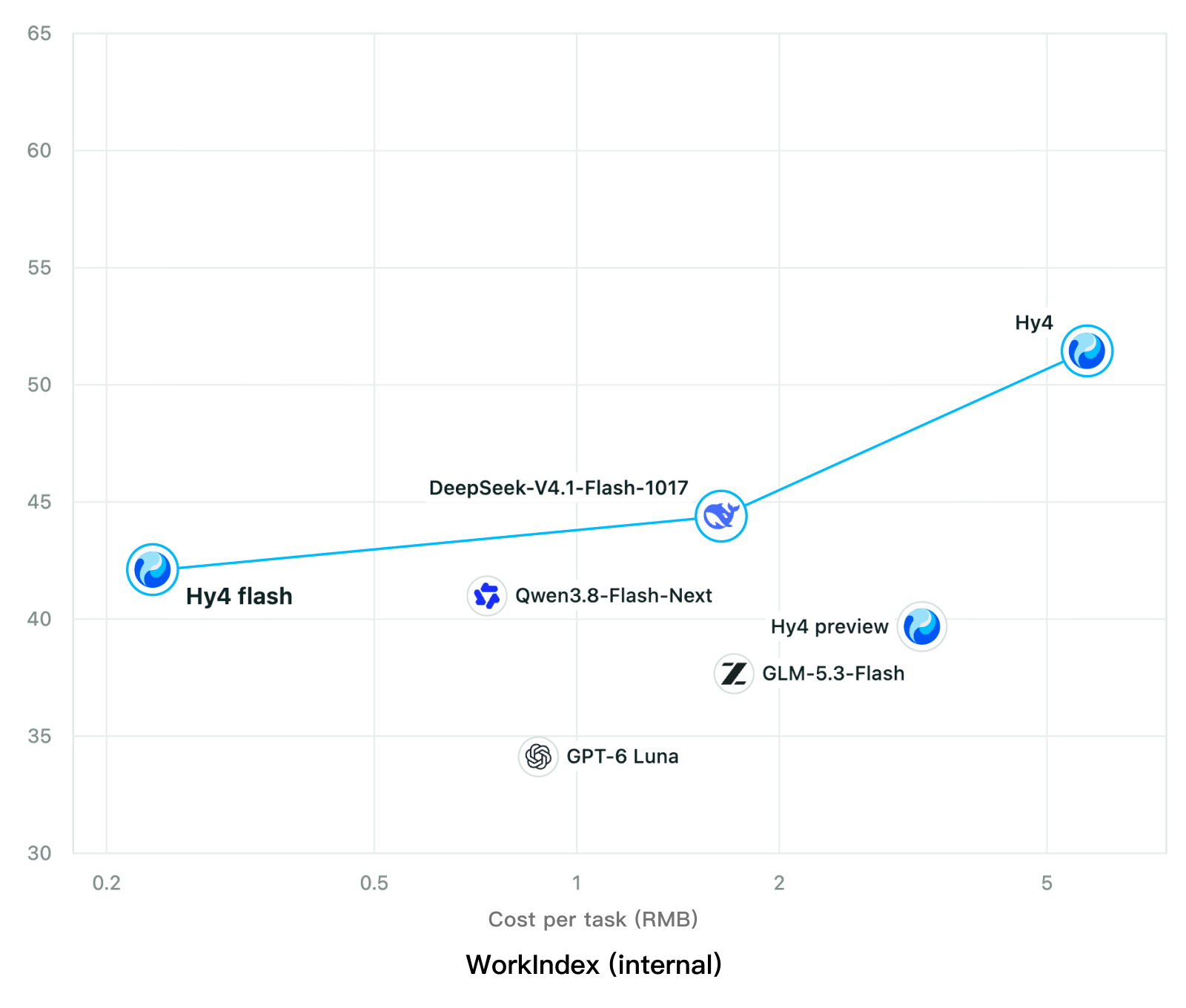
Tencent releases Hy4 flash as open weights, with FP8 and base versions, under the Tencent Hy LicenseTencent, Hy4 flash 가중치 공개 — FP8 · base 모델 포함, Tencent Hy License
Checked확인일
Chart: Tencent Hy4 flash model card. Tencent internal testing.그림: Tencent Hy4 flash 모델 카드. Tencent 내부 시험 결과입니다.
ElevenLabsElevenLabs
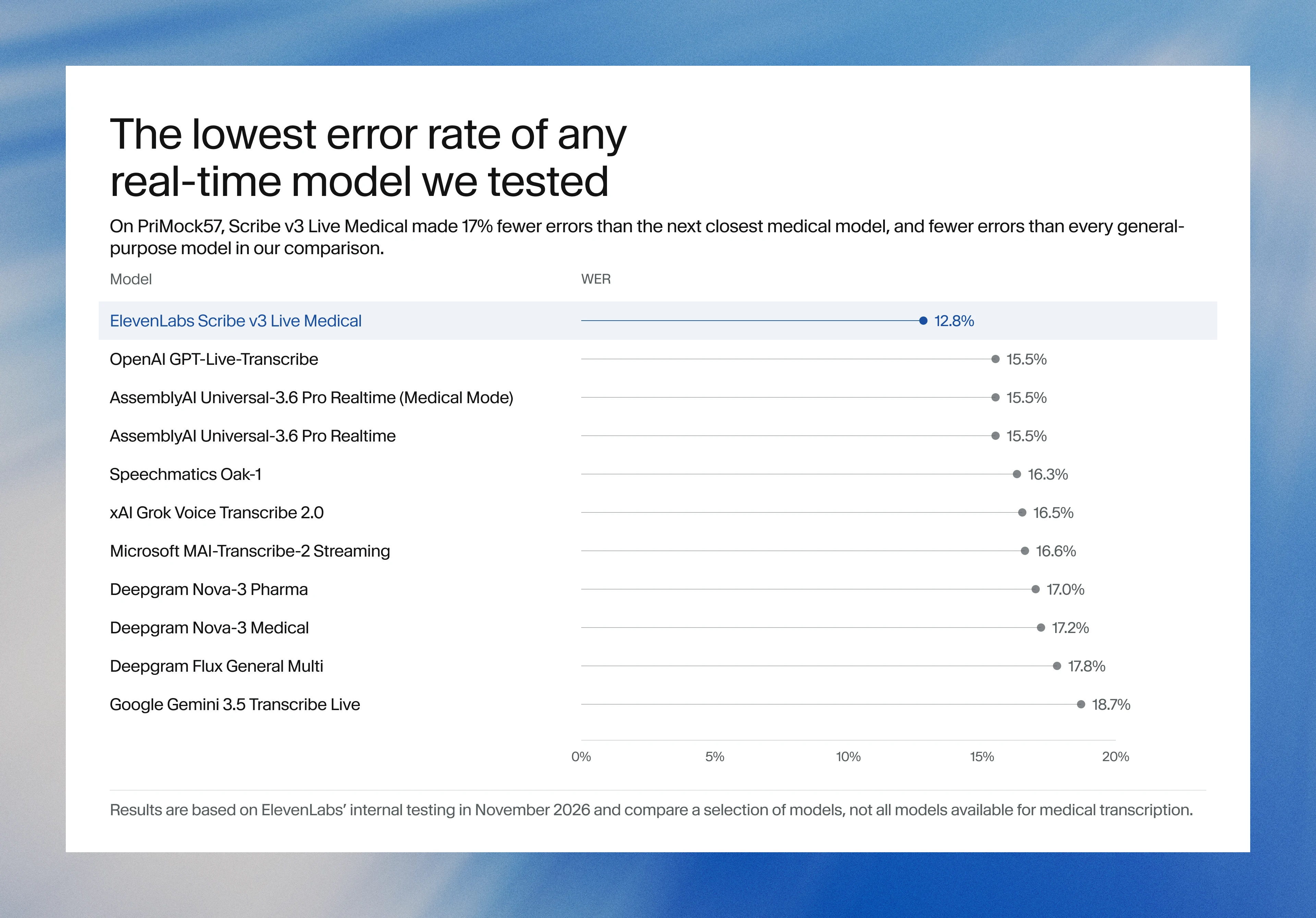
ElevenLabs releases Scribe v3 Live Medical, real-time medical transcription for voice agents in ElevenAgentsElevenLabs, ElevenAgents 음성 에이전트용 실시간 의료 전사 Scribe v3 Live Medical 공개
Checked확인일
Image: ElevenLabs blog.그림: ElevenLabs 블로그.
GoogleGoogle
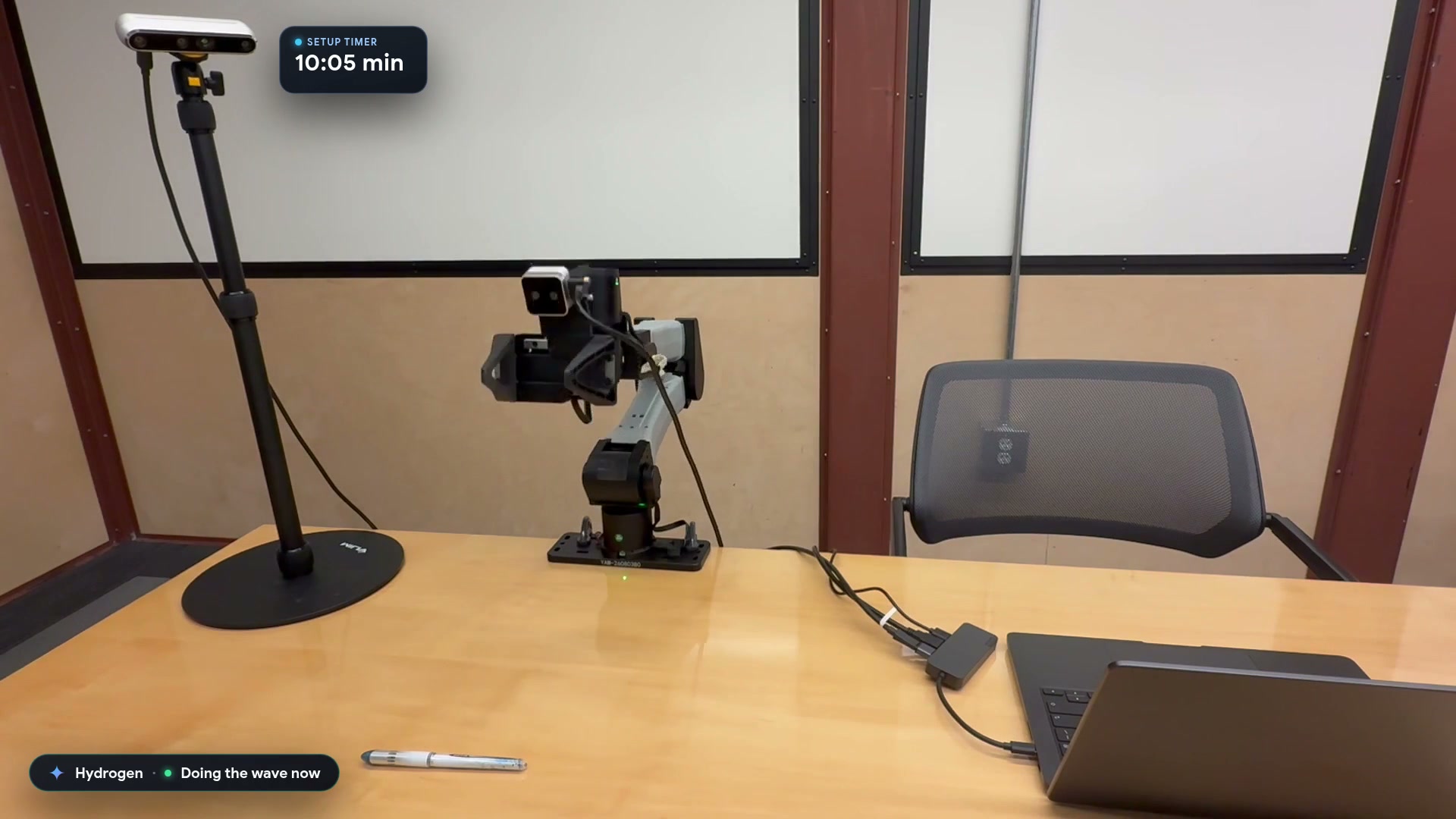
Google launches a Robotics plugin for Google Antigravity that sets up, simulates and controls robot arms with Gemini 4 HydrogenGoogle, Gemini 4 Hydrogen으로 로봇 팔을 준비·시뮬레이션·제어하는 Google Antigravity용 Robotics 플러그인 공개
Checked확인일
Video still: Google Developers Blog.영상 장면: Google Developers 블로그.