HREN


Google brings the Gemini app to Apple CarPlay with hands-free Gemini Live conversationsGoogle, Apple CarPlay에 Gemini 앱 출시, 차 화면에서 Gemini Live와 음성 대화
Google has brought the Gemini app to Apple CarPlay, letting iOS users talk with Gemini Live hands-free from the car's display. It is rolling out globally from November 11 to all Gemini users on iOS across every supported Gemini Live language, and requires the latest Gemini app on iPhone, microphone permissions and having used Gemini Live on the phone at least once.Google이 Gemini 앱을 Apple CarPlay에 넣어, iOS 사용자가 차 화면에서 Gemini Live와 손을 쓰지 않고 대화할 수 있게 했습니다. 11월 11일부터 전 세계 iOS의 모든 Gemini 사용자에게 Gemini Live 지원 언어 전체로 배포되고 있으며, 최신 Gemini 앱과 마이크 권한, 휴대폰에서 Gemini Live를 한 번 이상 쓴 이력이 필요합니다.
- Source published원문 게시일
- Checked확인일
Google has brought the Gemini app to Apple CarPlay. Following the rollout on Android Auto and cars with Google built-in, iOS users can have natural, free-flowing conversations with Gemini Live from their car's display, hands-free. Google says it designed Gemini on CarPlay to work like a conversational driving companion that minimizes distraction. Beyond the quick tasks voice assistants have handled, such as playing a playlist or getting directions home, it presents time on the road as a chance to catch up, prepare for what is ahead or think out loud.Google이 Gemini 앱을 Apple CarPlay에 넣었습니다. Android Auto와 Google built-in 차량에 이어 나온 것으로, iOS 사용자는 차 화면에서 Gemini Live와 자연스럽게 이어지는 대화를 손을 쓰지 않고 나눌 수 있습니다. Google은 Gemini on CarPlay를 주의를 덜 빼앗는 대화형 운전 동반자처럼 쓰이도록 설계했다고 밝혔습니다. 음악 재생이나 길 안내 같은 짧은 일에 쓰던 음성 비서와 달리, 운전하는 시간을 밀린 일을 따라잡고 다음 일정을 준비하거나 생각을 소리 내어 정리하는 기회로 소개했습니다.
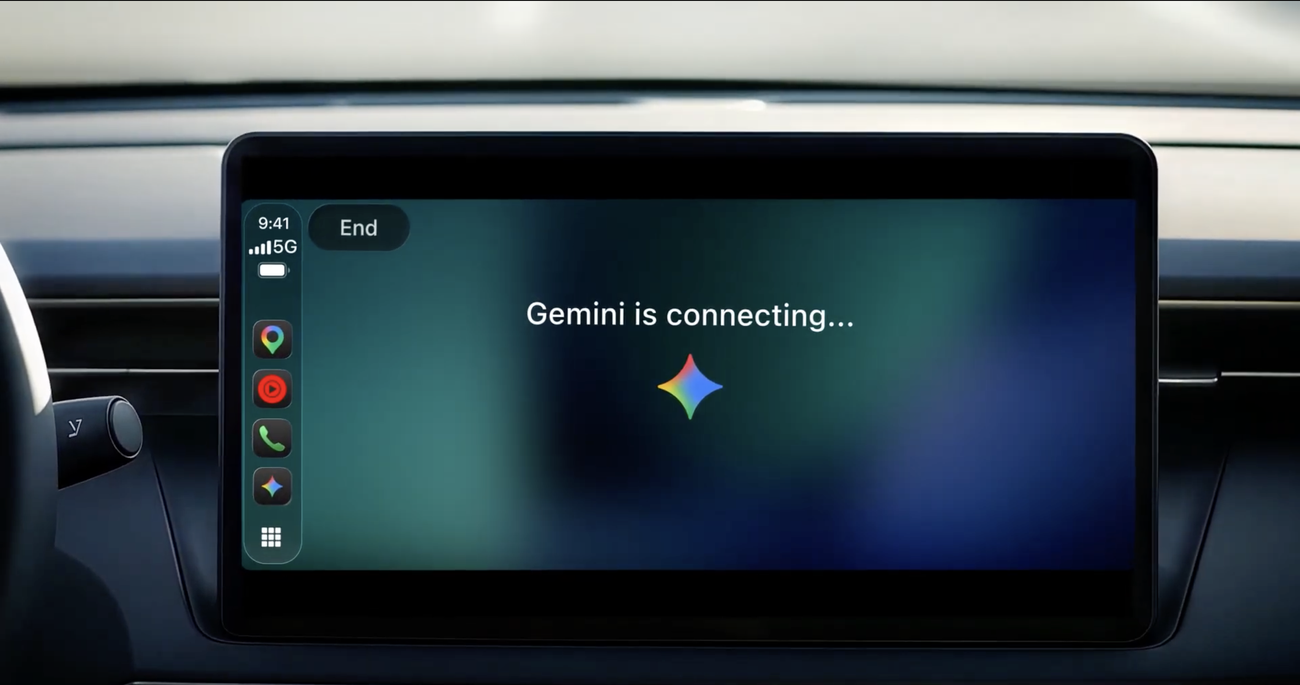
Tapping the Gemini app icon on the CarPlay screen or side rail lets you pick up a recent chat or start a fresh conversation. You talk back and forth at your own pace, interrupting to add a detail, changing the subject or pausing when you need to focus on an exit. Google gives four uses. First, you ask what is on your calendar and when to leave for the next appointment, or talk through what you want to say before you arrive. Second, because Gemini connects with Google Workspace apps like Gmail and Google Calendar, you ask for your daily brief, catch up on unread emails, get quick summaries of long email threads and talk through a quick reply by voice. Third, you ask for recommendations where you are heading, from a quick place to grab lunch to the backstory of a local landmark. Fourth, you use Gemini Live as a sounding board to practice a presentation, prepare for a tough conversation or break down a complex topic. CarPlay conversations sync automatically with the Gemini app on iPhone, so every summary, note and brainstorm is in the chat history when you park.CarPlay 화면이나 화면 옆 아이콘 줄에 있는 Gemini 앱 아이콘을 누르면 최근 대화를 이어 가거나 새 대화를 시작합니다. 대화는 사용자의 속도에 맞춰 오갑니다. 말하는 중간에 끼어들어 내용을 보태거나 주제를 바꿀 수 있고, 출구에 집중해야 할 때는 잠시 멈춰도 됩니다. Google이 든 쓰임새는 네 가지입니다. 첫째, 오늘 일정과 다음 약속을 위해 출발할 시각을 묻고 도착 전에 할 말을 미리 정리합니다. 둘째, Gemini가 Gmail, Google Calendar 같은 Google Workspace 앱과 연결돼 있어 daily brief를 듣고, 읽지 않은 메일을 따라잡고, 긴 메일 스레드를 요약받고, 목소리만으로 짧은 답장을 다듬습니다. 셋째, 가는 곳 근처에서 간단히 점심을 먹을 곳이나 지역 명소에 얽힌 이야기를 추천받습니다. 넷째, 발표 연습이나 어려운 대화 준비, 복잡한 주제 풀이의 상대로 Gemini Live를 씁니다. CarPlay에서 나눈 대화는 iPhone의 Gemini 앱에 자동으로 동기화돼, 주차하면 요약과 메모가 대화 기록에 남아 있습니다.
Gemini on Apple CarPlay began rolling out globally on November 11, 2026 to all Gemini users on iOS across every supported Gemini Live language. Getting started takes three things: the latest version of the Gemini app on your iPhone, microphone permissions enabled, and having used Gemini Live on your phone at least once. After that, connect your phone to your car, tap the Gemini icon on the CarPlay display, and start a new conversation or pick up a recent one.Gemini on Apple CarPlay는 2026년 11월 11일부터 iOS의 모든 Gemini 사용자에게 전 세계에서 배포되기 시작했고, Gemini Live가 지원하는 모든 언어로 쓸 수 있습니다. 시작하려면 세 가지가 필요합니다. iPhone의 Gemini 앱을 최신 버전으로 업데이트하고, 마이크 권한을 켜고, 휴대폰에서 Gemini Live를 한 번 이상 써 둬야 합니다. 그런 다음 휴대폰을 차에 연결하고 CarPlay 화면의 Gemini 아이콘을 눌러 새 대화를 시작하거나 최근 대화를 이어 가면 됩니다.
Gemini on Apple CarPlay is a feature that has been rolling out since November 11. The daily brief requires the Daily Brief feature to be enabled first. Certain personalization features, including Daily Brief, are not available to users under 18 or in the European Economic Area (EEA) and Nigeria. The email and calendar uses rest on Gemini's connection with Google Workspace apps such as Gmail and Google Calendar. Conversations with Gemini on CarPlay are held by voice, with your hands on the wheel and your eyes on the road.Gemini on Apple CarPlay는 11월 11일부터 배포가 진행되는 기능입니다. daily brief는 Daily Brief 기능을 먼저 켜 둬야 들을 수 있습니다. Daily Brief를 포함한 일부 개인화 기능은 18세 미만 사용자와 유럽경제지역(EEA), 나이지리아에서는 제공되지 않습니다. 메일과 일정을 다루는 쓰임새는 Gemini가 Gmail, Google Calendar 같은 Google Workspace 앱과 연결되는 것을 바탕으로 합니다. Gemini on CarPlay의 대화는 손은 운전대에, 눈은 도로에 둔 채 목소리로 나누는 방식입니다.
Keep reading더 읽기
All articles전체 글TencentTencent
Tencent releases Hy4 flash as open weights, with FP8 and base versions, under the Tencent Hy LicenseTencent, Hy4 flash 가중치 공개 — FP8 · base 모델 포함, Tencent Hy License
Checked확인일
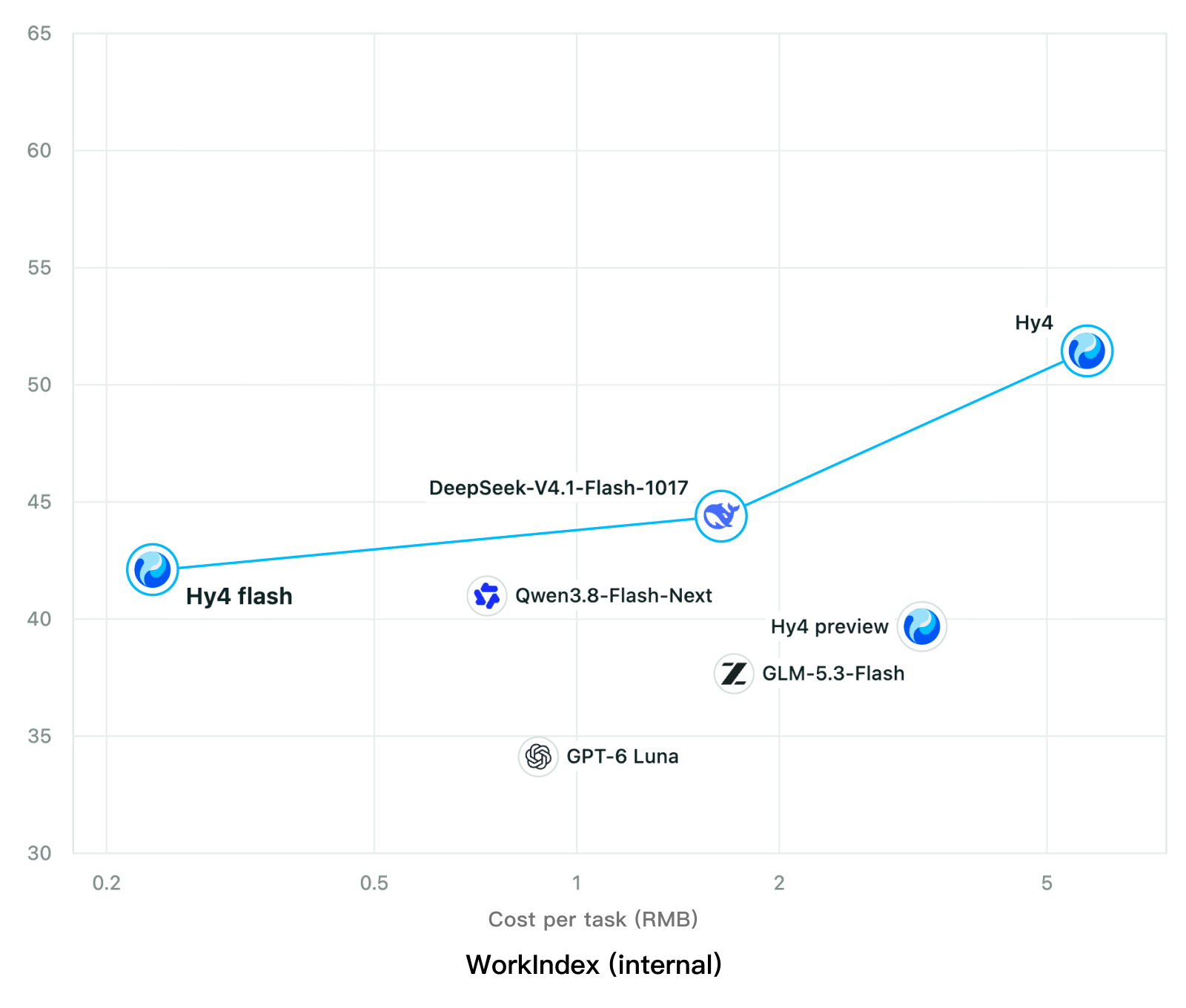
Chart: Tencent Hy4 flash model card. Tencent internal testing.그림: Tencent Hy4 flash 모델 카드. Tencent 내부 시험 결과입니다.
ElevenLabsElevenLabs
ElevenLabs releases Scribe v3 Live Medical, real-time medical transcription for voice agents in ElevenAgentsElevenLabs, ElevenAgents 음성 에이전트용 실시간 의료 전사 Scribe v3 Live Medical 공개
Checked확인일
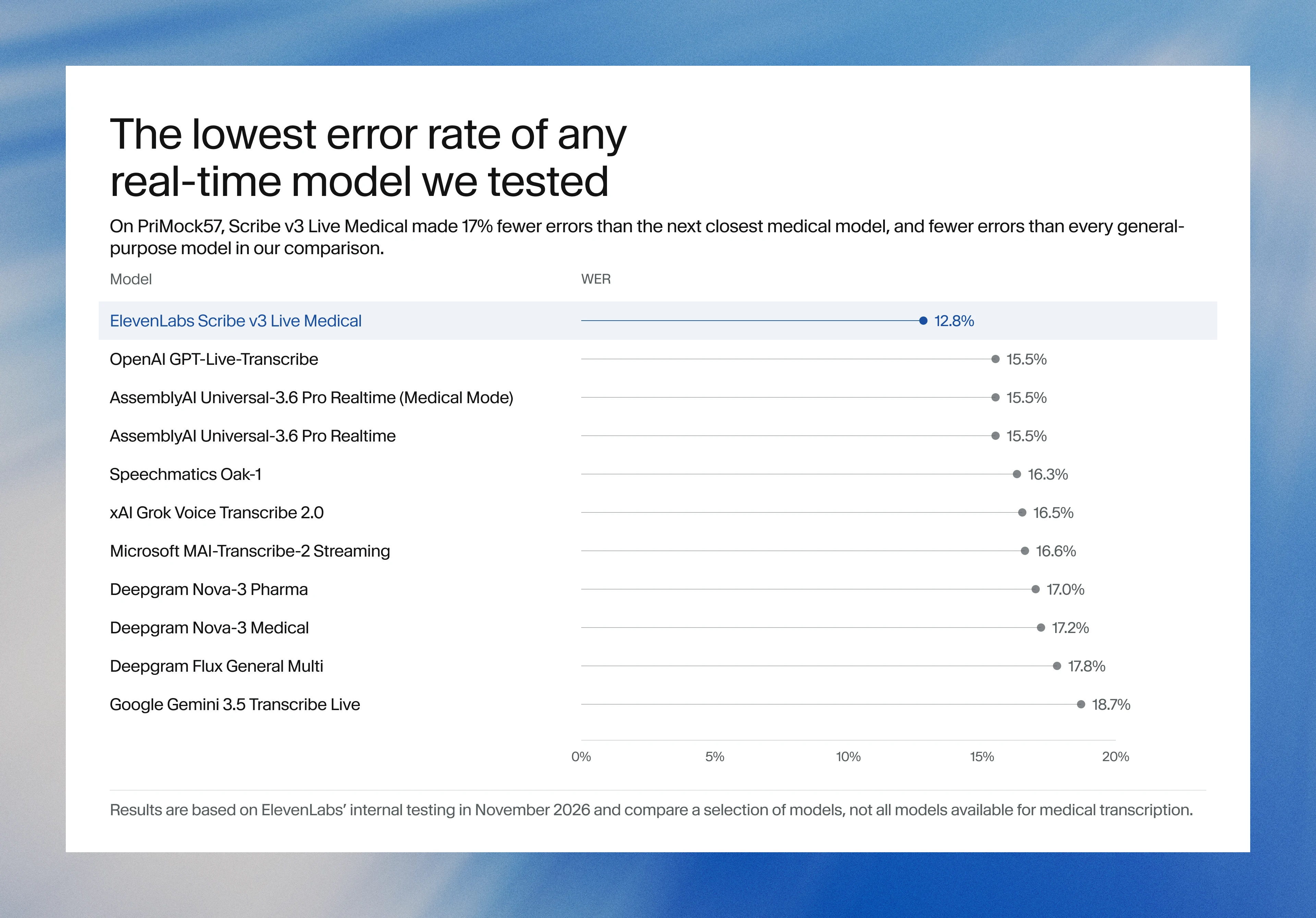
Image: ElevenLabs blog.그림: ElevenLabs 블로그.
GoogleGoogle
Google launches a Robotics plugin for Google Antigravity that sets up, simulates and controls robot arms with Gemini 4 HydrogenGoogle, Gemini 4 Hydrogen으로 로봇 팔을 준비·시뮬레이션·제어하는 Google Antigravity용 Robotics 플러그인 공개
Checked확인일
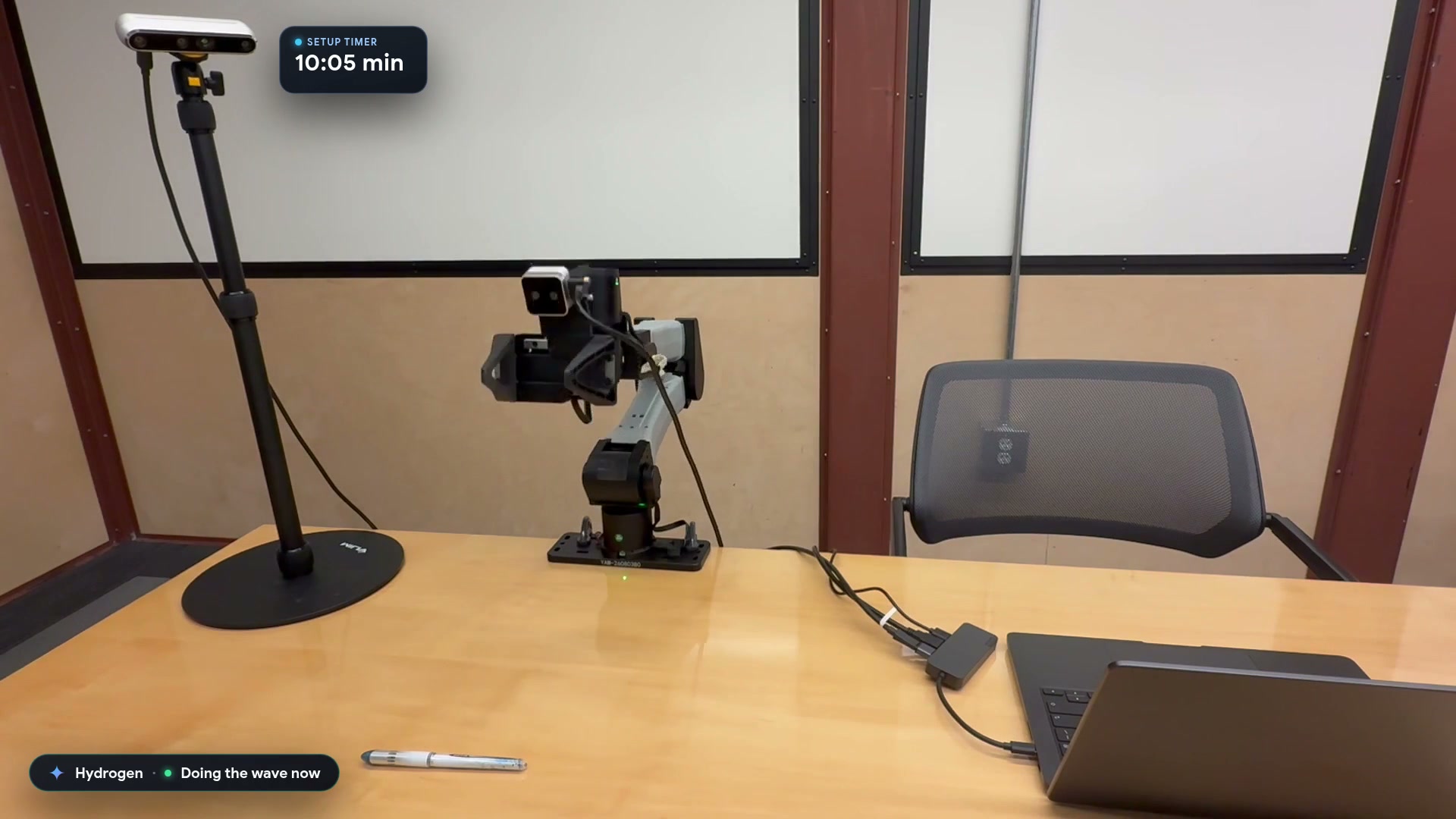
Video still: Google Developers Blog.영상 장면: Google Developers 블로그.