HREN


Luma adds Character Swap & Insert, a tool that swaps, inserts or removes characters in a sceneLuma, 장면 속 인물을 바꾸고 넣고 빼는 Character Swap & Insert 도구 추가
Luma has put Character Swap & Insert on its app site, a tool that swaps existing characters, inserts new ones or removes characters from a scene. Its page lists Target image and Character reference images fields and a Swap, Insert or Remove choice for each of 6 character slots, and notes that the Character reference images field needs an editor this page does not provide. Each variant costs credits, and the tool page does not state how many.Luma가 장면 속 인물을 바꾸거나 새로 넣거나 빼는 도구 Character Swap & Insert를 앱 사이트에 올렸습니다. 도구 페이지의 입력 목록에는 Target image와 Character reference images 칸, 인물 칸 6개마다 Swap, Insert, Remove 가운데서 고르는 항목이 있고, Character reference images 칸에는 이 페이지가 제공하지 않는 편집기가 필요하다는 안내가 적혀 있습니다. 결과마다 크레딧이 들고, 크레딧 수는 도구 페이지에 적혀 있지 않습니다.
- Source published원문 게시일
- Checked확인일
Luma has released Character Swap & Insert, a tool that swaps characters in a scene, inserts new ones or removes them. In its official post on X, Luma said the tool is now in Luma and described swapping the cast, swapping the car, adding a dog and taking someone out, all in the same shot. The tool page describes it as swapping existing characters, inserting new ones or removing characters from a scene. The page's preview description says it swaps existing characters or inserts new ones into any scene. The tool sits under solutions on Luma's app site, app.lumalabs.ai.Luma가 장면 속 인물을 바꾸고, 새로 넣고, 빼는 도구 Character Swap & Insert를 내놨습니다. Luma는 공식 X 글에서 이 도구가 Luma에 들어왔다고 알리며, 출연진을 바꾸고 차를 바꾸고 개를 더하고 누군가를 빼는 일을 같은 컷에서 한다고 소개했습니다. 도구 페이지는 이 기능을 기존 인물을 바꾸거나, 새 인물을 넣거나, 장면에서 인물을 빼는 것이라고 설명합니다. 페이지 미리보기 설명에는 기존 인물을 바꾸거나 새 인물을 어떤 장면에든 넣는다고 적혀 있습니다. 도구는 Luma 앱 사이트 app.lumalabs.ai의 solutions 아래 주소에 있습니다.

The tool page's input list has a Target image field for the scene and a Character reference images field for the characters, and it also has a field called Outlined target. Character slots run from Character 1 to Character 6, 6 in all, and each character has reference, direction and action entries. The action is an entry chosen from Swap, Insert and Remove, and direction is a text entry marked Optional. The run button reads Swap or insert characters. The page's settings also hold the text shown when the target image and character reference are missing, Add a target and a character reference, and the step and button names Characters mapped, Edit characters, Generate and Generate more.도구 페이지의 입력 목록에는 장면 그림을 뜻하는 Target image 칸과 인물 참조 그림을 뜻하는 Character reference images 칸이 있고, Outlined target이라는 칸도 있습니다. 인물 칸은 Character 1부터 Character 6까지 6개이며, 인물마다 reference, direction, action 항목이 있습니다. action은 Swap, Insert, Remove 가운데서 고르는 항목이고, direction은 글로 적는 항목으로 Optional이라고 표시돼 있습니다. 실행 단추에는 Swap or insert characters라고 적혀 있습니다. 페이지 설정에는 대상 그림과 인물 참조가 없을 때 보일 글자로 Add a target and a character reference가, 단계와 단추 이름으로 Characters mapped, Edit characters, Generate, Generate more가 들어 있습니다.
Variants is the number of results each run makes, and the tool page shows 2. Below it, the page says each one costs credits. The Quality field shows Max. According to the description in the page's settings, every mapped character is rendered together in the chosen number of takes. There is a Sign In link at the top of the page.Variants는 실행할 때마다 만드는 결과 수이고, 도구 페이지에는 2가 들어 있습니다. 그 아래에는 결과마다 크레딧이 든다고 적혀 있습니다. Quality 칸에는 Max가 표시돼 있습니다. 페이지 설정의 설명에 따르면 지정한 인물은 모두 함께, 고른 수만큼의 테이크로 렌더링됩니다. 페이지 위쪽에는 Sign In 링크가 있습니다.
The tool page carries a notice that the Character reference images field needs an editor this page does not provide, and it does not say where that editor is available. Nor does it state how many credits each variant costs or what the conditions are on each plan. There is a Sign In link, but the page does not say whether running the tool requires signing in. The target field is named Target image, and the page does not say whether a video can be used as the target. The tool page carries no release date either. Luma's post on X went up at 7:30 a.m. KST on November 12.도구 페이지에는 Character reference images 칸에 이 페이지가 제공하지 않는 편집기가 필요하다는 안내가 적혀 있고, 그 편집기를 어디서 쓰는지는 적혀 있지 않습니다. 결과마다 드는 크레딧 수와 요금제별 사용 조건도 페이지에 없습니다. Sign In 링크는 있지만 실행에 로그인이 필요한지도 적혀 있지 않습니다. 대상을 넣는 칸의 이름은 Target image이며, 영상을 대상으로 쓸 수 있는지는 페이지에 나와 있지 않습니다. 도구 페이지에는 공개 날짜도 없습니다. Luma의 X 글은 한국 시간으로 11월 12일 오전 7시 30분에 올라왔습니다.
Sources & references원문과 참고 자료
Keep reading더 읽기
All articles전체 글TencentTencent
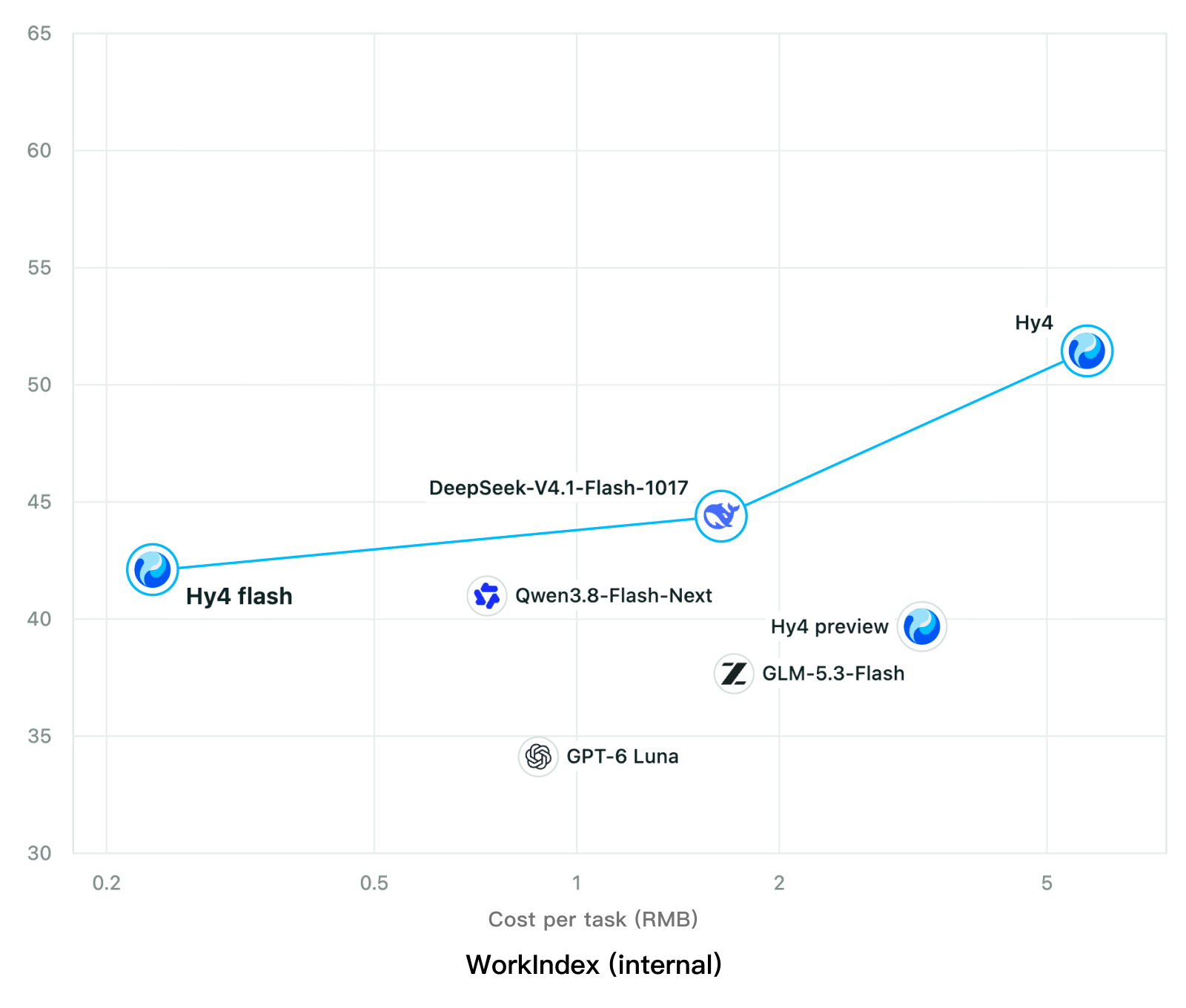
Tencent releases Hy4 flash as open weights, with FP8 and base versions, under the Tencent Hy LicenseTencent, Hy4 flash 가중치 공개 — FP8 · base 모델 포함, Tencent Hy License
Checked확인일
Chart: Tencent Hy4 flash model card. Tencent internal testing.그림: Tencent Hy4 flash 모델 카드. Tencent 내부 시험 결과입니다.
ElevenLabsElevenLabs
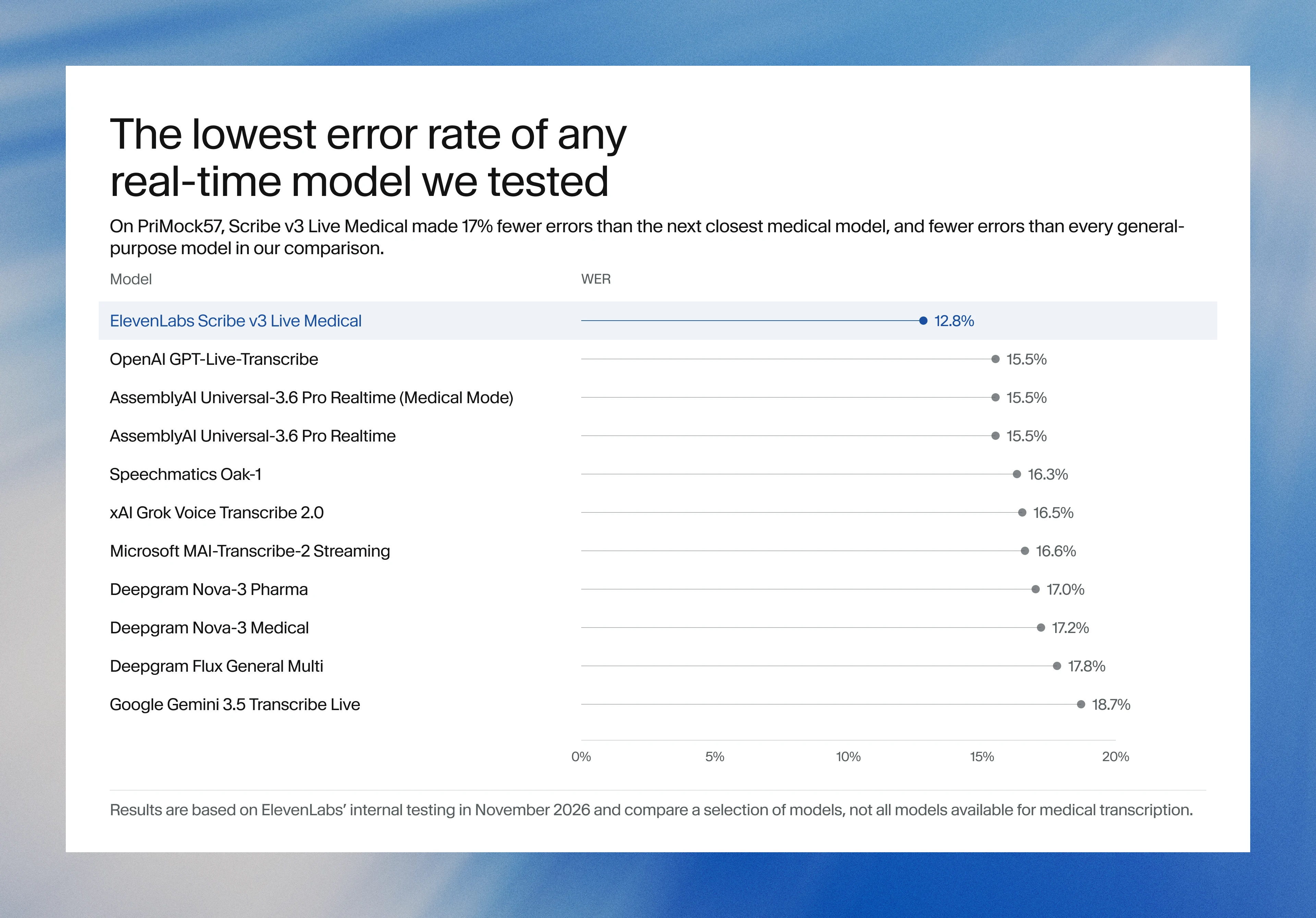
ElevenLabs releases Scribe v3 Live Medical, real-time medical transcription for voice agents in ElevenAgentsElevenLabs, ElevenAgents 음성 에이전트용 실시간 의료 전사 Scribe v3 Live Medical 공개
Checked확인일
Image: ElevenLabs blog.그림: ElevenLabs 블로그.
GoogleGoogle
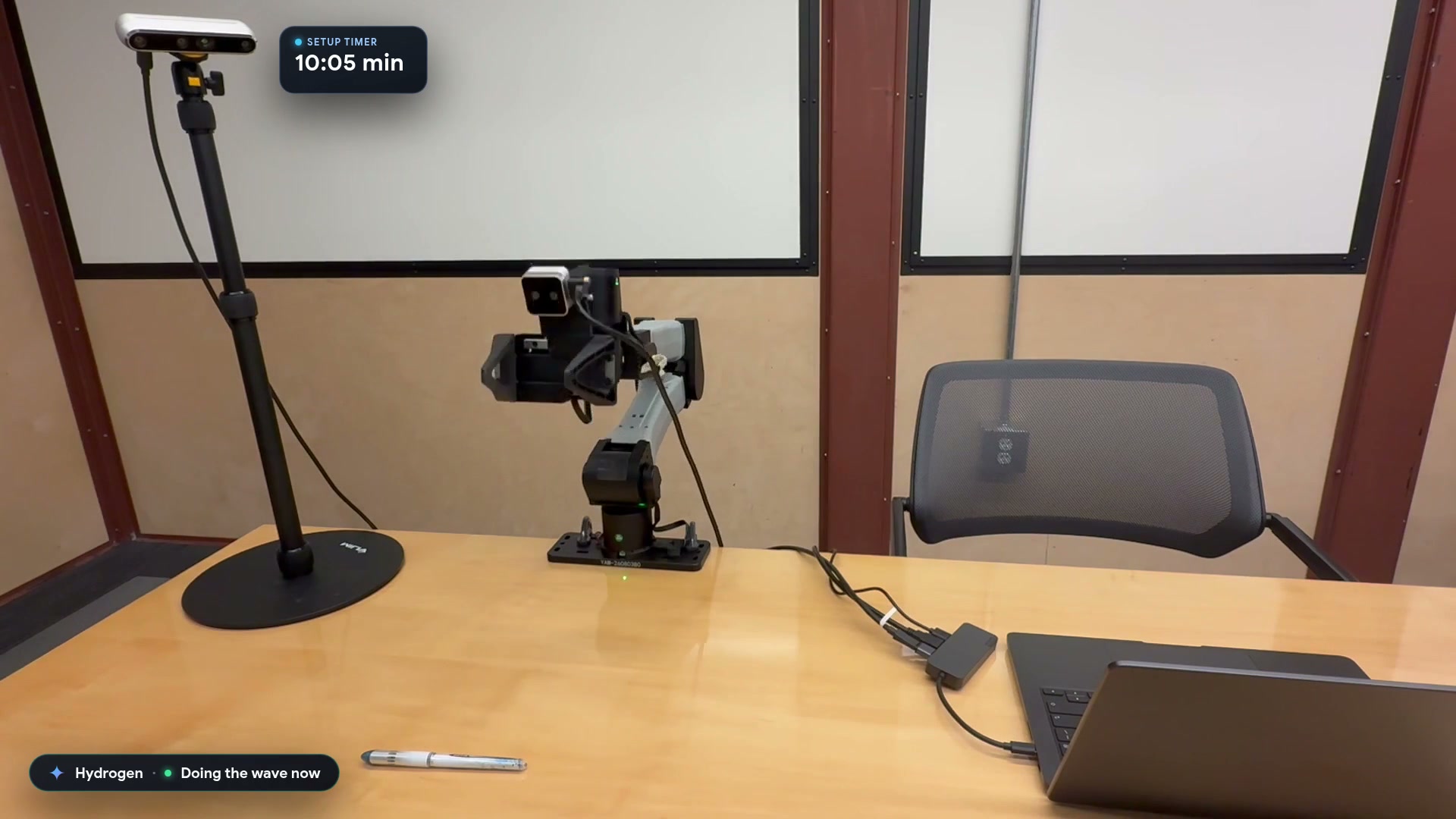
Google launches a Robotics plugin for Google Antigravity that sets up, simulates and controls robot arms with Gemini 4 HydrogenGoogle, Gemini 4 Hydrogen으로 로봇 팔을 준비·시뮬레이션·제어하는 Google Antigravity용 Robotics 플러그인 공개
Checked확인일
Video still: Google Developers Blog.영상 장면: Google Developers 블로그.