HREN


VS Code 1.146 adds Inbox mode and chat windows and deprecates the Local harnessVS Code 1.146, Inbox mode와 chat windows 추가하고 Local harness는 deprecated
VS Code 1.146 is out. It adds Inbox mode (Experimental), which puts agent sessions that need your attention at the top, and chat windows (Preview), which open a chat in a window of its own; both are off by default in Stable and are turned on in settings. The Local harness is deprecated as of this release and will be removed in February 2027.VS Code 1.146이 나왔습니다. 확인이 필요한 에이전트 세션을 맨 위에 모으는 Inbox mode(Experimental)와 채팅을 별도 창으로 여는 chat windows(Preview)가 들어왔고, 둘 다 Stable에서는 설정을 켜야 쓸 수 있습니다. Local harness는 이번 버전부터 deprecated이며 2027년 2월에 제거됩니다.
- Source published원문 게시일
- Checked확인일
VS Code 1.146 was released to Stable on November 11, 2026. The release notes list five highlights: Inbox mode (Experimental), which helps you focus on agent sessions that need your attention across all your projects; Model comparison (Preview), which brings Copilot Fusion into comparisons; chat windows (Preview), which give chats their own windows; finding and installing extensions in the Agents window (Experimental); and notice that the Local harness will be removed in February 2027.VS Code가 2026년 11월 11일 1.146을 Stable로 냈습니다. 릴리스 노트가 꼽은 주요 변화는 다섯 가지입니다. 여러 프로젝트의 에이전트 세션 가운데 확인이 필요한 것에 집중하게 돕는 Inbox mode(Experimental), Copilot Fusion을 넣어 결과를 견주는 Model comparison(Preview), 채팅마다 창을 따로 주는 chat windows(Preview), Agents window 안에서 확장을 찾아 설치하는 기능(Experimental), 그리고 Local harness가 2027년 2월에 제거된다는 예고입니다.
Inbox mode gives you one view of your agents without checking each workspace. Sessions that need your attention appear at the top, ahead of the Working, Ready to merge, On hold and Done groups, and a session that can wait can be set aside with Dismiss from Inbox, Put on Hold or Snooze. With chat windows, a chat opens in a window of its own, where you arrange the chat, its editors and its terminals to fit the task. To open one, right-click the session or chat in the sessions list and select Open in > New Window, or drag a chat out of the Agents window. A chat window can hold several chats from one or more sessions, and chat windows reopen with their chats and editors after VS Code restarts. Compare Models, which runs the same prompt across models, evaluates the results with a judge and combines them with a synthesizer, now lets you select Fusion for an attempt, the judge or the synthesizer.Inbox mode는 작업 공간을 하나씩 확인하지 않아도 에이전트 상황을 한 화면에 모읍니다. 확인이 필요한 세션이 맨 위에 오고, 그 아래로 Working, Ready to merge, On hold, Done 묶음이 이어집니다. 급하지 않은 세션은 Dismiss from Inbox, Put on Hold, Snooze로 미뤄 둘 수 있습니다. chat windows는 채팅을 별도 창으로 열어 채팅, 편집기, 터미널을 작업에 맞게 배치하는 기능입니다. 세션 목록에서 세션이나 채팅을 오른쪽 클릭해 Open in > New Window를 고르거나, 채팅을 Agents window 밖으로 끌어내면 새 창이 생깁니다. 창 하나에 여러 세션의 채팅을 함께 둘 수 있고, VS Code를 다시 시작해도 채팅과 편집기가 그대로 열립니다. 같은 프롬프트를 여러 모델에 돌려 judge로 평가하고 synthesizer로 합치는 Compare Models에서는 시도, judge, synthesizer에 Fusion을 고를 수 있게 됐습니다.
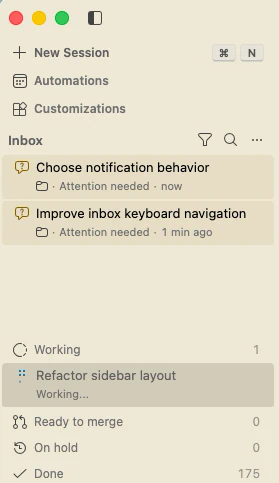
If VS Code is already installed, use Check for Updates to get 1.146. Inbox mode is off by default: enable the sessions.list.inboxEnabled setting, then select Grouping > Inbox Mode in the Agents window's sessions list. Chat windows are enabled by default in VS Code Insiders and off by default in Stable, where you enable sessions.chatWindows.enabled to try them. The experimental tools that let an agent discover models, launch comparisons and read the results are turned on with sessions.chat.compareAgents.tools.enabled; they are off by default and require Compare Models to be enabled. Extensions are installed from the Extensions section of Agent Customizations, where searching also queries the Marketplace and lists extensions you do not have yet with their publisher, install count and rating.이미 VS Code를 쓰고 있다면 Check for Updates로 1.146을 받습니다. Inbox mode는 기본으로 꺼져 있어 sessions.list.inboxEnabled 설정을 켠 뒤 Agents window 세션 목록에서 Grouping > Inbox Mode를 골라야 합니다. chat windows는 VS Code Insiders에서는 기본으로 켜져 있고 Stable에서는 꺼져 있어, Stable에서는 sessions.chatWindows.enabled 설정을 켜야 합니다. 에이전트가 모델을 찾아 비교를 실행하고 결과를 읽게 하는 도구(Experimental)는 sessions.chat.compareAgents.tools.enabled 설정으로 켜며, 기본으로 꺼져 있고 Compare Models가 켜져 있어야 합니다. 확장은 Agent Customizations의 Extensions 칸에서 설치합니다. 검색하면 아직 설치하지 않은 Marketplace 확장도 게시자, 설치 수, 평점과 함께 나옵니다.
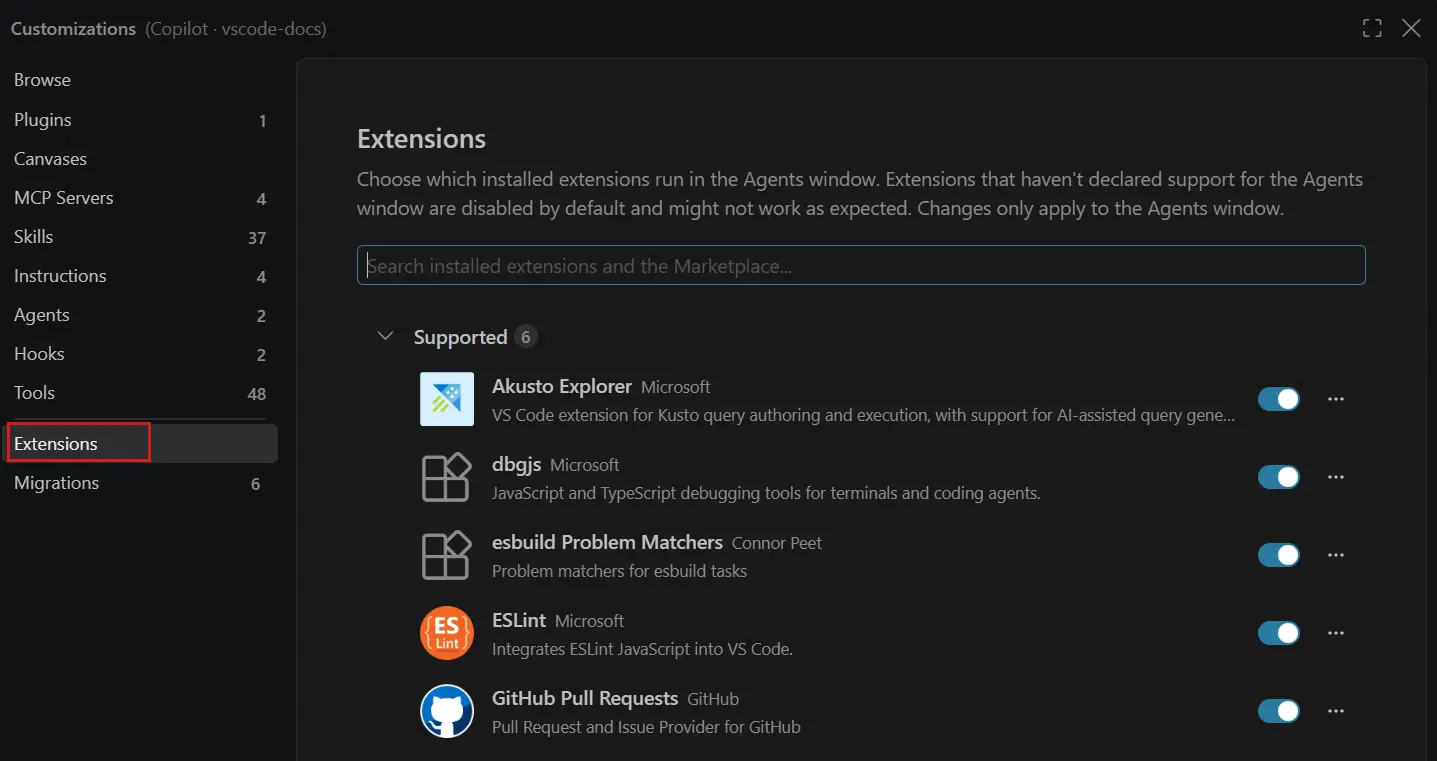
Inbox mode and extension management in the Agents window are Experimental, and chat windows and Model comparison are in Preview. Dismissing a session from the Inbox does not archive it; to archive it, select Mark Session as Done. Extensions that contribute views, debuggers, status bar items or walkthroughs without declaring support for the Agents window show a warning that lists the unsupported features. The Local harness is deprecated as of this release. For the next three months it remains usable but functionally frozen, and new features and improvements focus on the Copilot harness, the default for new sessions since VS Code 1.143. In February 2027 the Local harness will no longer be available, and the enterprise-managed setting vscode.temporaryDefaultToLocalHarness, which keeps the Local harness as the default, will also be removed. The Local-to-Copilot harness transition guide covers how to move.Inbox mode와 Agents window의 확장 설치는 Experimental, chat windows와 Model comparison은 Preview 단계입니다. Inbox에서 세션을 Dismiss해도 보관되지는 않으며, 보관은 Mark Session as Done으로 따로 합니다. Agents window 지원을 선언하지 않은 채 뷰, 디버거, 상태 표시줄 항목, walkthrough를 제공하는 확장에는 지원되지 않는 기능을 알리는 경고가 붙습니다. Local harness는 이번 버전부터 deprecated입니다. 앞으로 석 달 동안은 계속 쓸 수 있지만 기능이 동결되고, 새 기능과 개선은 VS Code 1.143부터 새 세션에 기본으로 쓰이는 Copilot harness에 집중됩니다. 2027년 2월에는 Local harness가 없어지고, Local harness를 기본으로 유지하던 기업 관리 설정 vscode.temporaryDefaultToLocalHarness도 함께 제거됩니다. 옮기는 방법은 Local-to-Copilot harness transition guide에 정리돼 있습니다.
Sources & references원문과 참고 자료
Keep reading더 읽기
All articles전체 글TencentTencent
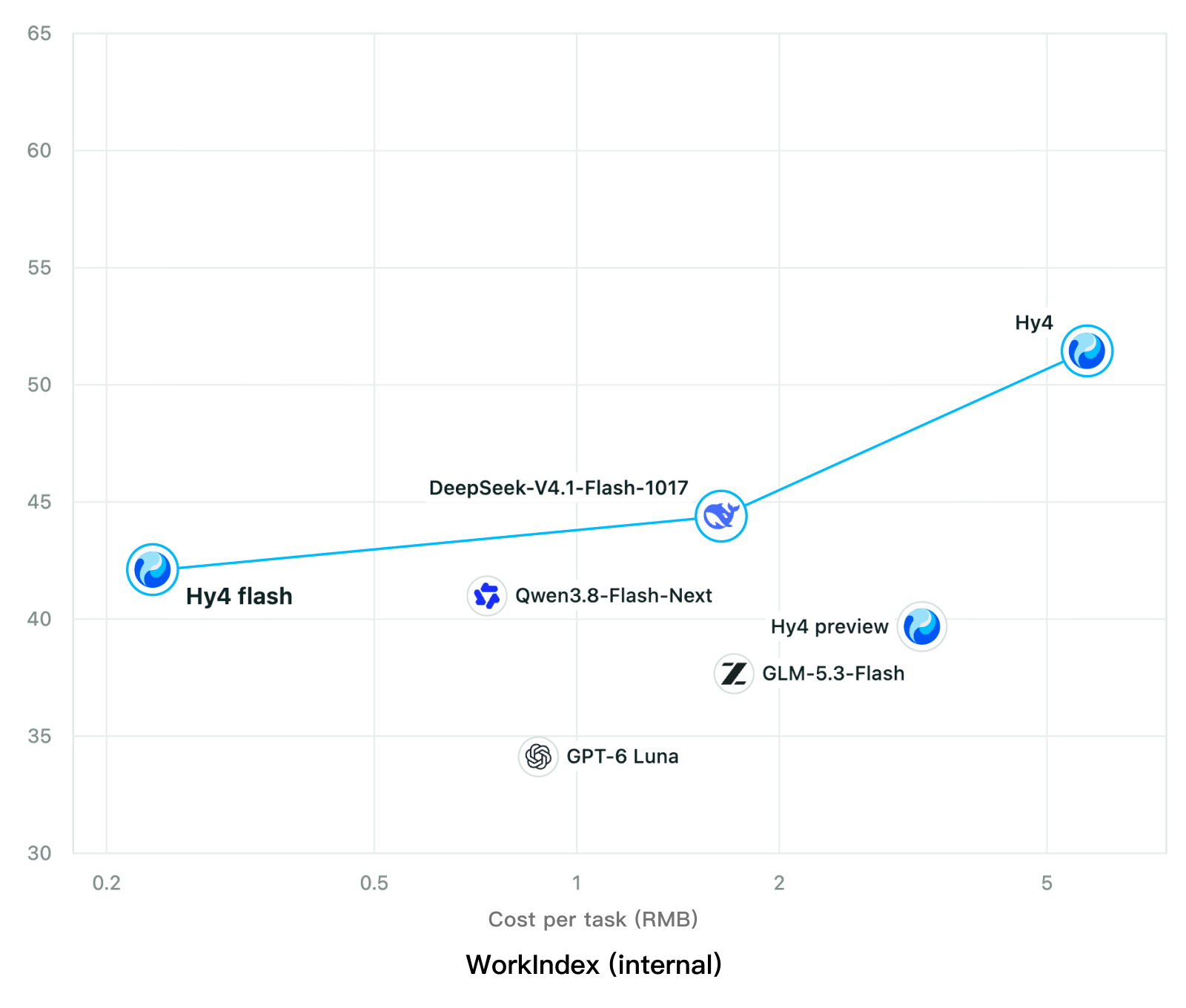
Tencent releases Hy4 flash as open weights, with FP8 and base versions, under the Tencent Hy LicenseTencent, Hy4 flash 가중치 공개 — FP8 · base 모델 포함, Tencent Hy License
Checked확인일
Chart: Tencent Hy4 flash model card. Tencent internal testing.그림: Tencent Hy4 flash 모델 카드. Tencent 내부 시험 결과입니다.
ElevenLabsElevenLabs
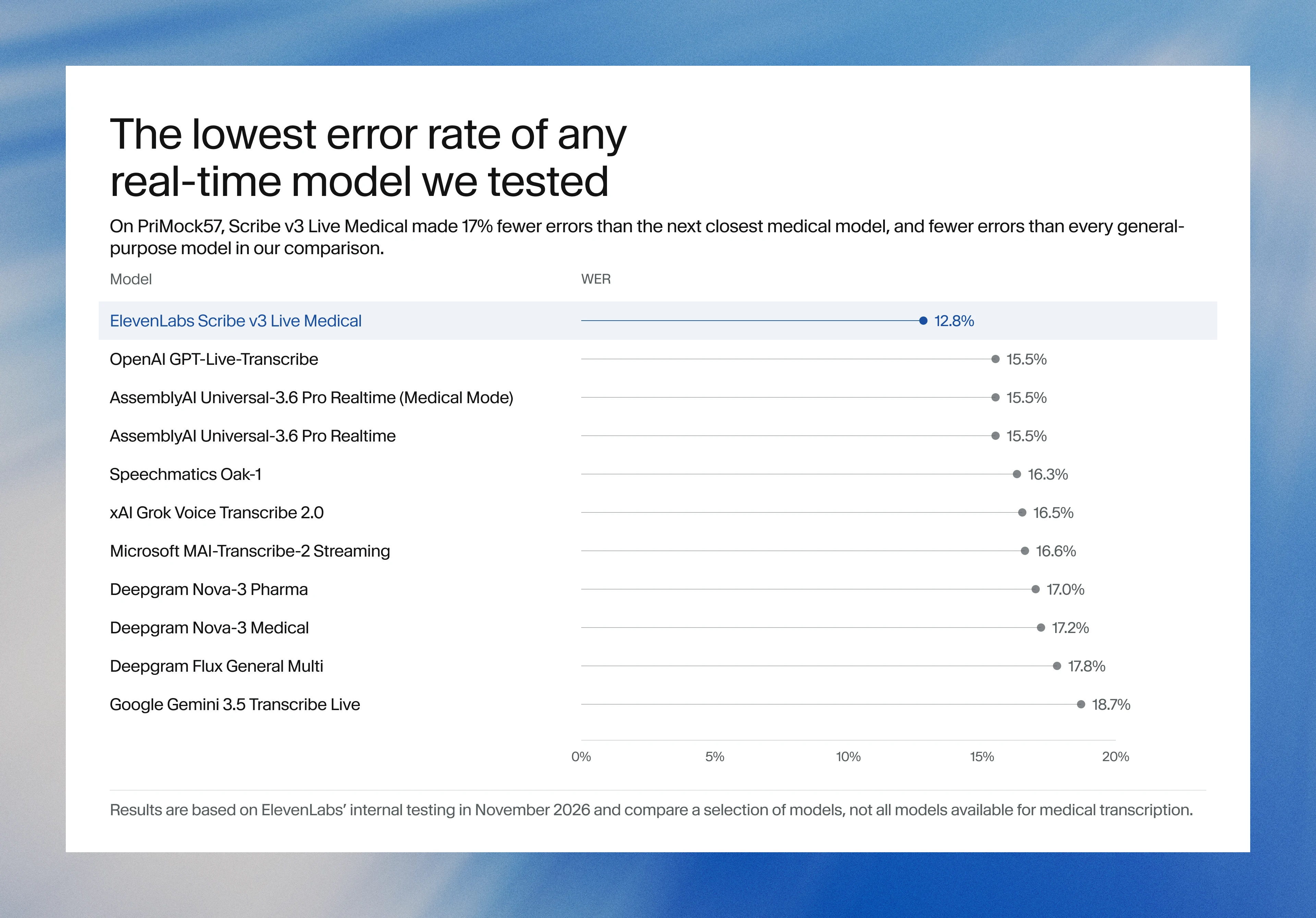
ElevenLabs releases Scribe v3 Live Medical, real-time medical transcription for voice agents in ElevenAgentsElevenLabs, ElevenAgents 음성 에이전트용 실시간 의료 전사 Scribe v3 Live Medical 공개
Checked확인일
Image: ElevenLabs blog.그림: ElevenLabs 블로그.
GoogleGoogle
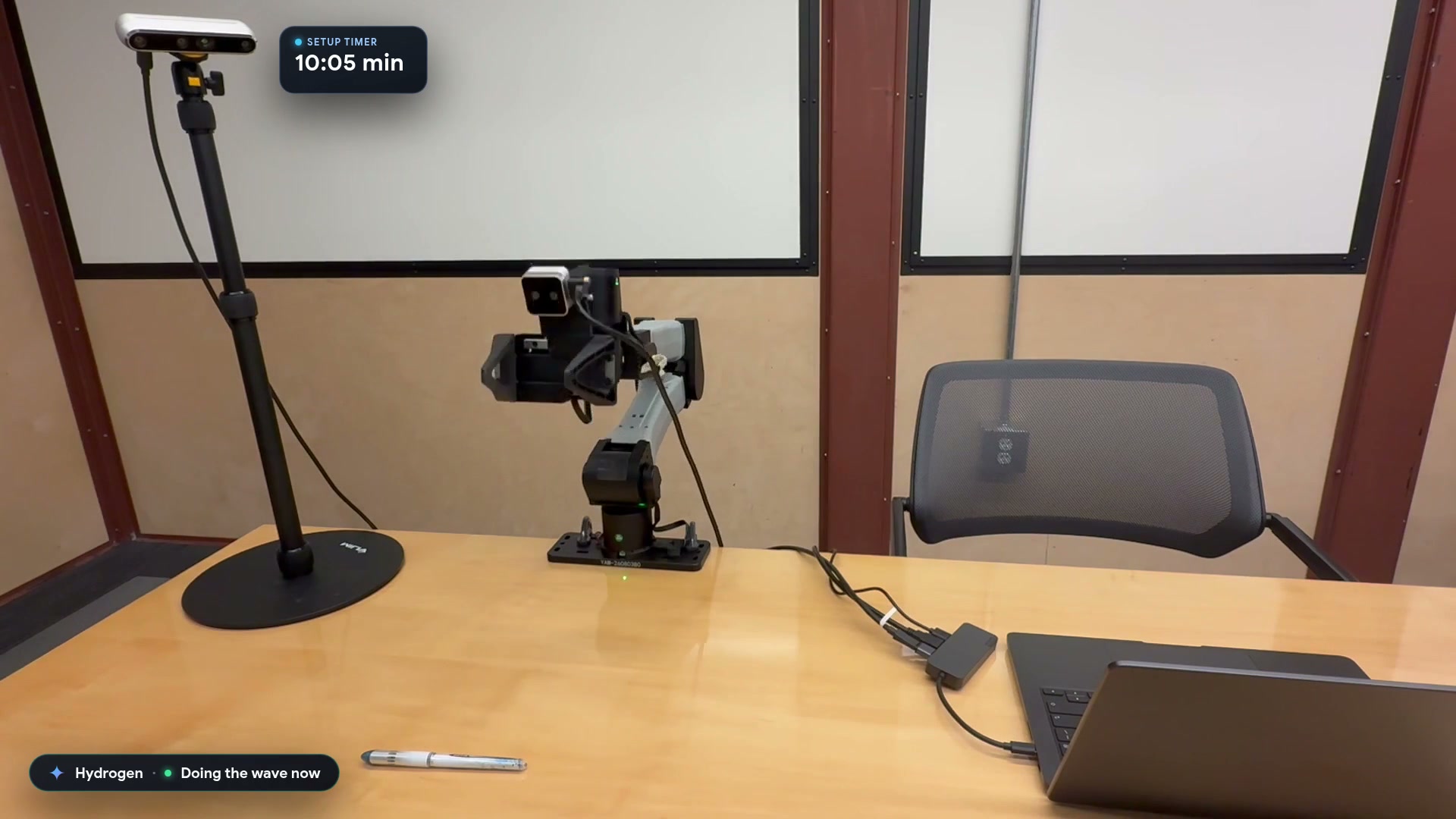
Google launches a Robotics plugin for Google Antigravity that sets up, simulates and controls robot arms with Gemini 4 HydrogenGoogle, Gemini 4 Hydrogen으로 로봇 팔을 준비·시뮬레이션·제어하는 Google Antigravity용 Robotics 플러그인 공개
Checked확인일
Video still: Google Developers Blog.영상 장면: Google Developers 블로그.