HREN


Anthropic starts a beta of Claude Meetings, which brings Claude into Google Meet calls to take notes and build docs and whiteboards while the meeting runsAnthropic, Claude Meetings 베타 시작. Claude가 Google Meet 회의에 들어와 회의 중에 문서와 화이트보드를 만들고 회의록 정리
Anthropic released Claude Meetings in beta on November 12. Claude joins a video call as a participant, follows the conversation and starts on work during the meeting. It is rolling out on Team and Enterprise plans and currently supports Google Meet. Claude saves a transcript, summary and screen descriptions, not audio.Anthropic이 11월 12일 Claude가 화상 회의에 참석자로 들어와 대화를 따라가며 회의 중에 일을 시작하는 Claude Meetings를 베타로 공개했습니다. Team과 Enterprise 요금제에서 차례로 열리고 있고, 지금은 Google Meet을 지원합니다. Claude는 녹취록, 요약, 화면 설명을 저장하지만 오디오는 저장하지 않습니다.
- Source published원문 게시일
- Checked확인일
Anthropic released Claude Meetings in beta on November 12. Claude can now join a video call as a visible participant, follow the conversation and start on work during the meeting. In the call, Claude works with people live to build docs, whiteboards or other artifacts, while teammates on the invite refine them. Claude also writes the notes and action items, so no one on the call has to. The post on X describes adding Claude to a team's video call so that it builds docs, whiteboards and other artifacts with people while they are still talking.Anthropic이 11월 12일 Claude Meetings를 베타로 공개했습니다. Claude가 화상 회의에 눈에 보이는 참석자로 들어와 대화를 따라가고, 회의가 진행되는 동안 바로 일을 시작하는 기능입니다. 회의에 들어온 Claude는 참석자들과 함께 문서나 화이트보드 같은 결과물을 실시간으로 만들고, 초대받은 팀원들은 그 결과물을 함께 다듬을 수 있습니다. 회의록과 할 일 목록도 Claude가 쓰기 때문에 회의에 있는 사람 누구도 따로 적을 필요가 없다는 설명입니다. 공식 X 글에서도 Claude를 팀의 화상 회의에 넣으면 사람들이 아직 이야기하는 동안 문서와 화이트보드 같은 결과물을 함께 만든다고 소개했습니다.

During a meeting, people can ask Claude questions out loud or in the call's chat. By default Claude answers in writing, and it can use connected tools with the user's permission. When Claude joins, it appears as a participant and posts a notice in the call's chat. After the call, the notes, action items, plan and whiteboard are on the meeting's page in claude.ai. The announcement gives the example of someone asking Claude, as the meeting ends, to share a recap with the team.회의 중에는 말로 묻거나 회의 채팅에 적어 Claude에게 질문할 수 있습니다. 기본 설정에서 Claude는 글로 답하고, 사용자의 허락을 받아 연결해 둔 도구를 쓸 수 있습니다. Claude가 회의에 들어오면 참석자 목록에 나타나고 회의 채팅에 안내 글을 남깁니다. 회의가 끝나면 메모, 할 일, 계획, 화이트보드가 claude.ai의 회의 페이지에 모입니다. 발표 글은 회의가 끝날 무렵 누군가 Claude에게 팀과 요약을 나눠 달라고 부탁하는 장면을 예로 들었습니다.
Claude Meetings is starting to roll out in beta on Team and Enterprise plans. It currently supports Google Meet, and support for other video conferencing platforms is coming soon. Claude joins when someone adds it or has auto-join on. On Team plans, inviting Claude to meetings is available by default and an admin can turn it off, while on Enterprise plans an admin turns it on for all or part of the organization. While it's in beta, it isn't available to some organizations, including those with zero data retention (ZDR), HIPAA-ready configuration or customer-managed encryption keys (CMEK). Setup steps are in the Help Center.Claude Meetings는 Team과 Enterprise 요금제에서 베타로 차례로 열리기 시작했습니다. 지금은 Google Meet을 지원하고, 다른 화상 회의 플랫폼도 곧 지원한다고 밝혔습니다. Claude는 누군가 회의에 추가하거나 자동 참여를 켜 두었을 때 들어옵니다. Team 요금제에서는 Claude 초대가 기본으로 켜져 있고 관리자가 끌 수 있으며, Enterprise 요금제에서는 관리자가 조직 전체나 일부에 켜 줘야 합니다. 베타 동안에는 zero data retention(ZDR), HIPAA-ready configuration, customer-managed encryption keys(CMEK)를 쓰는 조직을 비롯한 일부 조직에서 쓸 수 없습니다. 설정 방법은 도움말 센터에 정리돼 있습니다.
Claude saves a transcript, summary and screen descriptions, not audio. In the Help Center article, the default for calls with outside guests differs by plan. On Team plans, Claude can join calls with outside guests by default and an owner can turn this off, while on Enterprise plans an owner must allow it first. When outside guests aren't allowed, Claude stays out of calls when someone from outside the organization is invited and leaves if someone from outside joins partway through. The announcement describes this behavior as the default and says an admin can allow Claude on calls with outside guests. On calls with outside guests, Claude posts its notice in the call's chat but doesn't reply there, and what guests say is included in the notes and transcript. Guests don't get the meeting page or the recap email. Anthropic asks users to make sure everyone on a call is OK with being transcribed before adding Claude or turning on auto-join.Claude는 녹취록, 요약, 화면 설명을 저장하고 오디오는 저장하지 않습니다. 도움말 센터 문서에서는 바깥 손님이 있는 회의의 기본 설정이 요금제마다 다릅니다. Team 요금제에서는 Claude가 기본으로 바깥 손님이 있는 회의에도 들어갈 수 있고 소유자(owner)가 이를 끌 수 있으며, Enterprise 요금제에서는 소유자가 먼저 허용해야 합니다. 바깥 손님을 허용하지 않은 설정에서는 Claude가 조직 밖 사람이 초대된 회의에 들어가지 않고, 회의 도중 조직 밖 사람이 들어오면 나갑니다. 발표 글은 이 동작을 기본 설정으로 소개하고, 관리자가 허용하면 바깥 손님이 있는 회의에도 들어갈 수 있다고 설명합니다. 바깥 손님이 있는 회의에서 Claude는 회의 채팅에 안내 글을 남기지만 채팅으로 답하지는 않고, 손님이 한 말도 메모와 녹취록에 들어갑니다. 손님은 회의 페이지와 요약 메일을 받지 못합니다. Anthropic은 Claude를 추가하거나 자동 참여를 켜기 전에 회의 참석자 모두가 녹취에 동의하는지 확인하라고 안내했습니다.
During the beta, Claude's notes and transcripts are free on Team and Enterprise plans, and so are its answers in calls. An answer that uses one of the connected tools counts toward the plan's usage. The docs, whiteboards and other artifacts Claude makes in a call are free through February 10, 2027.베타 동안 Team과 Enterprise 요금제에서 Claude의 메모와 녹취록은 무료이고, 회의 중 Claude의 답변도 무료입니다. 다만 답변에 연결된 도구를 쓰면 그만큼 요금제 사용량에 들어갑니다. 회의 중에 Claude가 만든 문서, 화이트보드 같은 결과물은 2027년 2월 10일까지 무료입니다.
Sources & references원문과 참고 자료
Keep reading더 읽기
All articles전체 글TencentTencent
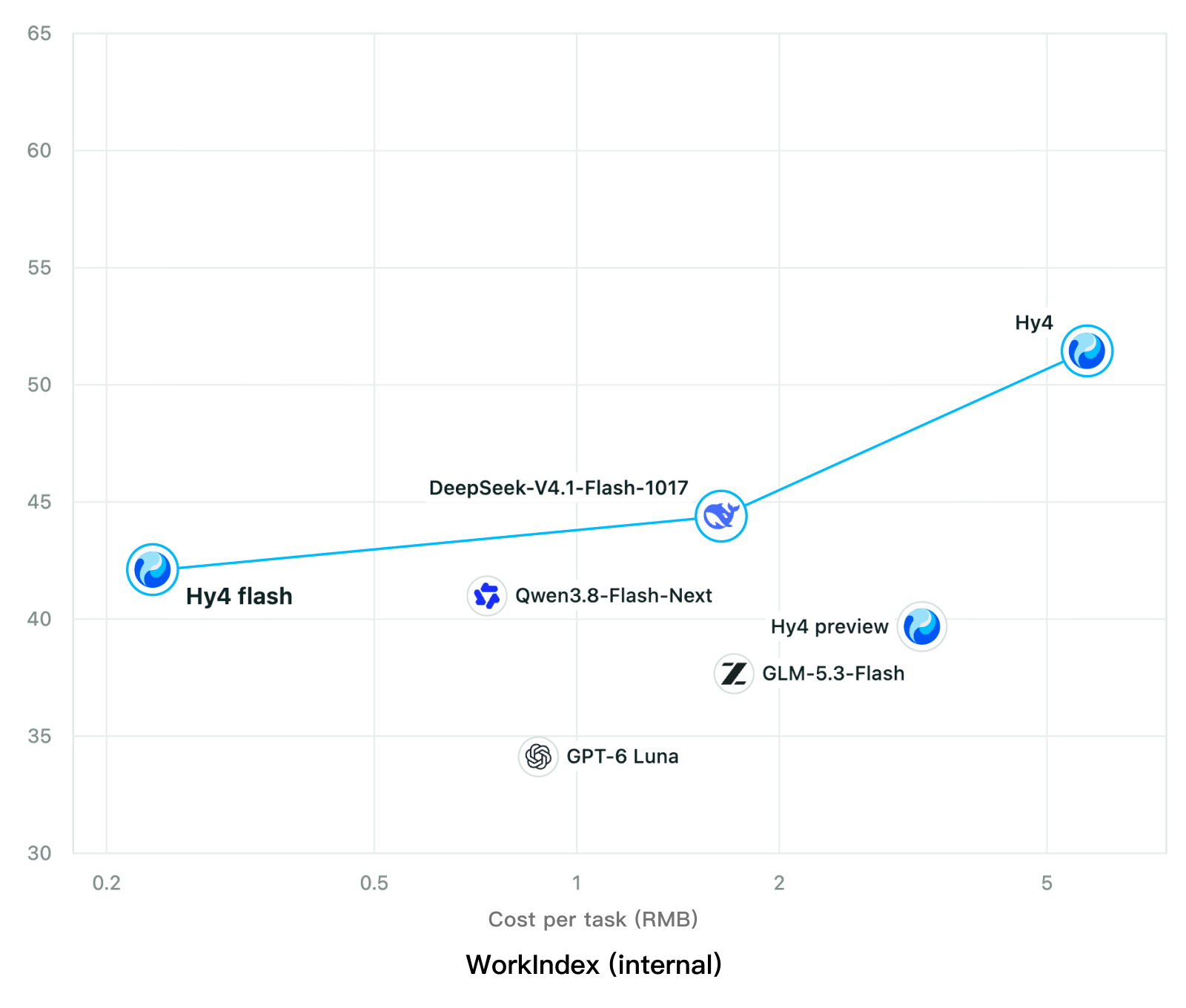
Tencent releases Hy4 flash as open weights, with FP8 and base versions, under the Tencent Hy LicenseTencent, Hy4 flash 가중치 공개 — FP8 · base 모델 포함, Tencent Hy License
Checked확인일
Chart: Tencent Hy4 flash model card. Tencent internal testing.그림: Tencent Hy4 flash 모델 카드. Tencent 내부 시험 결과입니다.
ElevenLabsElevenLabs
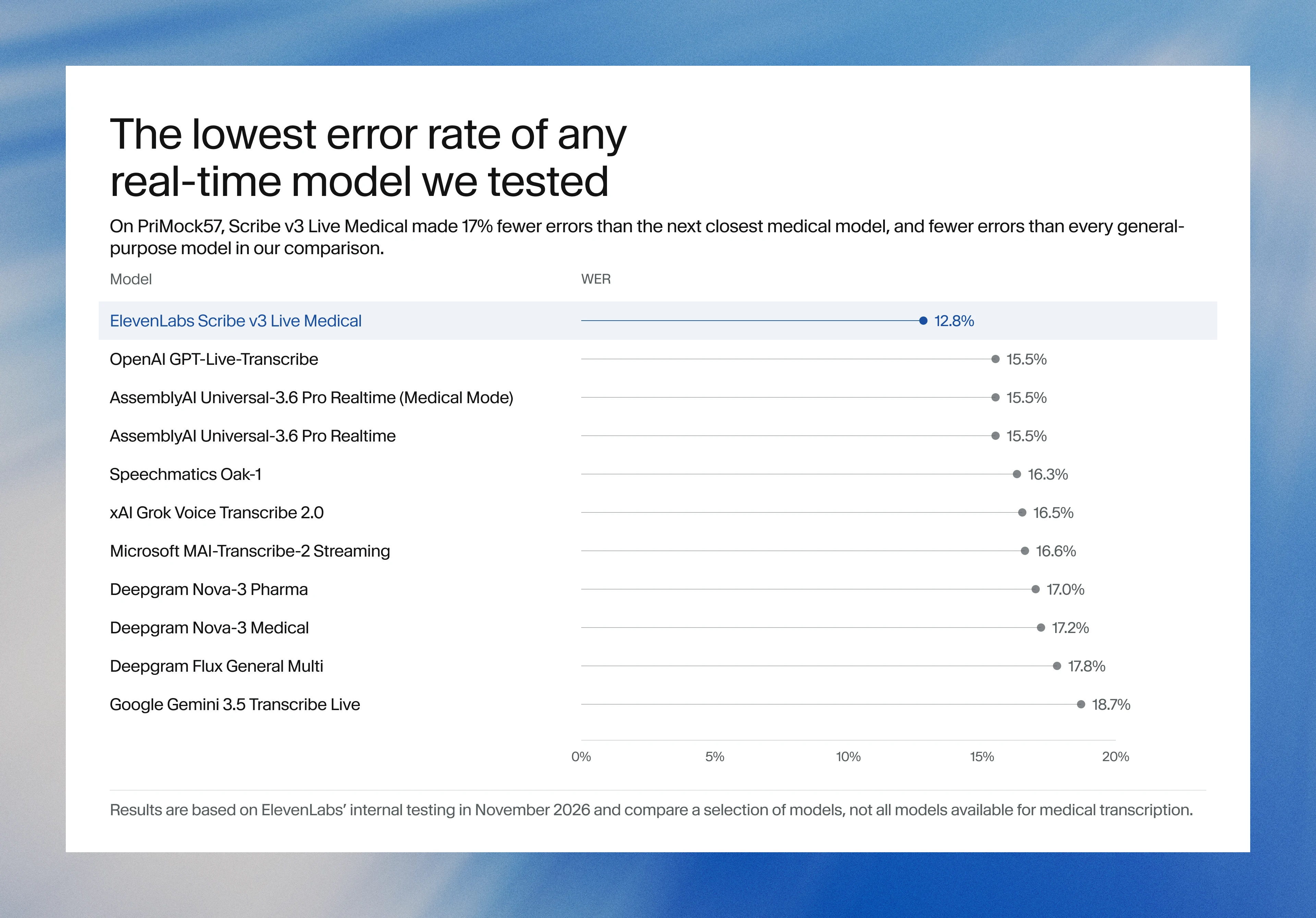
ElevenLabs releases Scribe v3 Live Medical, real-time medical transcription for voice agents in ElevenAgentsElevenLabs, ElevenAgents 음성 에이전트용 실시간 의료 전사 Scribe v3 Live Medical 공개
Checked확인일
Image: ElevenLabs blog.그림: ElevenLabs 블로그.
GoogleGoogle
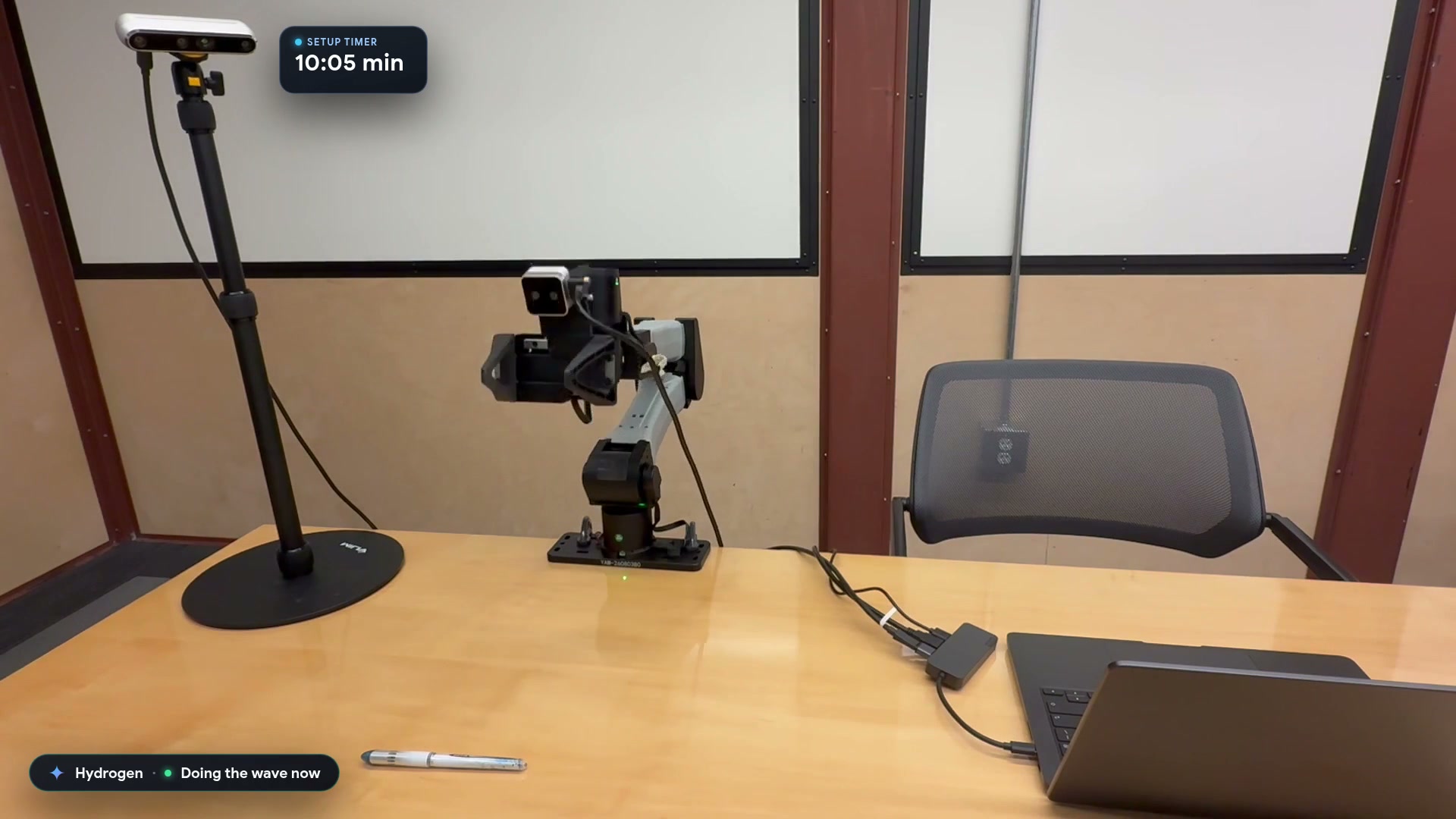
Google launches a Robotics plugin for Google Antigravity that sets up, simulates and controls robot arms with Gemini 4 HydrogenGoogle, Gemini 4 Hydrogen으로 로봇 팔을 준비·시뮬레이션·제어하는 Google Antigravity용 Robotics 플러그인 공개
Checked확인일
Video still: Google Developers Blog.영상 장면: Google Developers 블로그.