HREN


Google lets Gemini app users in the U.S. connect Google Wallet for answers based on their spendingGoogle, 미국 Gemini 앱 사용자가 Google Wallet을 연결해 지출에 맞춘 답을 받게 해
Google now lets all Gemini app users in the U.S. connect Google Wallet to Personal Intelligence in Gemini. Tagging Google Wallet in a chat lets Gemini chart cash flow from spending, find forgotten subscriptions and flag price increases. Gemini can only read account information and can't move money, and the connection can be turned off at any time.Google이 미국의 모든 Gemini 앱 사용자가 Google Wallet을 Gemini의 Personal Intelligence에 연결할 수 있게 했습니다. 채팅에서 Google Wallet을 태그하면 지출을 바탕으로 현금 흐름 차트를 그리고, 잊고 있던 구독과 값이 오른 정기 결제를 찾아 줍니다. Gemini는 계좌 정보를 읽기만 하고 자금을 옮기지 못하며, 연결은 언제든 끌 수 있습니다.
- Source published원문 게시일
- Checked확인일
Google has made it possible for all Gemini app users in the U.S. to connect Google Wallet to Gemini and get responses informed by their spending habits. Personal Intelligence in Gemini securely connects information from apps people already use, such as Gmail, Photos, YouTube and Search, to make the experience more personalized and helpful. Google says it is adding Google Wallet to that list of connected apps for more tailored responses around personal finance.Google이 미국의 모든 Gemini 앱 사용자가 Google Wallet을 Gemini에 연결해 자기 지출 습관을 바탕으로 한 답을 받을 수 있게 했습니다. Gemini의 Personal Intelligence는 Gmail, Photos, YouTube, Search처럼 이미 쓰는 앱의 정보를 안전하게 연결해 더 개인에게 맞춘 도움을 주는 기능입니다. Google은 이 연결 앱 목록에 Google Wallet을 더해 개인 재무에 관해 더 맞춤한 답을 받을 수 있게 했다고 밝혔습니다.
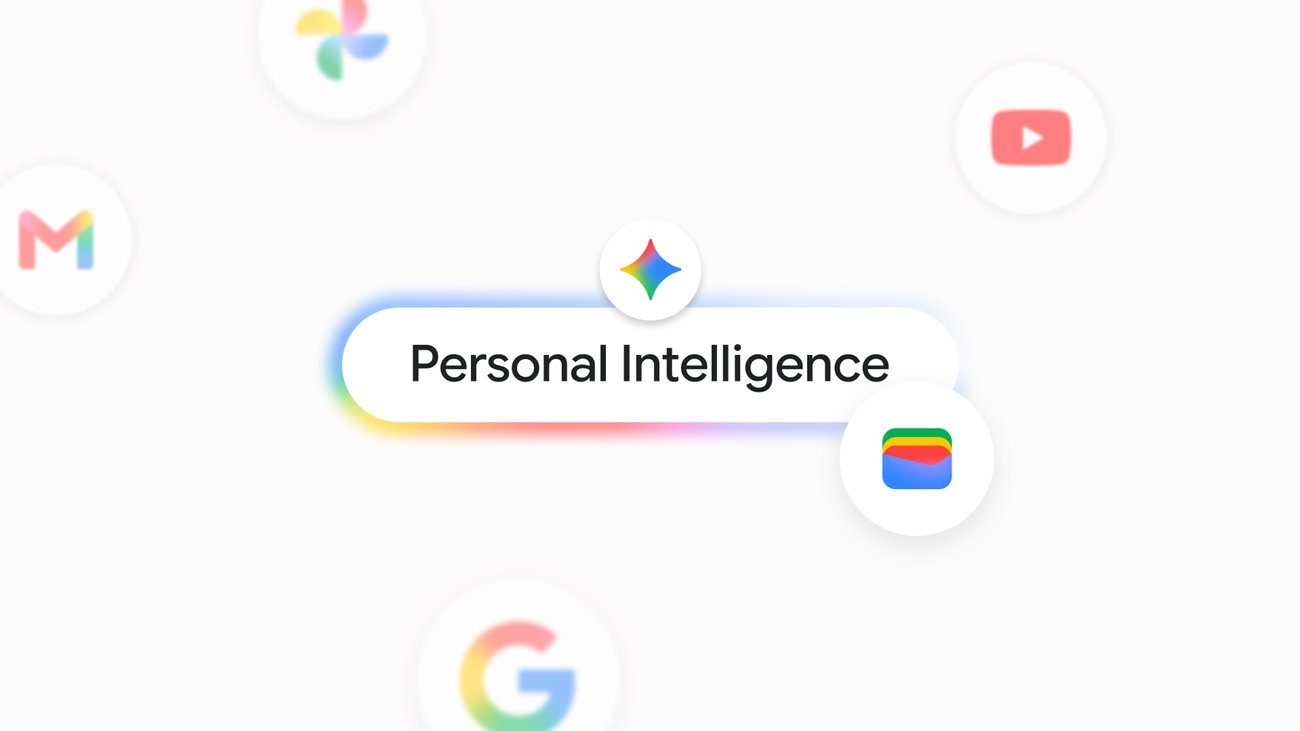
It works by tagging Google Wallet in a Gemini chat and asking about personal finance, budgeting and more. The Google blog post gives three examples. Asked to review last quarter's spending as part of a plan to save over the next three months, Gemini generates dynamic charts tracking cash flow, asset allocation and budgets directly in the chat. Asked which subscriptions are still being paid for and whether any went up in price this year, Gemini finds recurring charges across linked accounts and flags price increases. Asked how much went to gifts and travel last year and to help set a holiday budget, Gemini looks at the last year of transactions and suggests a tailored budget.쓰는 법은 Gemini 채팅에서 Google Wallet을 태그하고 개인 재무나 예산에 관해 묻는 것입니다. Google 블로그는 세 가지 예를 들었습니다. 지난 분기 지출을 돌아보며 앞으로 석 달 동안 저축하고 싶다고 물으면, Gemini가 현금 흐름과 자산 배분, 예산을 보여 주는 차트를 대화 안에 바로 그립니다. 아직 요금을 내고 있는 구독과 올해 값이 오른 구독을 물으면, 연결한 계좌들에서 정기 결제를 찾아내고 가격이 오른 것을 알려 줍니다. 지난해 선물과 여행에 쓴 금액을 묻고 올해 연말 예산을 잡아 달라고 하면, 지난 1년의 거래를 살펴보고 그 사람에게 맞춘 예산을 제안합니다.
Google Wallet in Gemini began rolling out on Nov. 13 to all Gemini app users in the U.S., across web and mobile and in the Gemini app on both Android and iOS. The connection is turned on under Connected Apps in Personal Intelligence settings. Users can also securely link financial accounts from credit cards and banks to Wallet via Plaid to unlock deeper insights. The post does not give a schedule for other countries or any pricing terms.Google Wallet 연결은 11월 13일부터 미국의 모든 Gemini 앱 사용자에게 차례로 열리고 있습니다. 웹과 모바일에서, Android와 iOS의 Gemini 앱 모두에 적용됩니다. 연결은 Personal Intelligence 설정의 Connected Apps에서 켭니다. 신용카드와 은행 계좌를 Plaid를 거쳐 Wallet에 연결하면 더 깊은 분석을 받을 수 있습니다. 미국 밖 지역의 일정과 요금 조건은 원문에 나와 있지 않습니다.
Google says it built these tools with security and privacy at the center. With Wallet connected, Gemini can only read information from the accounts; it can't move, manage or invest money. Users decide if and when to opt in, and can turn the connection on or off at any time.Google은 이 도구들을 보안과 개인정보를 중심에 두고 만들었다고 설명했습니다. Wallet을 연결하더라도 Gemini는 계좌의 정보를 읽기만 할 수 있고, 자금을 옮기거나 관리하거나 투자하지는 못합니다. 이 기능을 쓸지, 언제 쓸지는 사용자가 정하며, 연결은 언제든 켜거나 끌 수 있습니다.
In the same post, Google introduced Memory Summary for Personal Intelligence, a readable snapshot of the saved preferences, interests and ongoing goals that Gemini remembers, kept in one place. It can be viewed, refined or cleared at any time under Profile, Personal Intelligence and then Memory Summary, and it is available on web and mobile for all Gemini app users where Personal Intelligence is available.Google은 같은 글에서 Personal Intelligence의 Memory Summary도 소개했습니다. Gemini가 기억하는 저장된 취향과 관심사, 진행 중인 목표를 한곳에서 읽기 쉽게 보여 주는 요약으로, Profile 아래 Personal Intelligence의 Memory Summary에서 언제든 보고 고치거나 지울 수 있습니다. Memory Summary는 Personal Intelligence를 쓸 수 있는 곳의 모든 Gemini 앱 사용자에게 웹과 모바일에서 제공됩니다.
Keep reading더 읽기
All articles전체 글TencentTencent
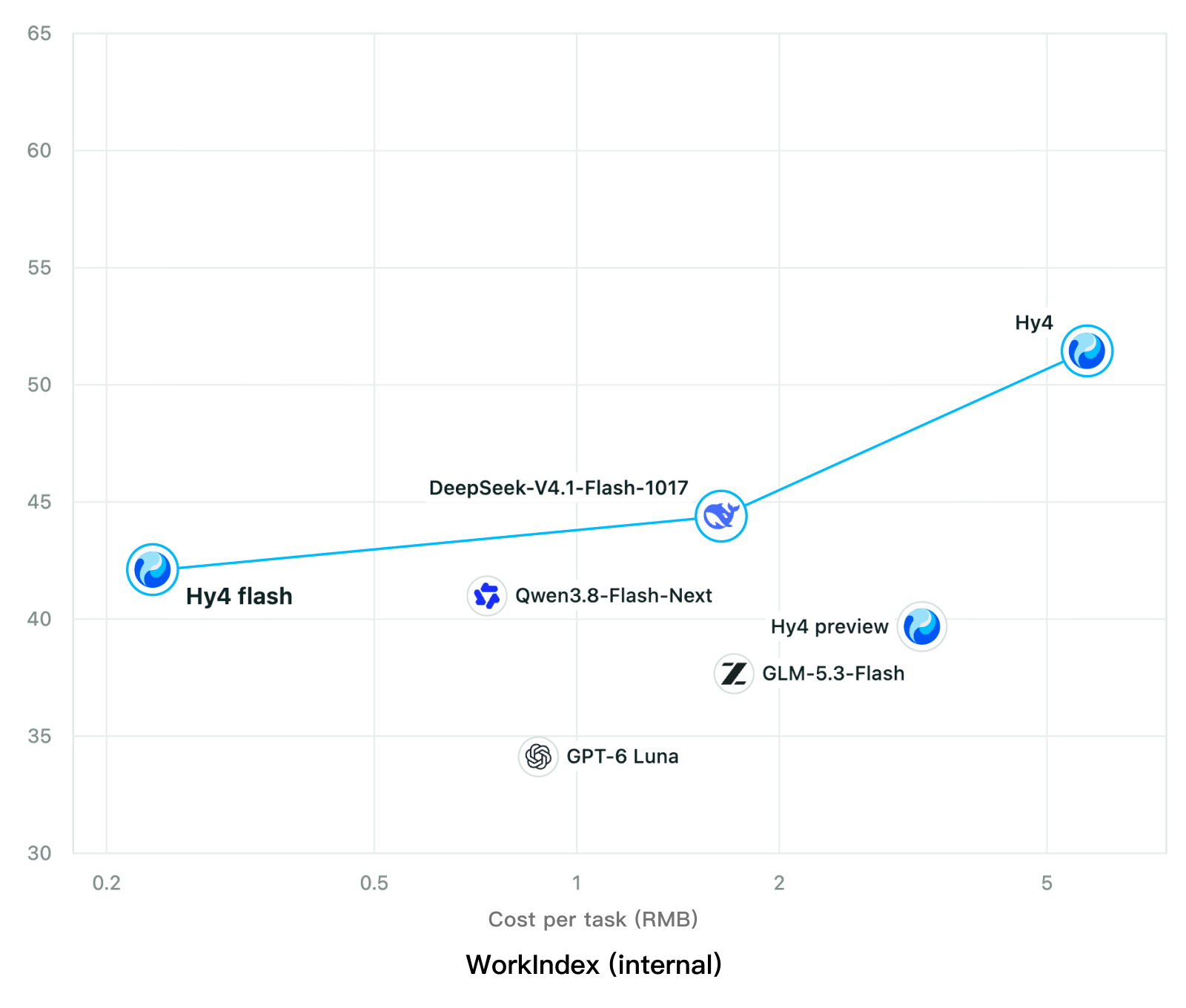
Tencent releases Hy4 flash as open weights, with FP8 and base versions, under the Tencent Hy LicenseTencent, Hy4 flash 가중치 공개 — FP8 · base 모델 포함, Tencent Hy License
Checked확인일
Chart: Tencent Hy4 flash model card. Tencent internal testing.그림: Tencent Hy4 flash 모델 카드. Tencent 내부 시험 결과입니다.
ElevenLabsElevenLabs
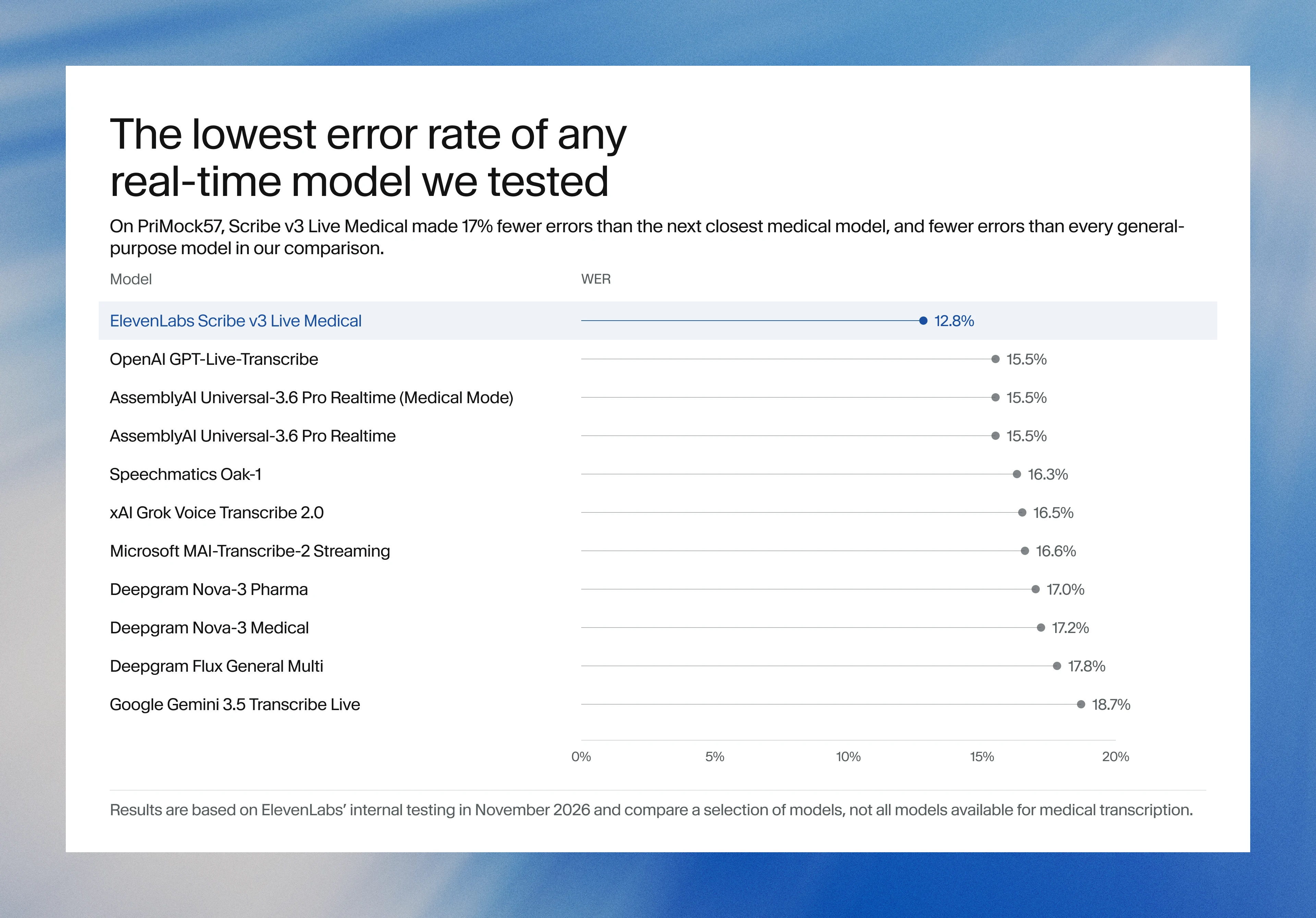
ElevenLabs releases Scribe v3 Live Medical, real-time medical transcription for voice agents in ElevenAgentsElevenLabs, ElevenAgents 음성 에이전트용 실시간 의료 전사 Scribe v3 Live Medical 공개
Checked확인일
Image: ElevenLabs blog.그림: ElevenLabs 블로그.
GoogleGoogle
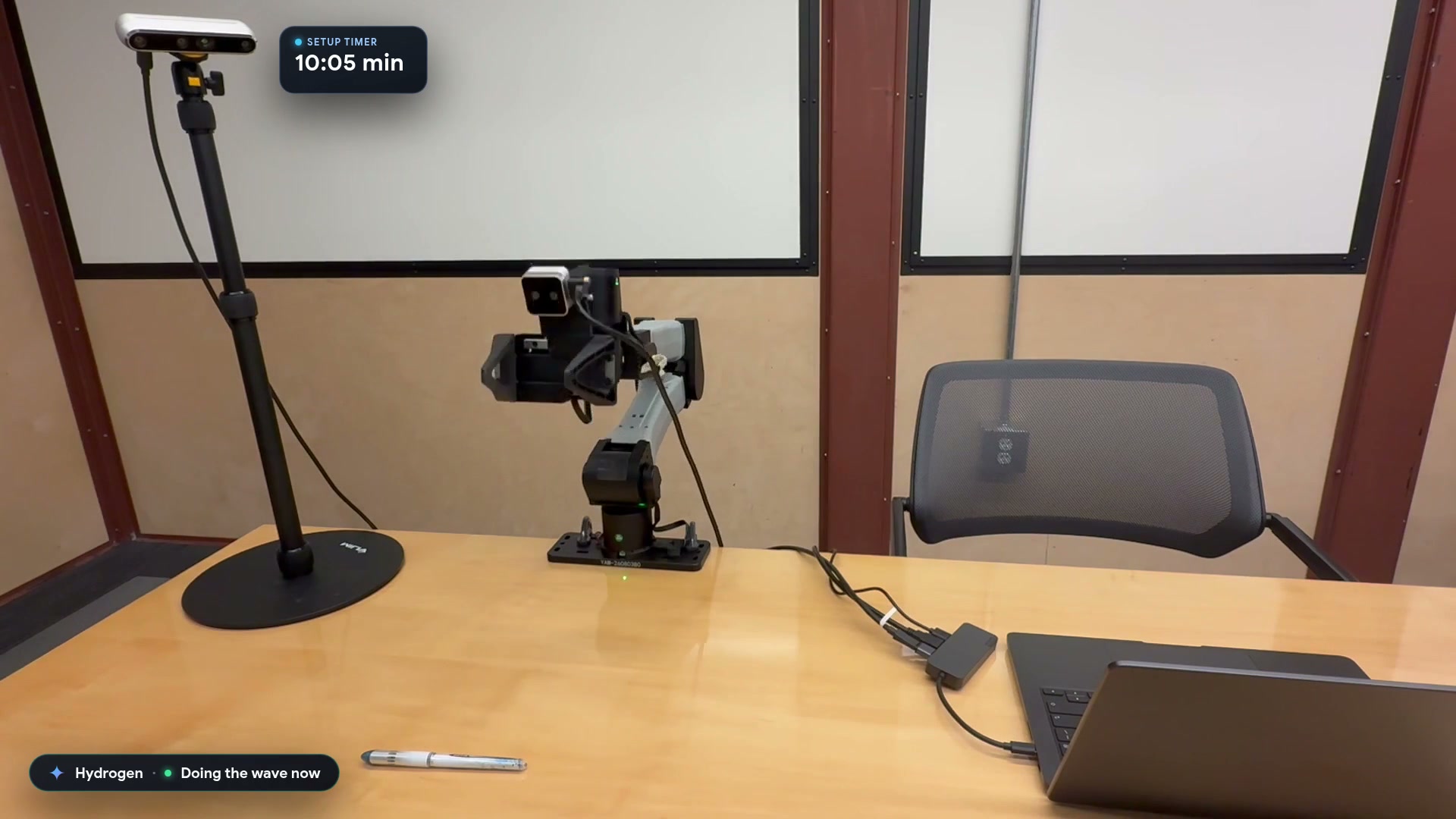
Google launches a Robotics plugin for Google Antigravity that sets up, simulates and controls robot arms with Gemini 4 HydrogenGoogle, Gemini 4 Hydrogen으로 로봇 팔을 준비·시뮬레이션·제어하는 Google Antigravity용 Robotics 플러그인 공개
Checked확인일
Video still: Google Developers Blog.영상 장면: Google Developers 블로그.