HREN


Suno releases Suno Bridge in beta, a Mac app that creates new parts inside Ableton Live 12Suno, Ableton Live 12 안에서 새 악기와 보컬 파트를 만드는 Mac 앱 Suno Bridge 베타 공개
Suno has released Suno Bridge in beta, an app that creates new instrument and vocal parts with Suno inside music production software. It currently works only with Ableton Live 12 on a Mac and requires a Premier subscription, and opening a session uploads the Live project and its audio files to the user's Suno account. Generated clips land on the timeline in sync with the track's tempo and key.Suno가 음악 제작 프로그램 안에서 Suno로 새 악기와 보컬 파트를 만드는 앱 Suno Bridge를 베타로 냈습니다. 지금은 Mac의 Ableton Live 12에서만 되고 Premier 구독이 있어야 하며, 세션을 열면 Live 프로젝트와 오디오 파일이 Suno 계정으로 올라갑니다. 만든 클립은 곡의 템포와 키에 맞춰 타임라인에 놓입니다.
- Source published원문 게시일
- Checked확인일
Suno introduced Suno Bridge in beta on Nov. 13. It is a standalone app that brings Suno's music models into the music production software people already use, so new instrument and vocal parts can be created and dropped straight onto the timeline. At the beta launch it works only with Ableton Live 12 running on a Mac, and it does not run on Windows PCs. Suno says it plans to expand to more operating systems and DAW platforms. The app is a free download, but it requires a Suno Premier subscription, and generating audio in Bridge uses Suno credits just as creating in Studio does.Suno가 11월 13일 Suno Bridge를 베타로 공개했습니다. Suno의 음악 모델을 이미 쓰고 있는 음악 제작 프로그램(DAW) 안으로 가져오는 별도 앱으로, 새 악기 파트와 보컬 파트를 만들어 타임라인에 바로 놓게 해 줍니다. 베타 출시 때는 Mac에서 도는 Ableton Live 12만 지원하고, Windows PC에서는 쓸 수 없습니다. Suno는 앞으로 다른 운영체제와 DAW로 넓힐 계획이라고 밝혔습니다. 앱은 무료로 받을 수 있지만 쓰려면 Suno Premier 구독이 있어야 하고, Bridge에서 오디오를 만들 때는 Studio에서 만들 때처럼 Suno 크레딧이 듭니다.
Suno says prompts entered in Bridge create new instrumentation and vocals that fit the tempo, key, style, harmonic content and groove of the session. Unlike stock samples, the new sounds follow the track's chord progressions, groove and key, with no leaving the session, no dragging and dropping and no manual alignment. Plugins and audio routing stay in Live as they are.Suno는 Bridge에 적은 프롬프트가 세션의 템포, 키, 스타일, 화성, 그루브에 맞는 새 악기 연주와 보컬을 만든다고 설명했습니다. 일반 샘플과 달리 곡의 코드 진행과 리듬감, 키를 따르고, 세션을 떠나거나 파일을 끌어다 놓거나 손으로 박자를 맞출 필요가 없다는 것입니다. 쓰던 플러그인과 오디오 라우팅은 Live에 그대로 둔 채 새 소리를 더할 수 있습니다.
Setup takes a few steps. Run the installer and drag Suno Bridge into the Applications folder, open the Live session, then open Bridge and upload the project when it asks. Bridge runs alongside Ableton Live, and both apps need to be open. A loop range set in Live (cmd+L) becomes the prompting window; setting the loop from bar 9 to 16, for example, gives an 8-bar loop that starts on the first beat of bar 9. In Bridge, the user then selects an instrument type and describes the sound, and the new clips drop onto the timeline in sync with the track.쓰는 차례는 이렇습니다. 설치 프로그램을 실행해 Suno Bridge를 Applications 폴더로 옮기고, Live 세션을 연 다음 Bridge를 열어 프로젝트를 올립니다. Bridge는 Ableton Live와 나란히 돌아가며 두 앱이 모두 열려 있어야 합니다. Live에서 루프 구간을 정하면(cmd+L) 그 구간이 프롬프트를 적용할 범위가 됩니다. 예를 들어 9마디부터 16마디까지 루프를 걸면 9마디 첫 박에서 시작하는 8마디 루프가 됩니다. 그다음 Bridge에서 악기 종류를 고르고 원하는 소리를 글로 적으면, 만든 클립이 곡과 맞춰진 채 타임라인에 놓입니다.
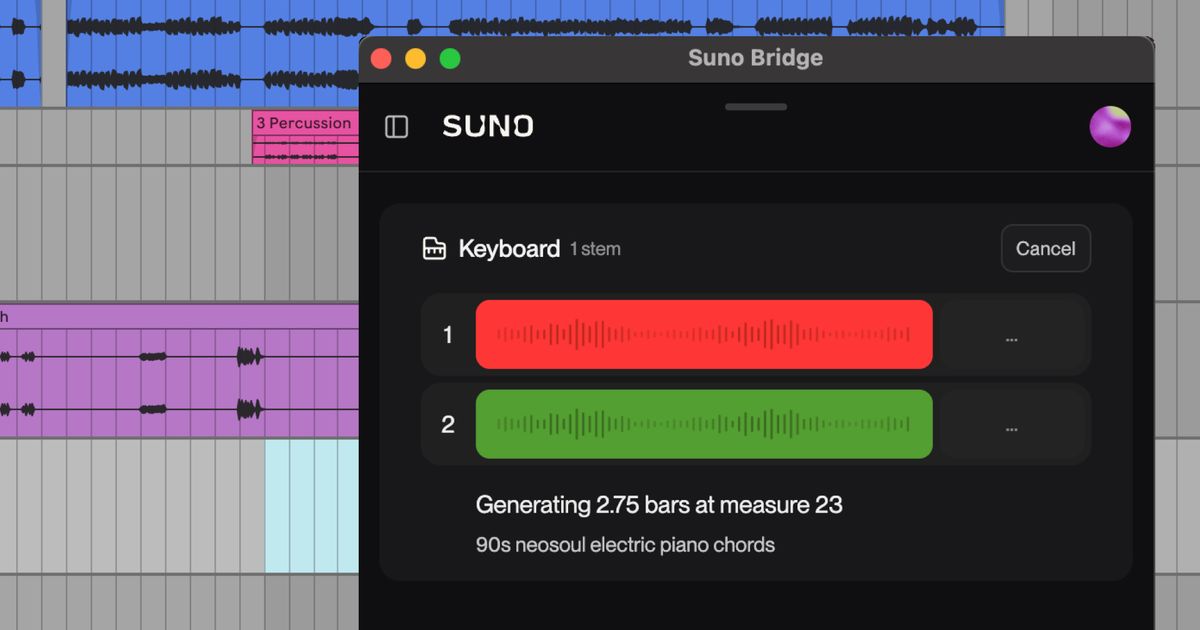
Audio made with Bridge is kept separate from the Suno library and can be found by opening the profile icon in Bridge and selecting Downloads. To uninstall, select Uninstall from the Help menu under the same profile icon. Suno notes that Bridge has been developed independently of Ableton.Bridge로 만든 결과물은 Suno 라이브러리와 따로 보관되며, Bridge 창의 프로필 아이콘에서 Downloads를 고르면 모아 볼 수 있습니다. 앱을 지울 때는 같은 프로필 아이콘 아래 Help 메뉴에서 Uninstall을 고릅니다. Suno는 Bridge가 Ableton과 관계없이 따로 개발한 앱이라고 밝혔습니다.
Using Bridge sends project files to Suno. When a session is opened in Bridge, the Ableton Live project and its audio files are uploaded to the user's Suno account so that Bridge understands the musical context of the track. Bridge only uploads the project the user chooses, and if it can't access some audio files, it asks for permission before including them. Uploaded audio goes through filters that detect copyrighted material, and flagged files are not ingested into Suno. If a project contains both original material and rightsholder material, only the rightsholder material is blocked.Bridge를 쓰면 작업 파일이 Suno로 올라갑니다. Bridge에서 세션을 열면 Ableton Live 프로젝트와 그 오디오 파일이 사용자의 Suno 계정으로 올라가고, Bridge는 이를 바탕으로 곡의 음악적 맥락을 파악합니다. 올라가는 것은 사용자가 고른 프로젝트뿐이며, 일부 오디오 파일에 접근하지 못하면 넣기 전에 허락을 묻습니다. 올린 오디오는 저작권 자료를 찾는 필터를 거치고, 필터에 걸린 파일은 Suno에 들어가지 않습니다. 사용자가 만든 소리와 권리자 자료가 함께 든 프로젝트라면 권리자 자료만 막힙니다.
Keep reading더 읽기
All articles전체 글TencentTencent
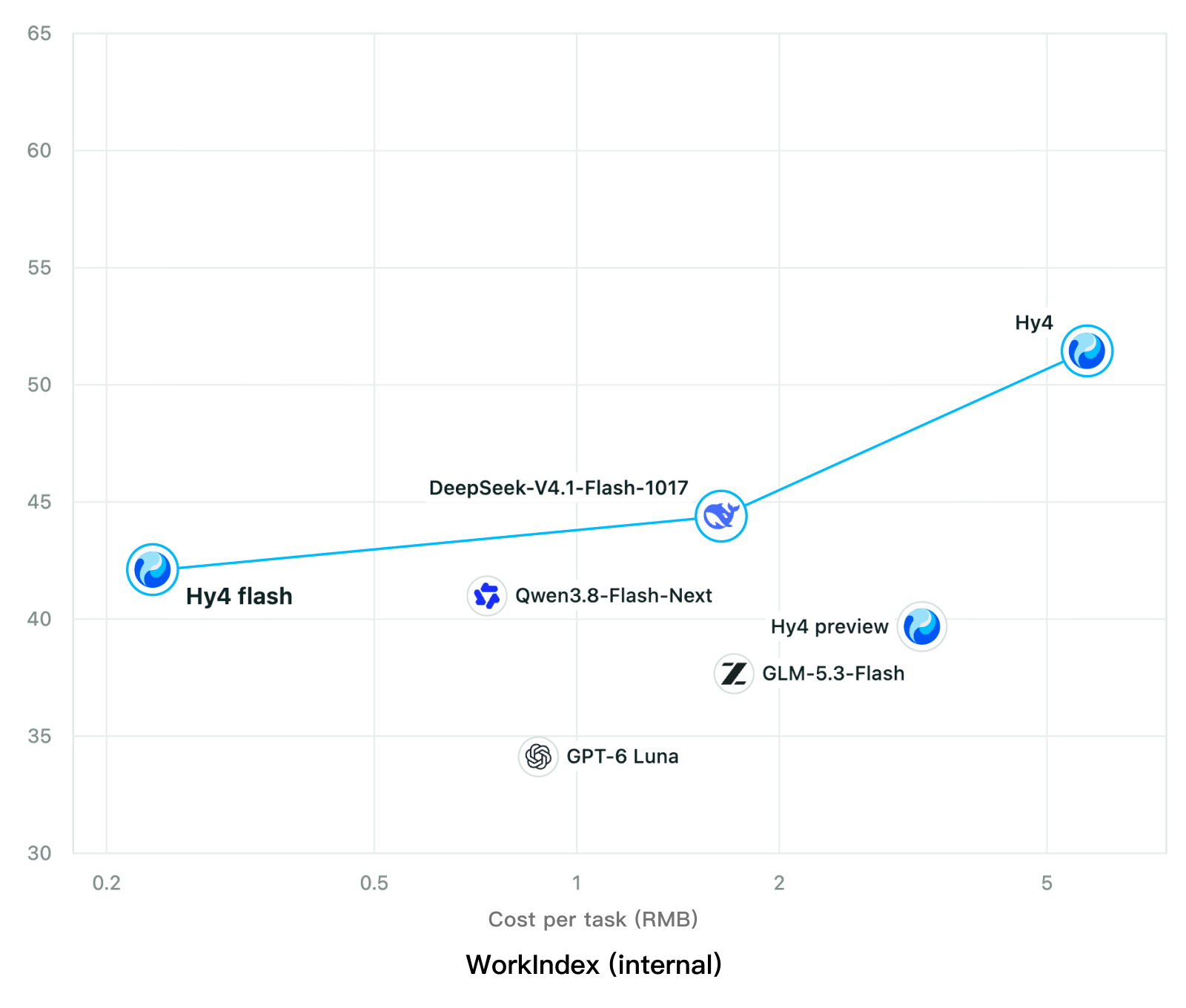
Tencent releases Hy4 flash as open weights, with FP8 and base versions, under the Tencent Hy LicenseTencent, Hy4 flash 가중치 공개 — FP8 · base 모델 포함, Tencent Hy License
Checked확인일
Chart: Tencent Hy4 flash model card. Tencent internal testing.그림: Tencent Hy4 flash 모델 카드. Tencent 내부 시험 결과입니다.
ElevenLabsElevenLabs
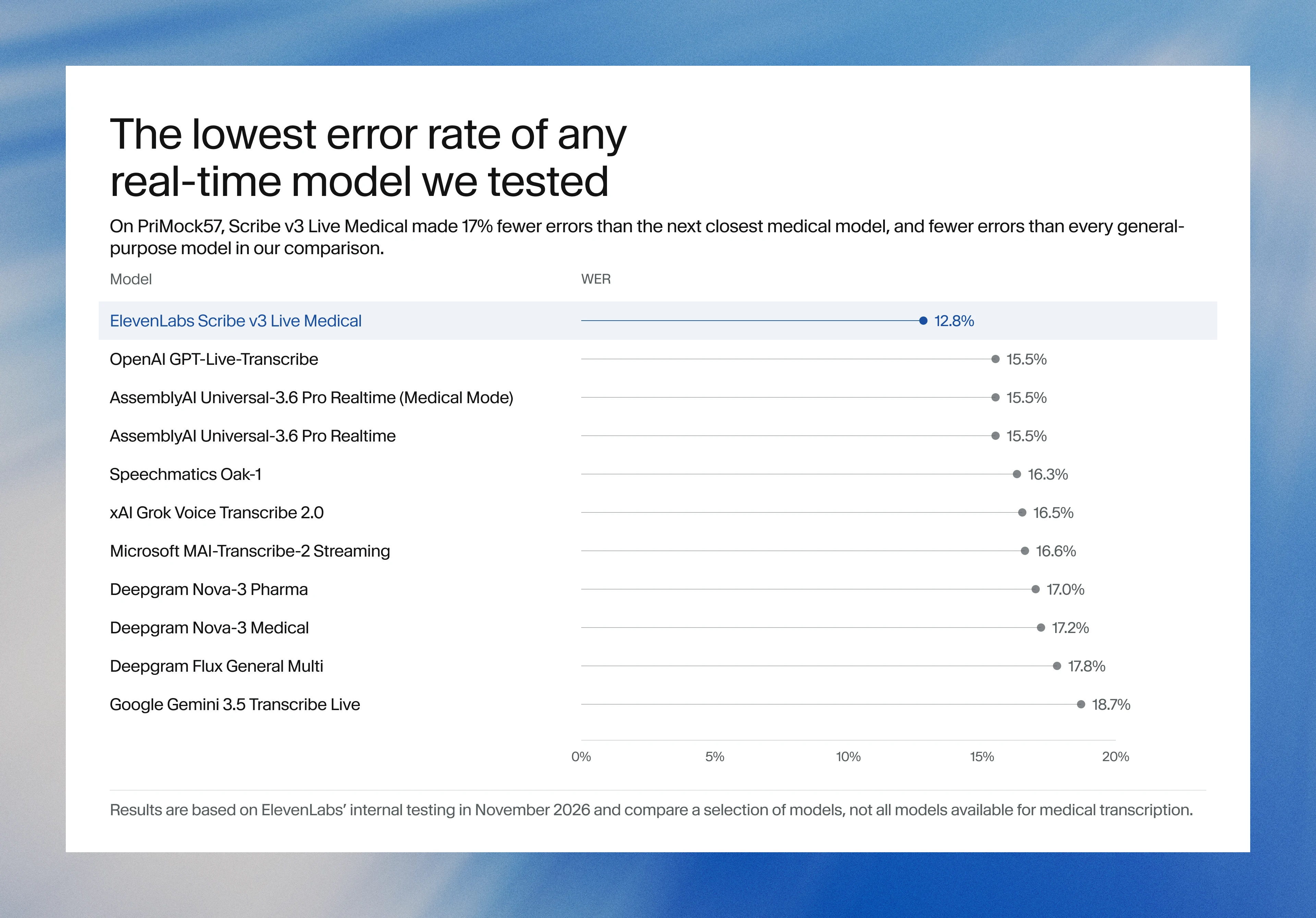
ElevenLabs releases Scribe v3 Live Medical, real-time medical transcription for voice agents in ElevenAgentsElevenLabs, ElevenAgents 음성 에이전트용 실시간 의료 전사 Scribe v3 Live Medical 공개
Checked확인일
Image: ElevenLabs blog.그림: ElevenLabs 블로그.
GoogleGoogle
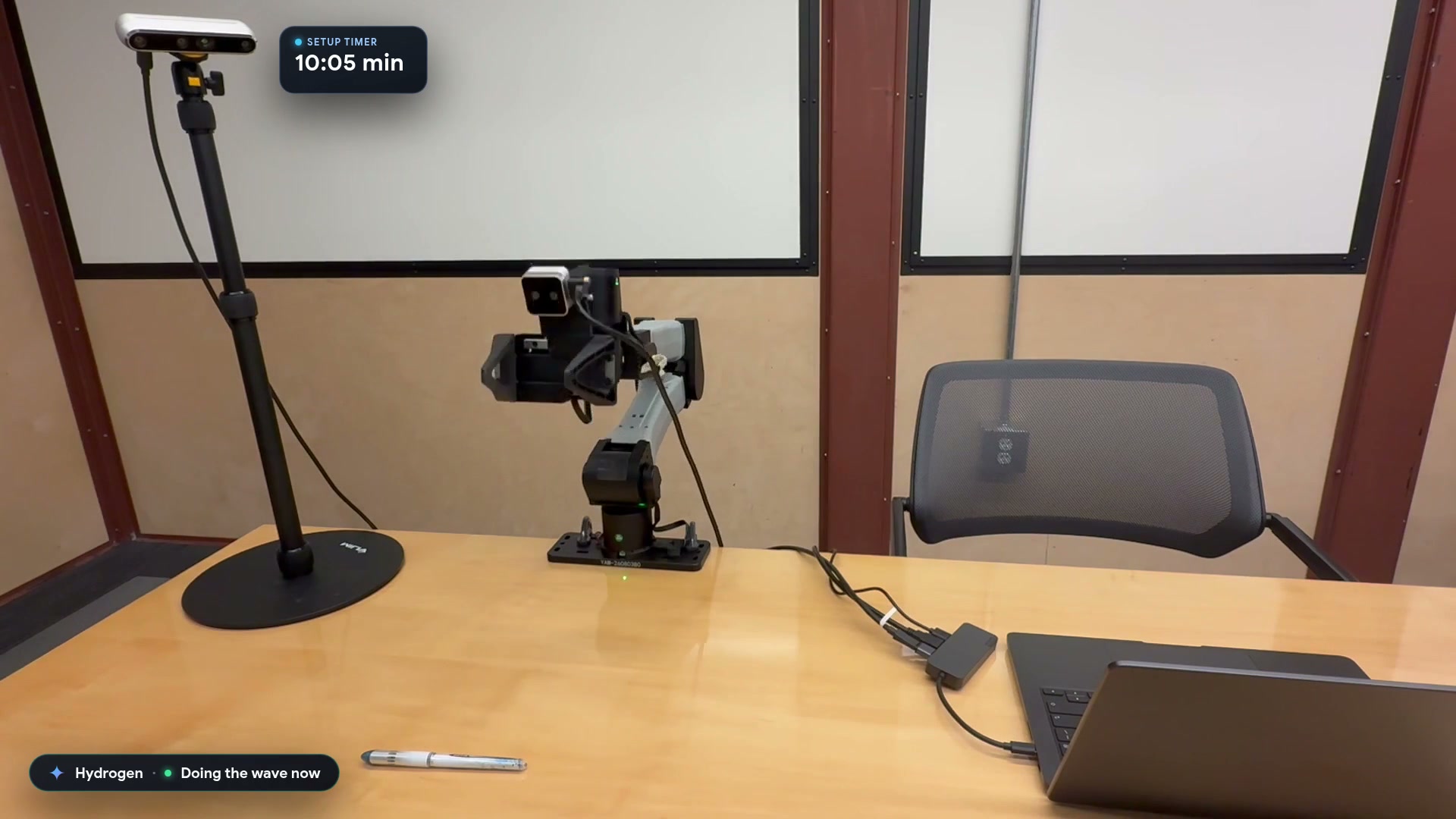
Google launches a Robotics plugin for Google Antigravity that sets up, simulates and controls robot arms with Gemini 4 HydrogenGoogle, Gemini 4 Hydrogen으로 로봇 팔을 준비·시뮬레이션·제어하는 Google Antigravity용 Robotics 플러그인 공개
Checked확인일
Video still: Google Developers Blog.영상 장면: Google Developers 블로그.