HREN


Google AI Studio now builds full-stack Android apps with Firebase and publishes them to a personal Google Play libraryGoogle AI Studio, Firebase를 붙인 풀스택 Android 앱을 만들고 개인 Google Play 라이브러리에 올리는 기능 추가
Google says Google AI Studio is rolling out the ability to build Kotlin Android apps with Cloud Firestore storage, Google Sign-In and Gemini calls from a single prompt, and to publish them to a personal Google Play library for installing on a phone, a publishing step that works with a standard Google account and, according to Google AI Studio’s official post on X, is available in the US only for now. The in-browser Android emulator now supports HD video and real-time audio.Google이 Google AI Studio에서 프롬프트 하나로 Cloud Firestore 저장, Google 로그인, Gemini 호출을 갖춘 Kotlin Android 앱을 만들고, 그 앱을 일반 Google 계정으로 개인 Google Play 라이브러리에 올려 휴대폰에 설치하는 기능을 오늘부터 차례로 연다고 밝혔으며, 이 개인 라이브러리 게시는 Google AI Studio 공식 X 글에 따르면 지금은 미국에서만 됩니다. 브라우저 속 Android 에뮬레이터는 HD 화면과 실시간 소리를 지원하게 됐습니다.
- Source published원문 게시일
- Checked확인일
Google says it is rolling out a major upgrade to building Android apps in Google AI Studio, in a post on the Google Developers Blog. The Build agent, working with Gemini 4 Carbon and Hydrogen, turns a single prompt into a Kotlin Android app with data persistence, user sign-in and AI features, and the app can be published to a personal Google Play library and installed on a phone, a publishing step that works with a standard Google account and, according to Google AI Studio’s official post on X, is available in the US only for now. All of the features in the post are rolling out in Google AI Studio starting today.Google이 Google Developers 블로그에서 Google AI Studio의 Android 앱 만들기에 큰 업그레이드를 내놓는다고 밝혔습니다. Gemini 4 Carbon과 Hydrogen을 쓰는 Build 에이전트가 프롬프트 하나에서 데이터 저장, 사용자 로그인, AI 기능을 갖춘 Kotlin Android 앱을 만들고, 이 앱을 일반 Google 계정으로 개인 Google Play 라이브러리에 올려 자기 휴대폰에 설치하게 한다는 내용인데, 이 개인 라이브러리 게시는 Google AI Studio 공식 X 글에 따르면 지금은 미국에서만 됩니다. 글에 적힌 기능은 모두 오늘부터 Google AI Studio에 차례로 열리고 있습니다.
The Build agent detects when a prompt calls for persistent storage, user sign-in or generative AI features, and with the user’s confirmation it provisions the backend and wires it into the Kotlin codebase. Before this, Android apps generated in AI Studio were limited to local session storage. The agent provisions a Cloud Firestore database with Firebase Security Rules tailored to the data model, so a session started on a tablet can continue on a phone, and offline changes sync when connectivity returns. Firebase Authentication with Google Sign-In is paired with per-user authorization rules so that users can only read and write their own documents.Build 에이전트는 프롬프트가 저장, 로그인, 생성형 AI 기능을 필요로 하는지 먼저 알아채고, 사용자가 확인하면 백엔드를 마련해 Kotlin 코드에 연결합니다. 이전에는 AI Studio에서 만든 Android 앱이 로컬 세션 저장에 그쳤습니다. 에이전트는 Cloud Firestore 데이터베이스와 데이터 모델에 맞춘 Firebase Security Rules를 만들어 태블릿에서 시작한 작업을 휴대폰에서 이어 가게 하고, 연결이 끊긴 동안의 변경은 다시 연결되면 맞춰집니다. Firebase Authentication의 Google 로그인과 사용자별 권한 규칙을 함께 걸어 사용자는 자기 문서만 읽고 쓸 수 있습니다.
Apps that call Gemini do not carry API keys inside the APK. The agent configures Firebase AI Logic and enforces Firebase App Check using Google Fraud Defense (formerly reCAPTCHA Enterprise), so credentials stay server-side and requests are verified as coming from the authentic, untampered app, both in the browser emulator and on Google Play. The emulator now starts faster, an HD toggle in its toolbar switches the stream to 1200p, and live audio from the app plays in the browser, which allows testing apps built on the Gemini Live API or text-to-speech. Clicking Take a screenshot in the emulator toolbar attaches the live screen to the prompt to guide visual UI edits, and custom fonts and builds backed by the official Android CLI have been added.Gemini를 부르는 앱은 API 키를 APK 안에 넣지 않습니다. 에이전트가 Firebase AI Logic을 설정하고 Google Fraud Defense(옛 reCAPTCHA Enterprise)를 쓰는 Firebase App Check를 걸어, 키는 서버 쪽에 두고 요청이 손대지 않은 진짜 앱에서 왔는지를 브라우저 에뮬레이터와 Google Play 양쪽에서 확인합니다. 에뮬레이터는 시작이 빨라졌고 도구 막대의 HD 단추로 화면을 1200p로 바꿀 수 있으며, 앱 소리를 브라우저에서 바로 들을 수 있어 Gemini Live API나 TTS를 쓰는 앱도 시험할 수 있습니다. 도구 막대의 Take a screenshot을 누르면 에뮬레이터 화면이 프롬프트에 붙어 화면 수정을 그림과 함께 지시할 수 있고, 맞춤 글꼴과 공식 Android CLI를 쓰는 빌드도 더해졌습니다.
Google Play publishing works by setting up a Play account in a few clicks from the publish panel and publishing the app to a personal Google Play library, with Google AI Studio building and signing the Android App Bundle (.aab) behind the scenes. Building starts by selecting the Android chip at the top of the Google AI Studio Build workspace. Google says building and testing on a personal device from the Play Store comes at no cost.Google Play 게시는 Publish 패널에서 몇 번의 클릭으로 Play 계정을 만든 뒤 앱을 개인 Google Play 라이브러리에 올리는 방식이고, Google AI Studio가 Android App Bundle(.aab)을 뒤에서 빌드하고 서명합니다. 시작은 Google AI Studio Build 작업 공간 위쪽에서 Android 칩을 고르는 것입니다. Google은 Play Store에서 자기 기기로 받아 시험하는 데 비용이 들지 않는다고 적었습니다.
The post does not say when personal library publishing will open outside the US, how to release a built app publicly to other users, or what Firebase and Gemini API usage will cost as it grows.개인 라이브러리 게시가 미국 밖에 언제 열리는지, 만든 앱을 다른 사용자에게 공개 출시하는 절차, Firebase와 Gemini API 사용량이 늘 때의 요금은 원문에 나와 있지 않습니다.
Keep reading더 읽기
All articles전체 글TencentTencent
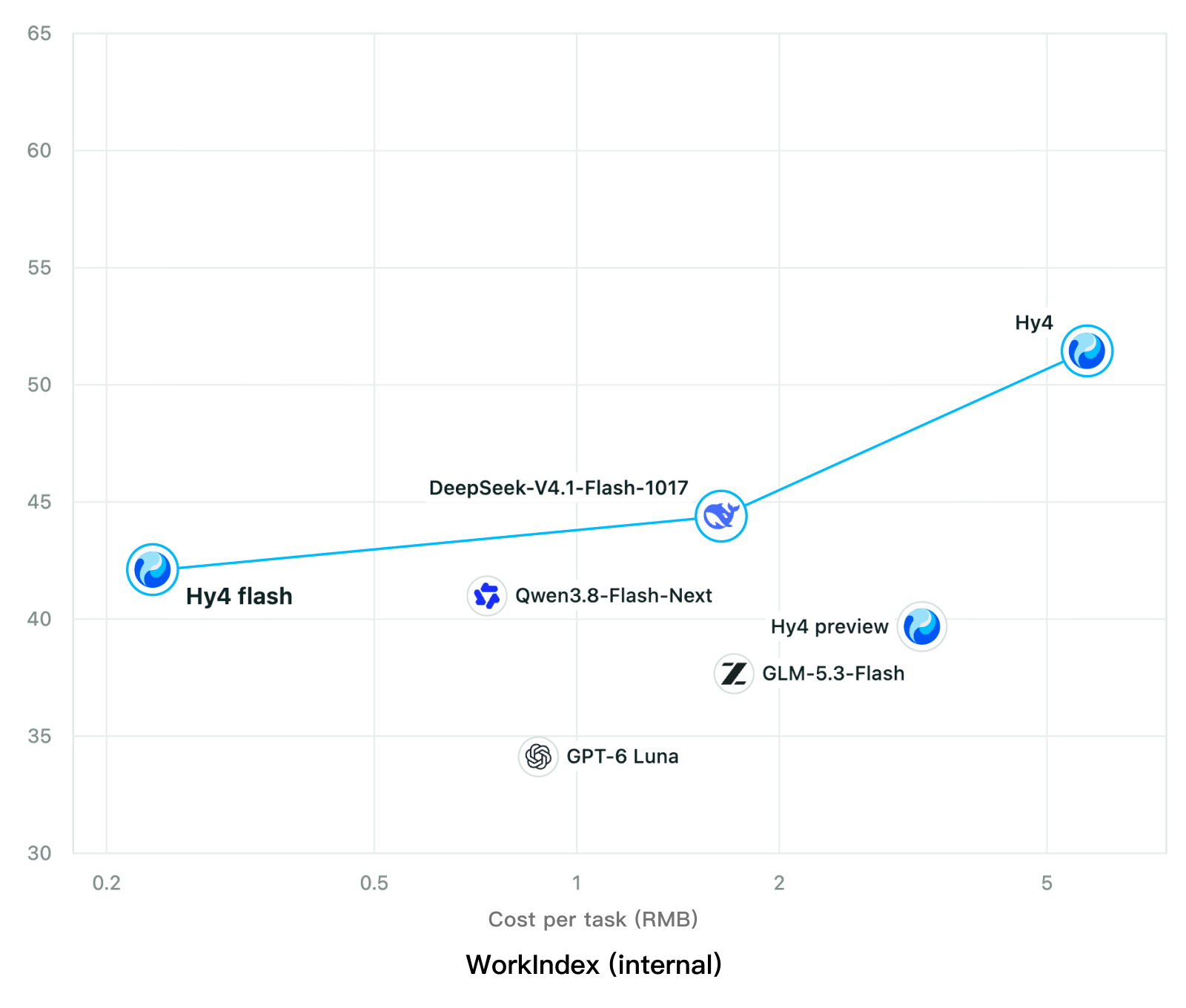
Tencent releases Hy4 flash as open weights, with FP8 and base versions, under the Tencent Hy LicenseTencent, Hy4 flash 가중치 공개 — FP8 · base 모델 포함, Tencent Hy License
Checked확인일
Chart: Tencent Hy4 flash model card. Tencent internal testing.그림: Tencent Hy4 flash 모델 카드. Tencent 내부 시험 결과입니다.
ElevenLabsElevenLabs
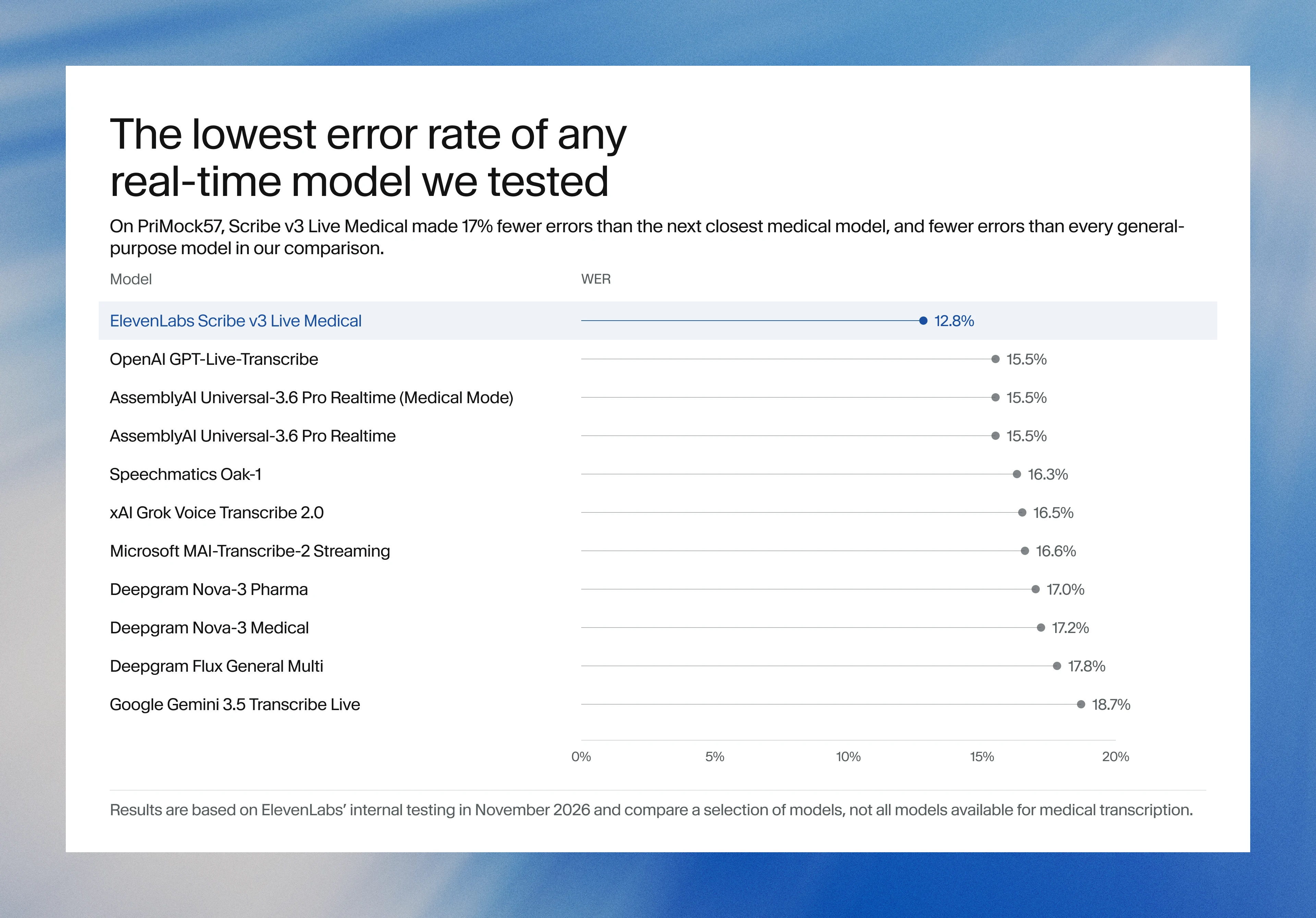
ElevenLabs releases Scribe v3 Live Medical, real-time medical transcription for voice agents in ElevenAgentsElevenLabs, ElevenAgents 음성 에이전트용 실시간 의료 전사 Scribe v3 Live Medical 공개
Checked확인일
Image: ElevenLabs blog.그림: ElevenLabs 블로그.
GoogleGoogle
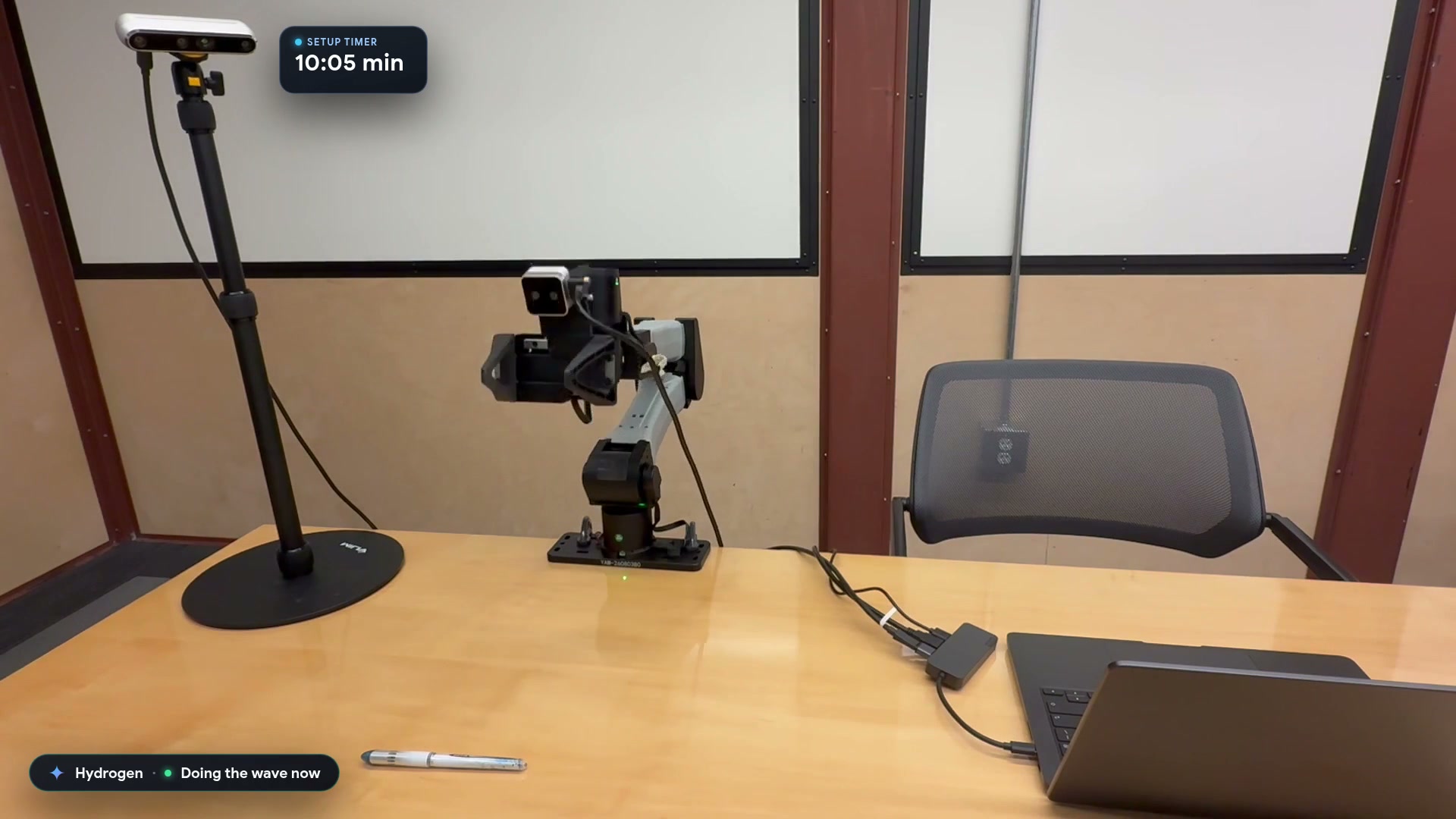
Google launches a Robotics plugin for Google Antigravity that sets up, simulates and controls robot arms with Gemini 4 HydrogenGoogle, Gemini 4 Hydrogen으로 로봇 팔을 준비·시뮬레이션·제어하는 Google Antigravity용 Robotics 플러그인 공개
Checked확인일
Video still: Google Developers Blog.영상 장면: Google Developers 블로그.