HREN


Google makes the Gemini side panel in Apps Script generally available for writing, reviewing and fixing Workspace scripts in plain languageGoogle, 평범한 말로 Workspace 스크립트를 짜고 고치는 Apps Script의 Gemini 사이드 패널 정식 출시
Google has made the Gemini side panel in Apps Script generally available, so users on Workspace Business Standard and Plus, Enterprise Standard and Plus, the AI Expanded Access add-on, Google AI Pro for Education, and consumer Google AI Pro and Ultra can describe a repetitive task in plain language and have Gemini write the script. Suggested code is accepted or rejected block by block in the editor, and Fix errors in the Execution Log has Gemini explain what went wrong and propose a fix. Scripts run with the user’s existing permissions and standard OAuth consent, admins manage access in the Admin console, and a gradual rollout of up to 15 days for feature visibility started on November 12.Google이 Apps Script의 Gemini 사이드 패널을 정식 출시해, Workspace Business Standard와 Plus, Enterprise Standard와 Plus, AI Expanded Access 부가 기능, Google AI Pro for Education, 개인용 Google AI Pro와 Ultra 사용자가 반복 작업을 평범한 말로 설명하면 Gemini가 스크립트를 짜게 했습니다. 제안된 코드는 편집기 안에서 블록마다 받아들이거나 물리치고, 실행 기록의 Fix errors를 누르면 Gemini가 원인을 풀어 설명하고 고칠 코드를 내놓습니다. 스크립트는 사용자의 기존 권한과 표준 OAuth 동의로 돌고 관리자는 Admin console에서 쓰임을 다루며, 11월 12일부터 기능이 보이기까지 최대 15일 걸리는 단계적 출시가 시작됐습니다.
- Source published원문 게시일
- Checked확인일
Google has made the Gemini side panel in Apps Script generally available, it says on the Google Workspace Updates blog. Apps Script is the tool for customizing, connecting and automating Workspace that sits under the Extensions menu in Sheets, Docs, Slides and Forms, and Google says anyone across an organization can now create, customize and troubleshoot scripts in plain language with no coding experience required. It is available on Workspace Business Standard and Plus, Enterprise Standard and Plus, the AI Expanded Access add-on, Google AI Pro for Education, and consumer Google AI Pro and Ultra, following a public beta earlier this year.Google이 Apps Script의 Gemini 사이드 패널을 정식 출시했다고 Google Workspace Updates 블로그에서 밝혔습니다. Apps Script는 Sheets, Docs, Slides, Forms의 Extensions 메뉴 안에 들어 있는 Workspace 맞춤, 연결, 자동화 도구이고, 이제 조직 안 누구나 코딩 경험 없이 평범한 말로 스크립트를 만들고 고치고 문제를 풀 수 있다고 Google은 설명합니다. 대상은 Workspace Business Standard와 Plus, Enterprise Standard와 Plus, AI Expanded Access 부가 기능, Google AI Pro for Education, 개인용 Google AI Pro와 Ultra이며, 올해 앞서 공개 베타를 거쳤습니다.
Instead of starting from a blank code editor, a user describes a repetitive task and Gemini writes the code. Google’s examples include creating Calendar events from urgent Gmail messages, pulling and cleaning real-time data into models, and turning Sheets tables into formatted Docs reports. Scripts run natively in Workspace with the user’s existing permissions and standard OAuth consent, and Google says IT admins keep full visibility and control in the Admin console.빈 코드 편집기에서 시작하는 대신 반복 작업을 설명하면 Gemini가 코드를 씁니다. Google이 든 예는 급한 Gmail 메일로 Calendar 일정을 만드는 일, 실시간 데이터를 모델로 끌어와 정리하는 일, Sheets 표를 서식 있는 Docs 보고서로 바꾸는 일입니다. 스크립트는 사용자의 기존 권한과 표준 OAuth 동의로 Workspace 안에서 돌고, IT 관리자는 Admin console에서 이를 모두 보고 다룰 수 있다고 Google은 밝혔습니다.
Gemini understands the files across the open Apps Script project and can build an automation from scratch or keep adding capabilities, such as automatic time-based triggers, as the conversation continues. Multi-block suggestions are reviewed in the editor with Accept or Reject on each block, or with Accept All and Reject All before saving. When a runtime error occurs, Fix errors in the Execution Log has Gemini diagnose what went wrong, explain it in plain language and suggest a ready-to-apply update.Gemini는 열린 Apps Script 프로젝트의 파일들을 이해해 처음부터 자동화를 만들거나, 대화를 이어 가며 시간 기반 트리거 같은 기능을 더합니다. 여러 블록으로 된 제안은 편집기 안에서 블록마다 Accept나 Reject를 누르거나, 저장 전에 Accept All과 Reject All로 한꺼번에 정합니다. 실행 중 오류가 나면 실행 기록(Execution Log)의 Fix errors를 눌러, Gemini가 원인을 진단하고 평범한 말로 설명한 뒤 바로 넣을 수 있는 수정안을 내놓게 합니다.
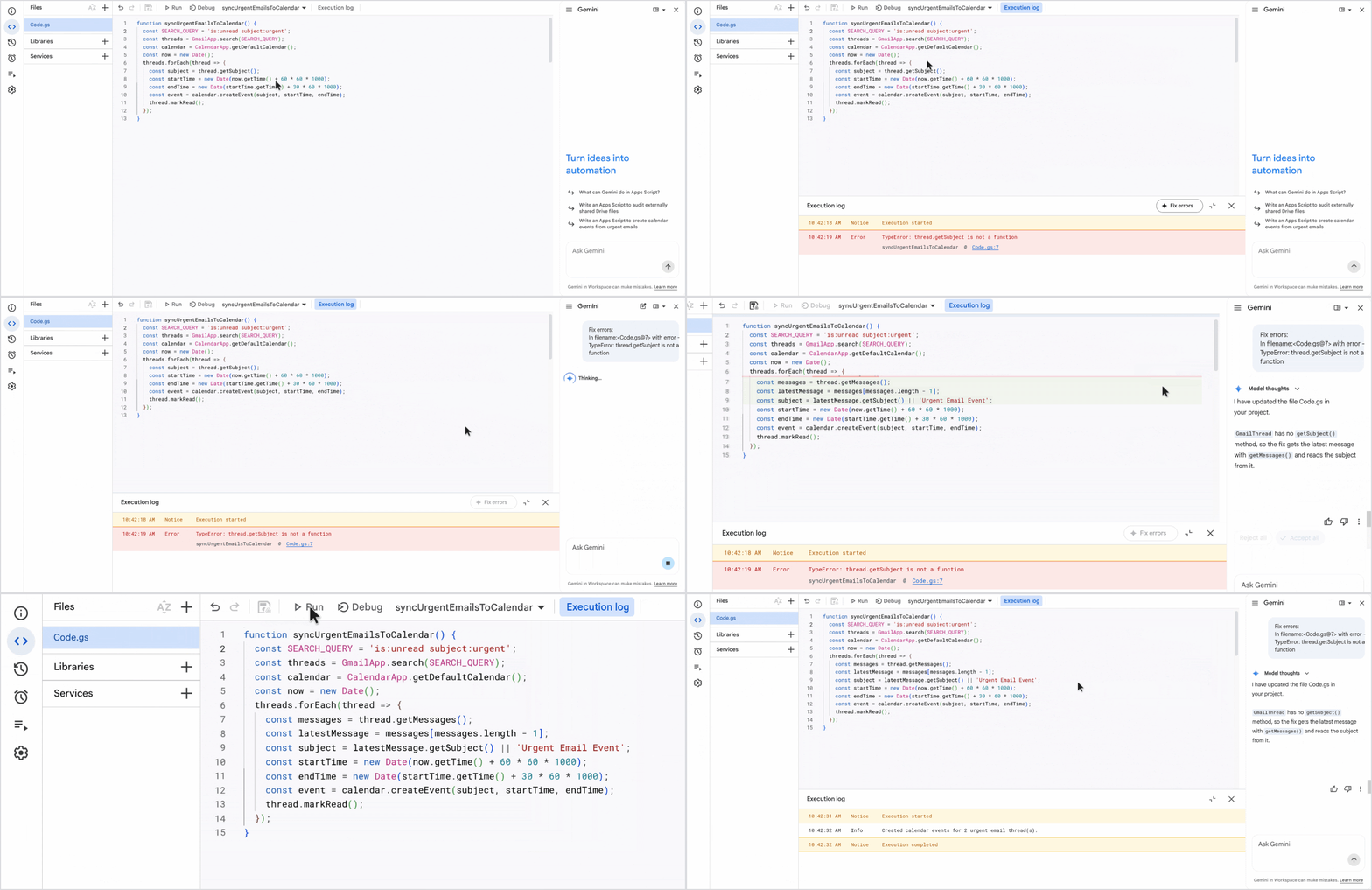
Users reach it by opening script.google.com or script.new, or by choosing Apps Script from the Extensions menu inside Sheets, Docs or Slides; the Gemini side panel opens automatically on new scripts and can also be opened with the Ask Gemini icon at the top right of the editor. On the admin side, it respects existing Apps Script service settings and the Workspace generative AI access controls in the Admin console, with access managed by organizational unit or group, data access governed through OAuth app access controls and external URL allowlists, and script activity monitored in Drive and OAuth audit logs.사용자는 script.google.com이나 script.new를 열거나 Sheets, Docs, Slides 안의 Extensions 메뉴에서 Apps Script를 고르면 되고, 새 스크립트에서는 Gemini 사이드 패널이 저절로 열리며 편집기 오른쪽 위 Ask Gemini 아이콘으로도 열 수 있습니다. 관리자 쪽에서는 기존 Apps Script 서비스 설정과 Admin console의 Workspace 생성형 AI 접근 설정을 그대로 따르고, 조직 단위나 그룹별로 접근을 정하며, OAuth 앱 접근 설정과 외부 URL 허용 목록으로 데이터 접근을 다루고, Drive와 OAuth 감사 로그로 스크립트 활동을 봅니다.
For Rapid Release and Scheduled Release domains, a gradual rollout started on November 12, and the feature can take up to 15 days to become visible. The post does not say whether accounts outside the listed plans can use it, or whether it carries extra cost or usage limits.Rapid Release와 Scheduled Release 도메인 모두 11월 12일부터 단계적 출시가 시작됐고, 기능이 보이기까지 최대 15일이 걸립니다. 대상 요금제 밖 계정이 쓸 수 있는지, 따로 드는 비용이나 사용 한도가 있는지는 원문에 나와 있지 않습니다.
Keep reading더 읽기
All articles전체 글TencentTencent
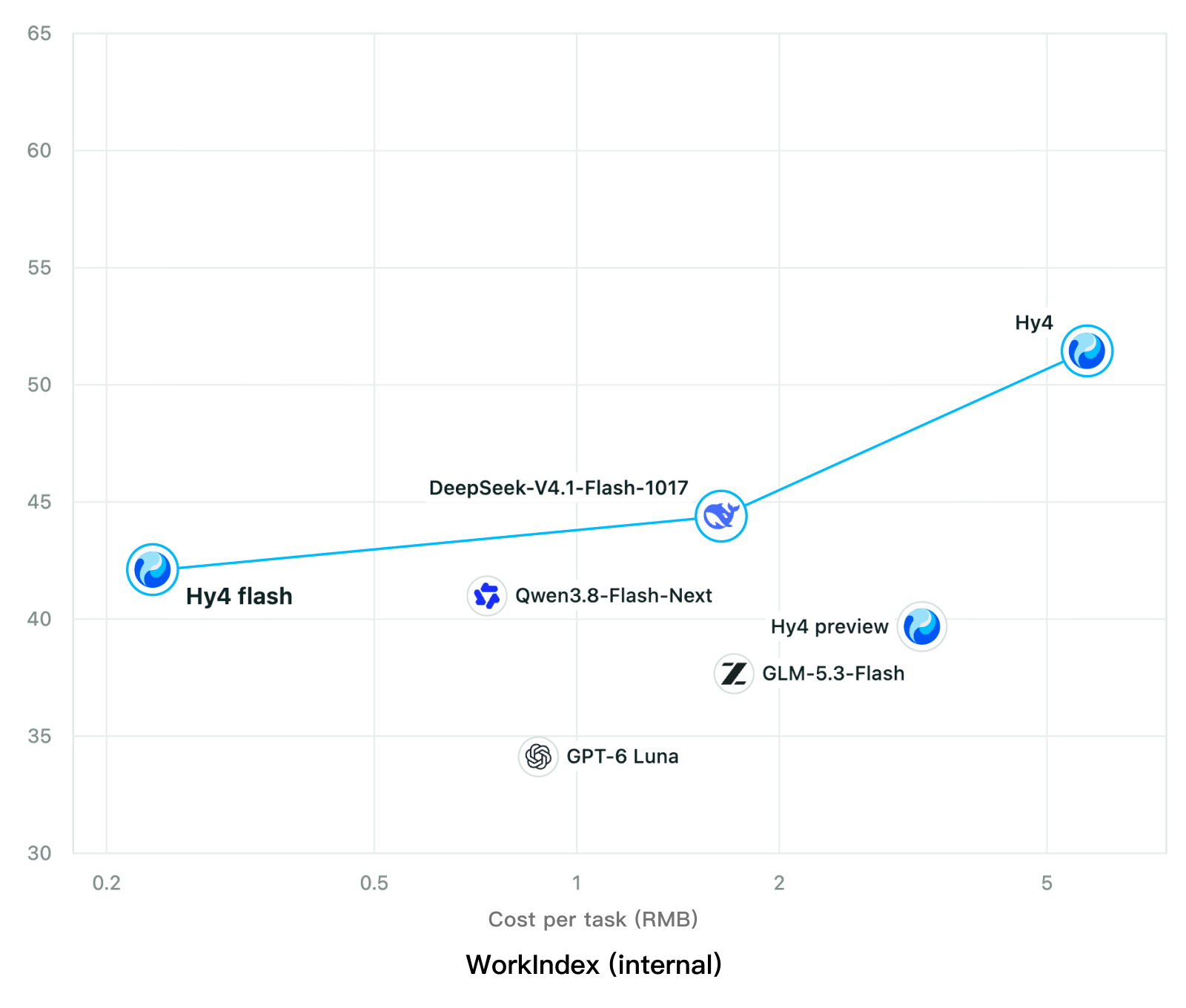
Tencent releases Hy4 flash as open weights, with FP8 and base versions, under the Tencent Hy LicenseTencent, Hy4 flash 가중치 공개 — FP8 · base 모델 포함, Tencent Hy License
Checked확인일
Chart: Tencent Hy4 flash model card. Tencent internal testing.그림: Tencent Hy4 flash 모델 카드. Tencent 내부 시험 결과입니다.
ElevenLabsElevenLabs
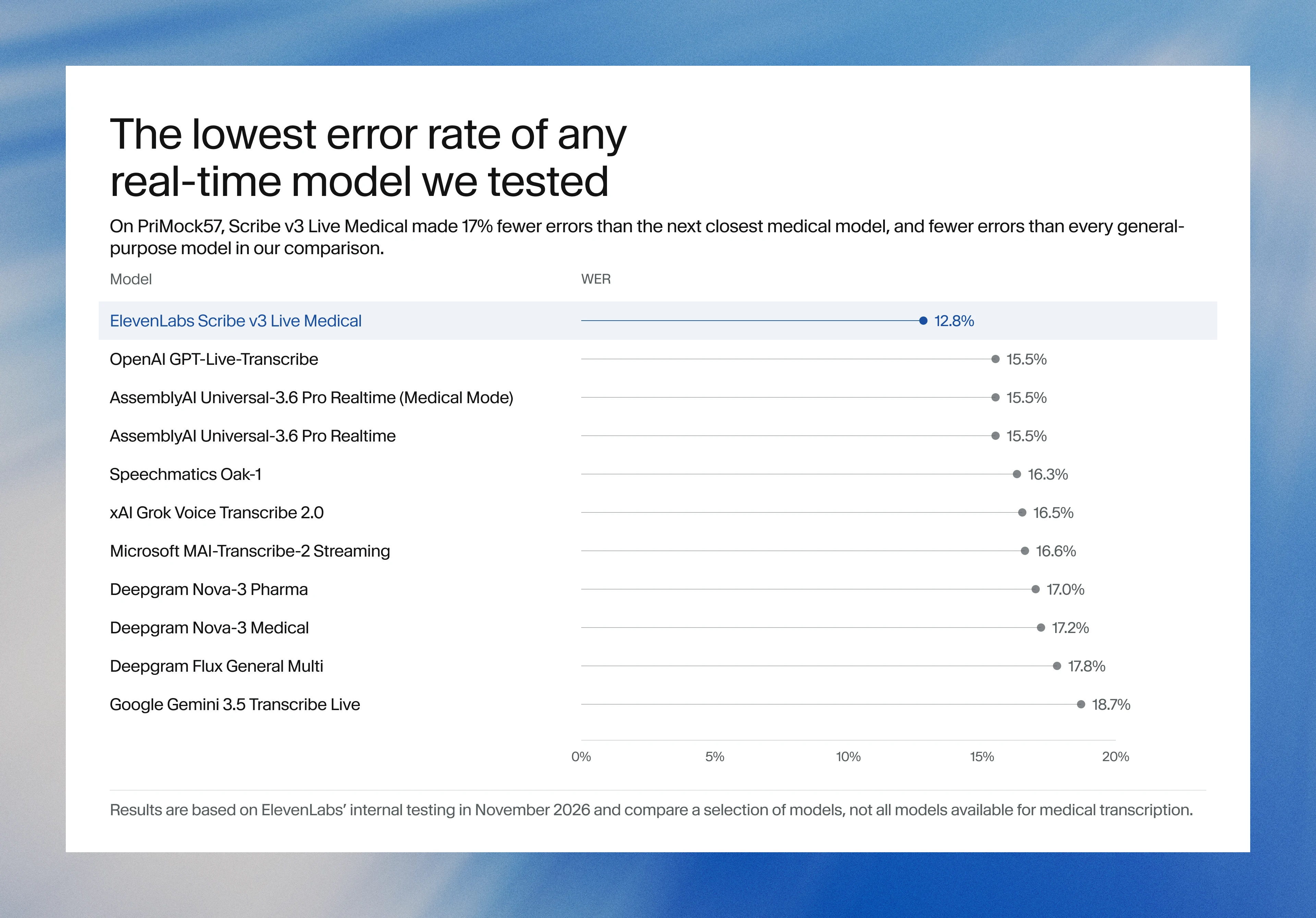
ElevenLabs releases Scribe v3 Live Medical, real-time medical transcription for voice agents in ElevenAgentsElevenLabs, ElevenAgents 음성 에이전트용 실시간 의료 전사 Scribe v3 Live Medical 공개
Checked확인일
Image: ElevenLabs blog.그림: ElevenLabs 블로그.
GoogleGoogle
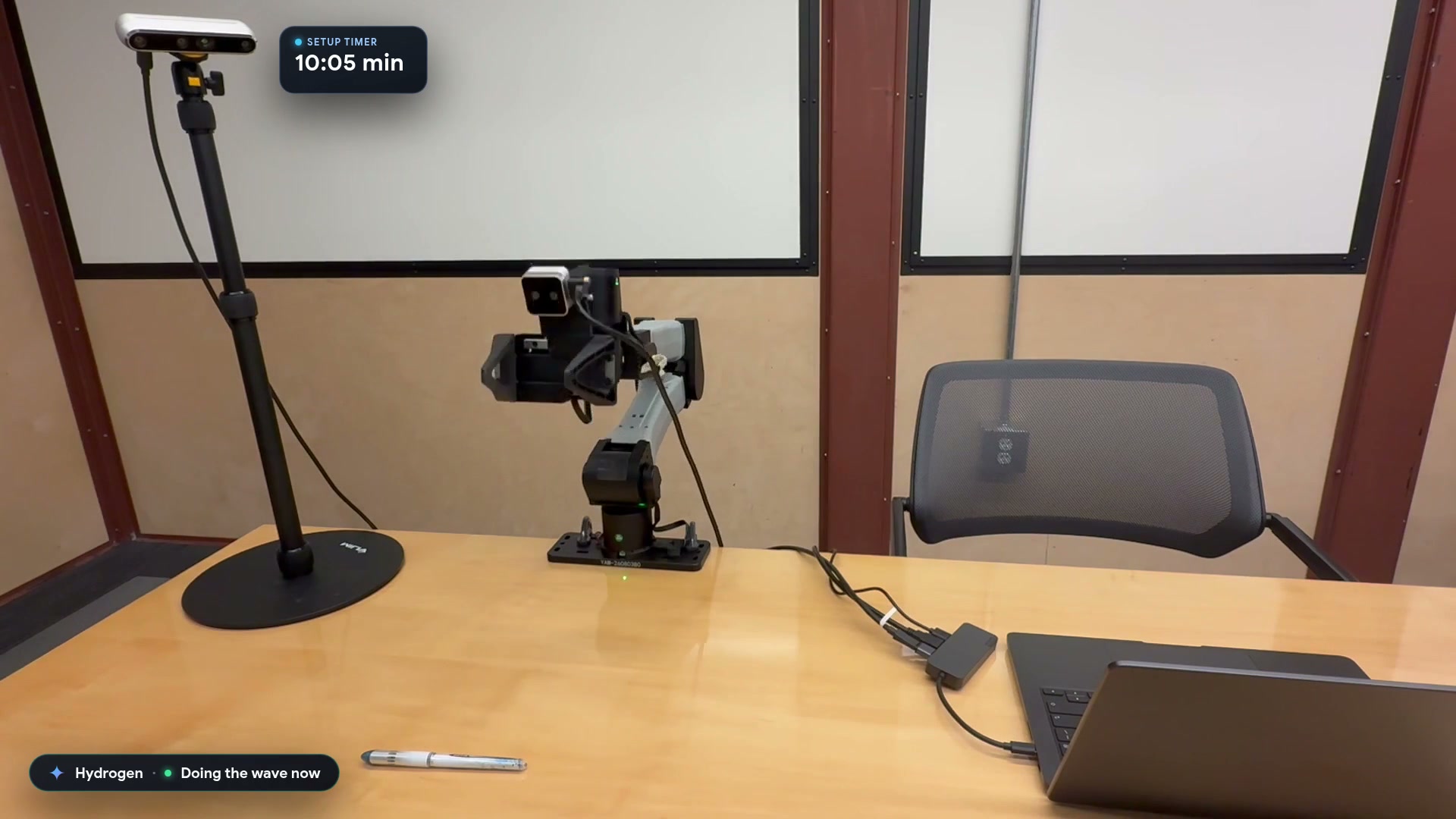
Google launches a Robotics plugin for Google Antigravity that sets up, simulates and controls robot arms with Gemini 4 HydrogenGoogle, Gemini 4 Hydrogen으로 로봇 팔을 준비·시뮬레이션·제어하는 Google Antigravity용 Robotics 플러그인 공개
Checked확인일
Video still: Google Developers Blog.영상 장면: Google Developers 블로그.