HREN


peer, an open-source tool that lets coding agent sessions message each other by namepeer, 코딩 에이전트 세션끼리 이름으로 메시지를 주고받게 하는 오픈소스 도구
It hands messages to each engine's own input path instead of typing into a terminal, shows session states, and reports in the same line whether a message arrived. It needs Python 3.9 or later, and the fast path through Claude's inbox is not a public API, so an update can break it.터미널에 글자를 쳐 넣지 않고 각 엔진의 입력 통로로 메시지를 넘기고, 세션 상태를 보여 주며 전달 여부는 같은 줄에서 알려 줍니다. Python 3.9 이상이 필요하고, Claude 받은편지함을 쓰는 빠른 경로는 공개 API가 아니어서 업데이트로 깨질 수 있습니다.
- Checked확인일
peer is an open-source tool that lets Claude Code and Codex sessions message each other by name. Instead of typing into another terminal, it hands each message to the engine's own input path: for Claude Code, the built-in cross-session inbox that its SendMessage tool uses between local sessions, and for Codex, the app-server's turn/start and turn/steer for sessions started with peer run codex. The repository is public under the MIT license.peer는 Claude Code와 Codex 세션이 서로 이름으로 메시지를 주고받게 해 주는 오픈소스 도구입니다. 다른 터미널에 글자를 쳐 넣는 대신 메시지를 각 엔진의 입력 통로로 넘깁니다. Claude Code에는 로컬 세션 사이에서 SendMessage 도구가 쓰는 내장 세션 간 받은편지함으로 보내고, Codex에는 peer run codex로 시작한 세션의 앱 서버 turn/start와 turn/steer로 보냅니다. 저장소는 MIT 라이선스로 공개돼 있습니다.
The project says a script that types into another terminal goes wrong in a different way at each step. An Enter lands on an approval prompt and answers it, a message sticks to a half-typed draft, or a paste never gets submitted. peer gives one command to send and real states such as working, blocked, idle and waiting-on instead of screen-reading, and it says in the same line whether the message arrived. It says a running Claude Code session gets the message whether idle or busy, without a restart.프로젝트는 다른 터미널에 글자를 쳐 넣는 스크립트가 단계마다 다르게 틀어진다고 설명합니다. Enter가 승인 질문에 떨어져 대신 답해 버리거나, 메시지가 반쯤 쓴 초안에 붙거나, 붙여 넣은 글이 제출되지 않은 채 남는 식입니다. peer는 명령 하나로 보내고, 화면을 읽는 대신 working, blocked, idle, waiting-on 같은 실제 상태를 보여 주며, 닿았는지는 같은 줄에서 알려 줍니다. 실행 중인 Claude Code 세션은 쉬든 일하든 다시 시작하지 않고 메시지를 받는다고 밝혔습니다.
Running peer on its own lists nearby sessions by the same tmux session, similar folders and recent contacts. peer say sends a message and reports whether it was delivered or is queued or held, with what it waits for and how to fix it. peer ask waits up to 60 seconds for a reply, and peer read pulls a session's last answers from engine history rather than the screen. peer spawn starts an agent in a detached tmux session. If a recipient's turn fails on a rate limit, an overload or an API error, peer tells the sender why. With an ssh entry in ~/.config/peer/hosts.json, messages also reach sessions on other machines. For replies to come back, peer has to be installed on that machine too, with this machine added to its hosts.json.peer만 실행하면 같은 tmux 세션, 비슷한 폴더, 최근 연락 상대 기준으로 가까운 세션이 나옵니다. peer say는 메시지를 보내고 전달됐는지, 대기나 보류 중이면 무엇을 기다리고 어떻게 고치는지 알려 줍니다. peer ask는 답을 최대 60초 기다리고, peer read는 상대의 마지막 답을 화면이 아니라 엔진 기록에서 읽습니다. peer spawn은 분리된 tmux 세션에 새 에이전트를 띄웁니다. 받는 세션의 차례가 사용 한도, 과부하, API 오류로 실패하면 peer가 보낸 세션에 그 까닭을 알립니다. ~/.config/peer/hosts.json에 ssh 주소를 적으면 다른 기계의 세션에도 메시지를 보냅니다. 답을 받으려면 그 기계에도 peer를 설치하고 그 기계의 hosts.json에 이 기계를 적어야 합니다.
Installation is one line that fetches the repository's install.sh with curl and runs it with sh. The script clones the repository to ~/.local/share/peer, links ~/.local/bin/peer and adds hooks and the agent skill. Python 3.9 or later is the only requirement, and tmux adds peer spawn and nearby-first listing. After installation, Codex asks once in /hooks whether to trust the new hooks. The README's recommended setup is peer install --accept-inbound --codex-alias, where --codex-alias adds a shell alias that starts codex as peer run codex. peer doctor shows what works, what is missing and the command that fixes it. Supported operating systems are not stated in the source.설치는 install.sh를 curl로 받아 sh로 실행하는 한 줄이고, 이 스크립트가 저장소를 ~/.local/share/peer에 받아 ~/.local/bin/peer 링크와 훅, 에이전트 스킬을 더합니다. Python 3.9 이상만 있으면 되고, tmux가 있으면 peer spawn과 가까운 세션 먼저 보여 주기가 더해집니다. 설치 뒤 Codex는 /hooks에서 새 훅을 믿을지 한 번 묻습니다. README가 권하는 설정은 peer install --accept-inbound --codex-alias이고, 이 중 --codex-alias는 셸 설정 파일에 codex를 peer run codex로 시작하는 별칭을 더합니다. peer doctor는 되는 것과 빠진 것, 고치는 명령을 보여 줍니다. 지원 운영체제는 원문에 나와 있지 않습니다.
--accept-inbound sets crossSessionInbound to accept in ~/.claude/settings.json, so Claude takes cross-session messages from any process running as the same user. Without it, a message to an idle Claude waits for that session's next tool call or turn. The project notes that such a process can already type into the user's terminals, so the setting opens little that was not open, and says it should still be decided on purpose.--accept-inbound는 ~/.claude/settings.json에 crossSessionInbound를 accept로 넣어, 같은 사용자로 실행되는 모든 프로세스가 보낸 세션 간 메시지를 Claude가 받게 합니다. 설정이 없으면 쉬는 Claude에게 간 메시지는 그 세션의 다음 도구 호출이나 차례까지 기다립니다. 프로젝트는 그런 프로세스는 이미 터미널에 글자를 칠 수 있어 새로 열리는 것이 적지만, 일부러 정할 일이라고 적었습니다.
Claude's cross-session inbox is not a public API. peer uses the protocol it observed and falls back to hooks when that changes, but a Claude Code update can break the fast path. Codex sessions receive messages only when started through peer run codex, peer spawn --kind codex or codex with --codex-alias, and Codex support is newer and less tested than Claude support. Between machines, the receiving side trusts the origin name it is given, and a session doing background work such as a subagent or a long shell can show as idle. peer is not affiliated with Anthropic or OpenAI.Claude의 세션 간 받은편지함은 공개 API가 아닙니다. peer는 관찰한 프로토콜을 쓰다가 바뀌면 훅을 쓰지만, Claude Code 업데이트로 빠른 경로가 깨질 수 있습니다. Codex 세션은 peer run codex, peer spawn --kind codex, 또는 --codex-alias를 건 codex로 시작했을 때만 메시지를 받고, Codex 지원은 Claude 지원보다 새롭고 덜 시험됐습니다. 기계 사이에서는 받는 기계가 전달받은 출발 이름을 그대로 믿고, 서브에이전트나 긴 셸 작업처럼 백그라운드 일을 하는 세션이 idle로 보일 수 있습니다. peer는 Anthropic, OpenAI와 관계없는 프로젝트입니다.
Sources & references원문과 참고 자료
Keep reading더 읽기
All articles전체 글rust-anythingrust-anything
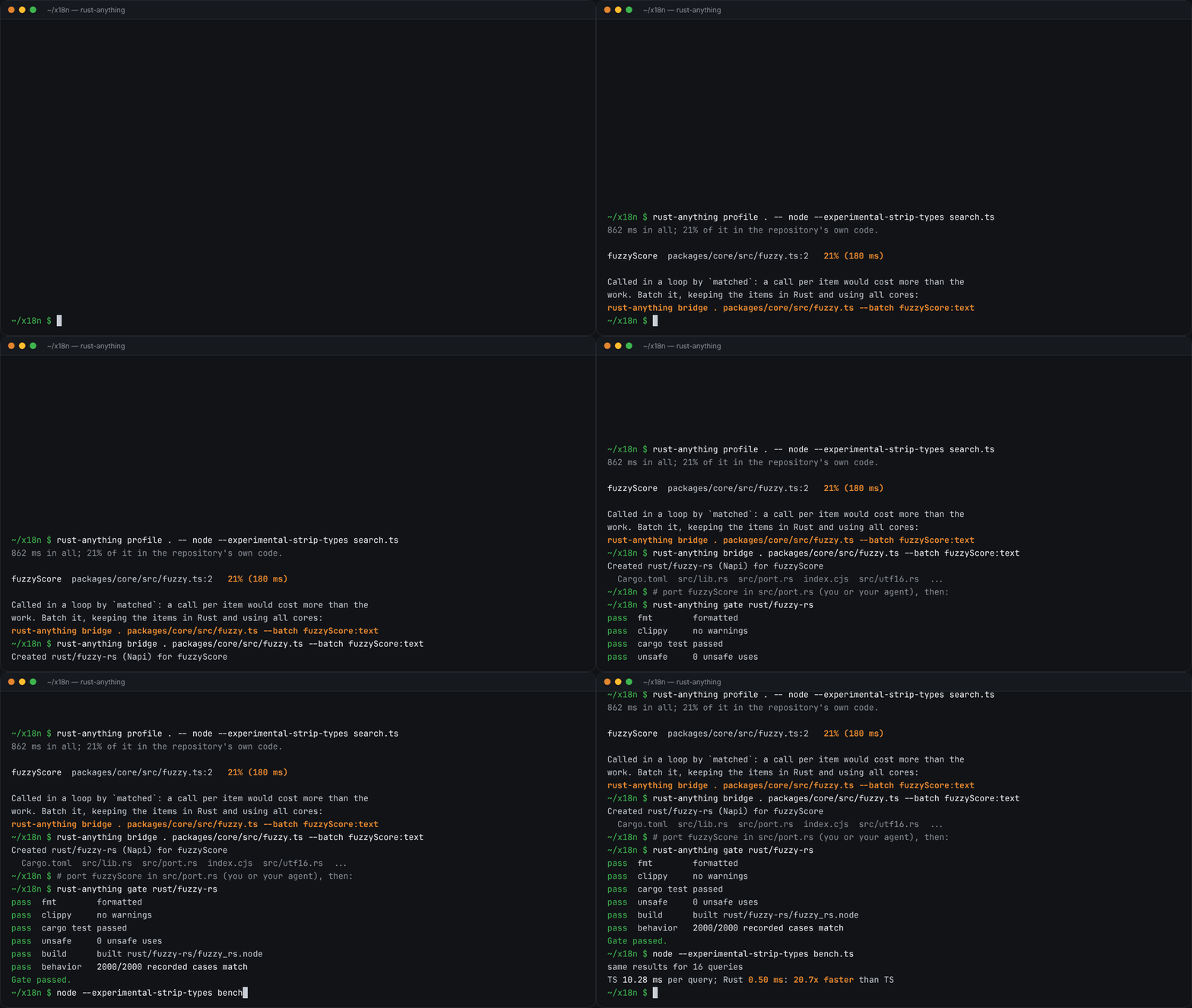
rust-anything, an MIT-licensed command-line tool that moves a Node.js, Python, C, Go, Ruby or Java app to Rust one piece at a time and checks each piece against recordings of the originalrust-anything, Node.js·Python·C·Go·Ruby·Java 앱을 한 조각씩 Rust로 옮기며 조각마다 원래 코드의 기록과 맞춰 보는 MIT License 명령줄 도구
Checked확인일
Image: rust-anything README.그림: rust-anything README.
sketchsketch
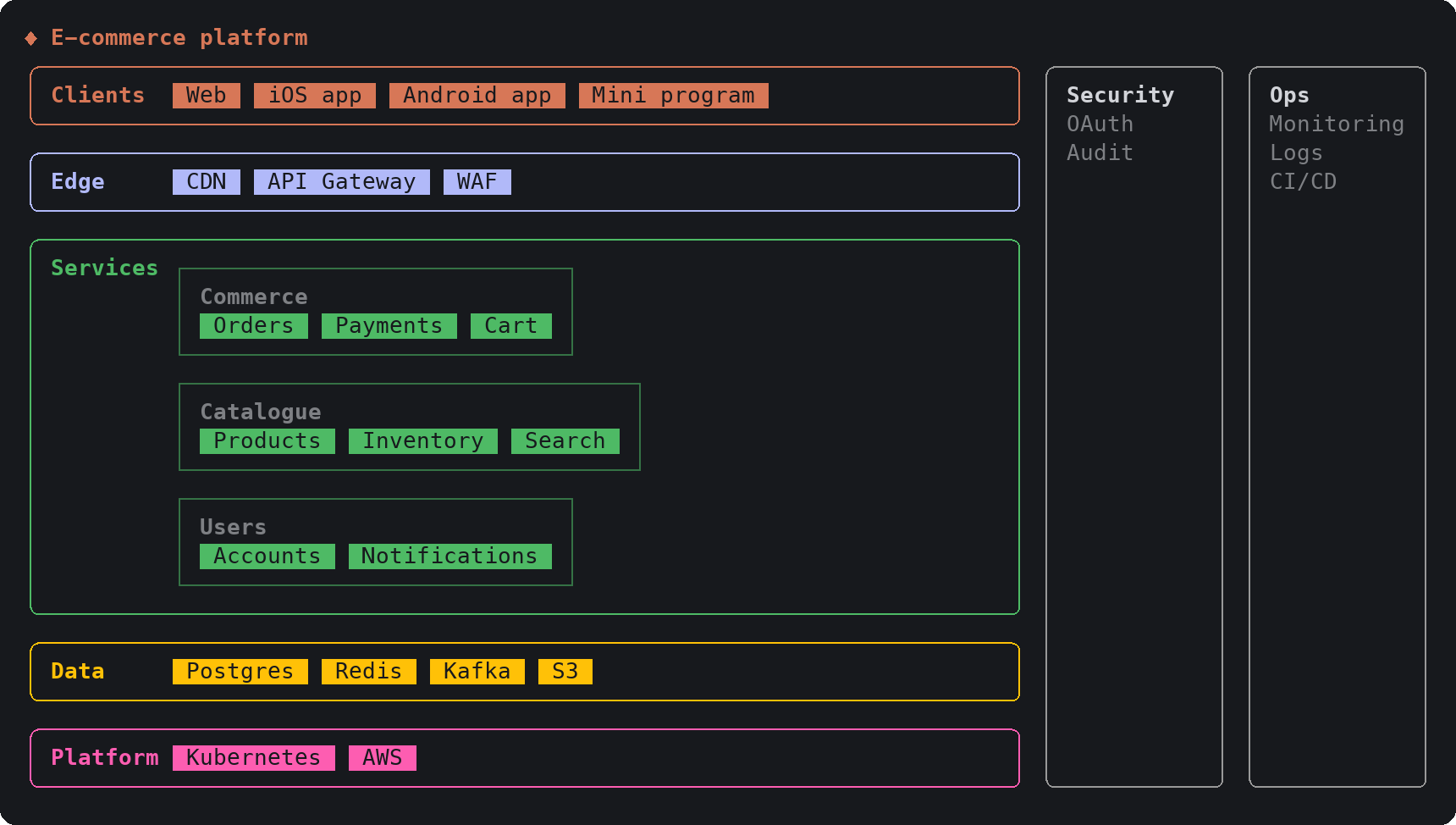
sketch, an MIT-licensed Claude Code plugin that answers with diagrams, roadmaps, wireframes and chart cards in the terminal instead of paragraphssketch, Claude Code의 답을 문단 대신 터미널 안 구조도와 로드맵, 화면 틀, 차트 카드로 그려 주는 MIT 플러그인
Checked확인일
Image: sketch README.그림: sketch README.
SketchCraftSketchCraft
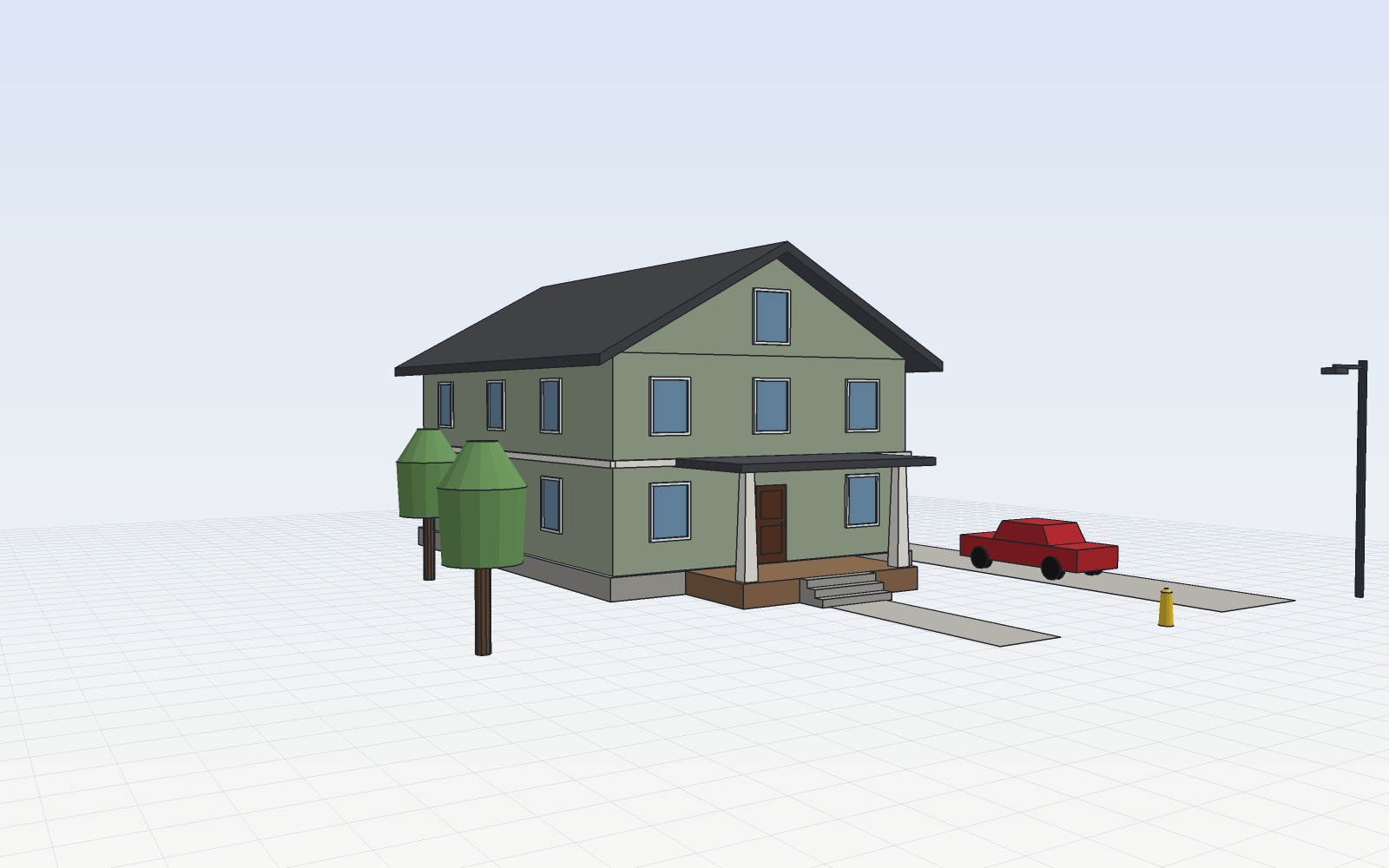
SketchCraft, a free MIT-licensed 3D modeler for houses, rooms and furniture that AI agents can also drive over MCP, limited to a workspace folderSketchCraft, 윤곽을 그려 끌어올리는 무료 MIT 3D 모델러, AI 에이전트도 작업 폴더 안에서 MCP로 같은 모델을 고친다
Checked확인일
Image: SketchCraft README.그림: SketchCraft README.