HREN


Pinky, a desktop app that lets coding agents use a real phone under approval rules you setPinky, 코딩 에이전트가 실제 휴대전화를 쓰게 하고 승인 규칙을 정하는 데스크톱 앱
While an agent operates an iPhone or Android phone over MCP, Pinky holds payment, trade and transfer buttons for your approval by default. It finds them by their labels in 10 languages, so an unusual one could slip through. It is open source under Apache-2.0 and pre-alpha.에이전트가 MCP로 iPhone이나 Android 휴대전화를 조작하는 동안 Pinky는 기본으로 결제, 거래, 송금 단추를 찾아 승인을 기다립니다. 단추는 10개 언어의 라벨로 찾아 특이한 단추는 빠져나갈 수 있고, 지금은 pre-alpha인 Apache-2.0 오픈소스입니다.
- Checked확인일
Pinky is a desktop app that lets agents able to use MCP servers, such as Claude Code or Cursor, operate a real iPhone or Android phone. You watch the work on your computer and approve risky steps or take over. It is free and open source under the Apache-2.0 license, with no account to create.Pinky는 Claude Code, Cursor처럼 MCP 서버를 쓰는 에이전트가 실제 iPhone이나 Android 휴대전화를 조작하게 하는 데스크톱 앱입니다. 사용자는 컴퓨터에서 작업을 지켜보며 위험한 단계를 승인하거나 넘겨받습니다. Apache-2.0 라이선스의 무료 오픈소스이고 계정이 필요 없습니다.
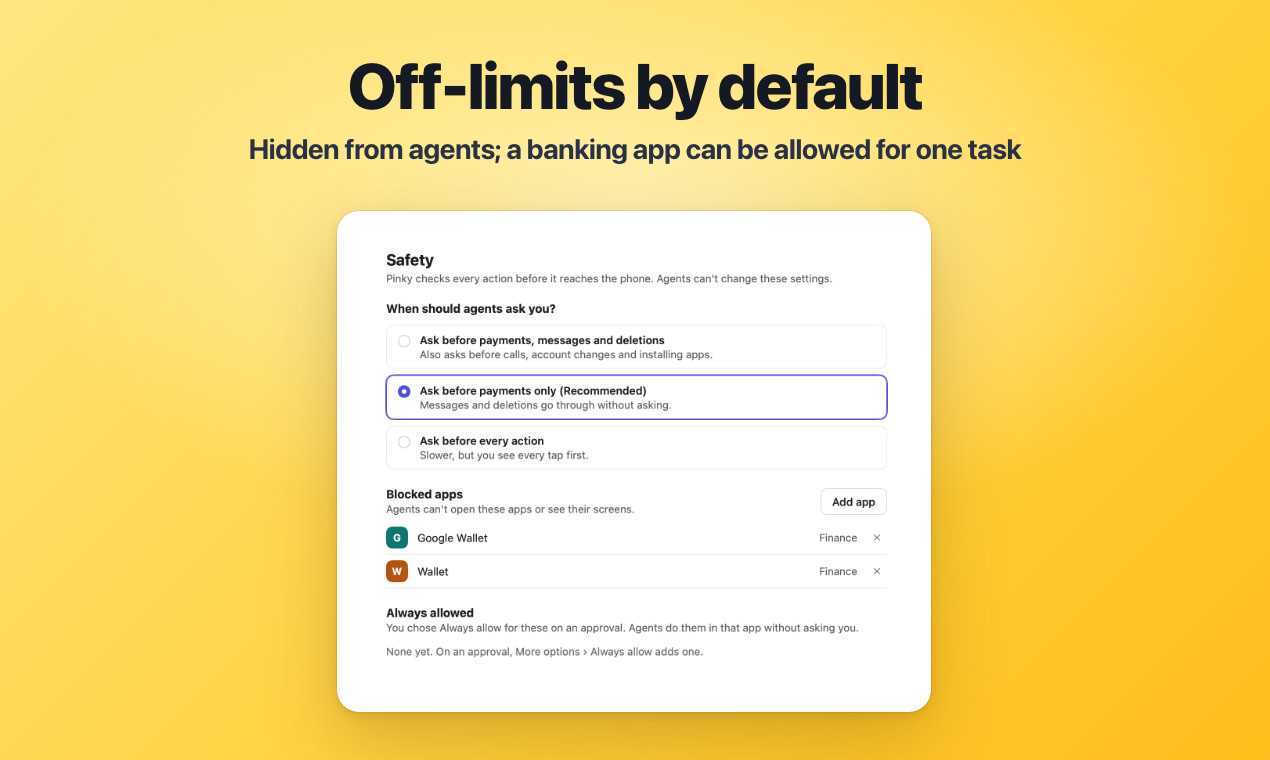
Approvals are enforced in Pinky's gateway rather than through instructions to the agent. For a step that needs you, nothing happens on the phone until you click Allow in Pinky, and no answer within 60 seconds means no. Payments, trades and transfers wait by default. In the Safety settings, sends, deletions and more can wait too, or every step can.승인 규칙은 지시문이 아니라 Pinky 게이트웨이에서 돌아갑니다. 승인이 필요한 단계는 Pinky에서 Allow를 누르기 전에는 실행되지 않고, 60초 안에 답이 없으면 거절로 처리합니다. 결제, 거래, 송금은 기본으로 기다리고, Safety 설정에서 보내기, 삭제 등도 기다리게 하거나 모든 단계를 묻게 할 수 있습니다.
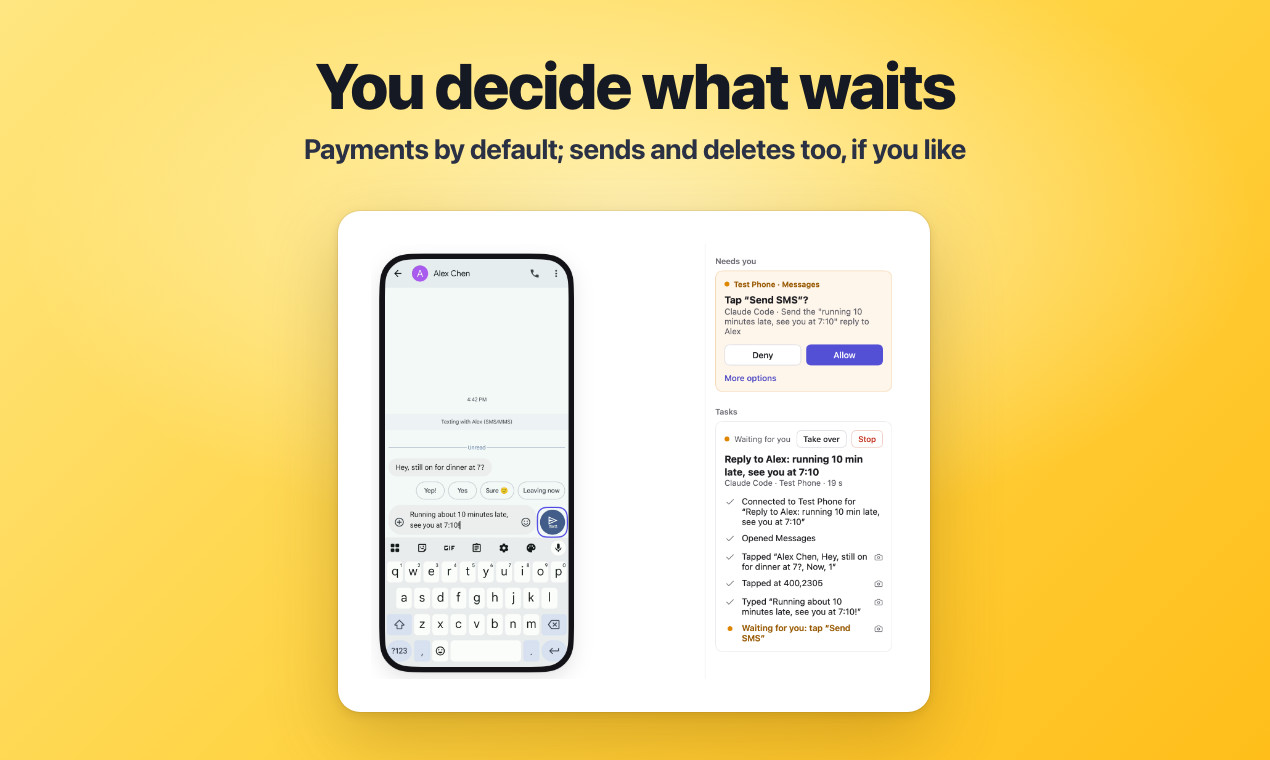
Banking, wallet and password-manager apps are invisible to agents by default, and agents can't type into password or one-time-code fields. When a task needs a banking or wallet app, the agent asks and you can allow that app for that task only. On Android 13 and later, agents work on a hidden second screen; older Android phones and iPhones use the main screen.은행, 지갑, 비밀번호 관리 앱은 기본으로 에이전트에게 보이지 않고, 비밀번호와 일회용 코드 칸에는 입력할 수 없습니다. 은행이나 지갑 앱이 필요하면 에이전트가 요청하고 사용자는 그 작업에 한해 허용할 수 있습니다. 숨겨진 둘째 화면은 Android 13 이상에서만 쓰고, 그 밖의 기기는 메인 화면을 씁니다.
Releases are on GitHub. A Mac needs macOS 13 or later on Apple silicon or Intel and gets a dmg. Windows 10 or 11 on 64-bit gets an installer. Linux needs a 64-bit x86-64 PC with Ubuntu 20.04, Debian 11 or a newer system (glibc 2.29 or later) and GTK 3, and gets a deb or tar.gz. Android 10 to 17 connects with a USB cable; some phones need a USB driver on Windows, and Linux needs udev rules. Android 11 and later can pair over Wi-Fi instead, and Android 10 moves to Wi-Fi with Use Wi-Fi instead… once it is plugged in. An iPhone or iPad on iOS 17.4 or later needs a USB cable and Apple's developer disk image to set up, and works over Wi-Fi afterwards; Windows needs Apple Devices or iTunes and Linux needs usbmuxd. The disk image comes with Xcode, and iOS 27 and later needs the image of Xcode 27 or later. Windows and Linux can copy it from such a Mac, and without an image, or when Apple refuses the one found, a third-party mirror is used only when you click Download. iOS 27 and later needs nothing installed on the phone, while iOS 17.4 to 26 also needs the WebDriverAgent helper app built and installed from Xcode.설치 파일은 GitHub 릴리스에서 받습니다. Mac은 macOS 13 이상의 Apple silicon이나 Intel에서 dmg, Windows는 10이나 11 64비트에서 설치 파일, Linux는 x86-64의 Ubuntu 20.04, Debian 11 또는 더 새로운 시스템(glibc 2.29 이상)과 GTK 3에서 deb나 tar.gz를 씁니다. Android 10부터 17까지는 USB 케이블로 연결하고, Windows는 일부 휴대전화에 USB 드라이버가, Linux는 udev 규칙이 필요합니다. Android 11 이상은 Wi-Fi로 페어링할 수도 있고, Android 10은 케이블을 연결한 뒤 Use Wi-Fi instead…로 옮깁니다. iOS 17.4 이상 iPhone과 iPad는 처음 설정할 때 USB 케이블과 Apple 개발자 디스크 이미지가 필요하고 그 뒤로는 Wi-Fi로도 씁니다. Windows는 Apple Devices나 iTunes, Linux는 usbmuxd가 있어야 합니다. 디스크 이미지는 Xcode에 들어 있고 iOS 27 이상은 Xcode 27 이상의 이미지가 필요합니다. Windows와 Linux는 그런 Mac에서 복사하고, 이미지가 없거나 Apple이 거부하면 Download를 누를 때만 제3자 미러에서 받습니다. iOS 27 이상은 휴대전화에 설치할 것이 없지만 iOS 17.4부터 26까지는 Xcode에서 빌드해 설치하는 WebDriverAgent 도우미 앱이 더 필요합니다.
The project is pre-alpha. Claude Code has used real phones through it end to end, on an Android phone over USB and an iPhone on iOS 27, and some built features still wait for a person to try them. Pinky finds the buttons to hold by their labels in 10 languages, so an unusual one could slip through.지금 상태는 pre-alpha입니다. Claude Code가 USB로 연결한 Android 휴대전화와 iOS 27 iPhone에서 끝까지 실행한 적이 있고, 만들어 둔 기능 일부는 아직 사람의 시험을 기다립니다. 기다릴 단추는 10개 언어의 라벨로 찾기 때문에 특이한 단추는 빠져나갈 수 있습니다.
With a free Apple ID the iOS helper has to be installed again every 7 days, and it has not been tried on an iPhone below iOS 27 yet. Up to Android 16, Wireless debugging turns itself off when the phone leaves the Wi-Fi network or restarts. While Android 10's Wi-Fi connection is on, any computer on the same network can try to connect to the phone, so it is only for Wi-Fi you trust, and an Allow USB debugging? prompt you did not cause should get Cancel. Below iOS 27, the WebDriverAgent connection isn't encrypted, so it is only as safe as the Wi-Fi. What the agent reads and the screenshots and reports it saves go to the agent you chose. Screen recordings show codes and blocked apps as they were, so they stay on your computer, and an agent gets the MP4 only when you allow it at each export. Pinky shares anonymous usage statistics and crash reports unless you turn both off in the Privacy settings or with DO_NOT_TRACK=1. The Windows installer is not signed yet, so SmartScreen may warn.무료 Apple ID로는 iOS 도우미를 7일마다 다시 설치해야 하고, iOS 27 아래 iPhone에서는 아직 시험되지 않았습니다. Android 16까지는 Wi-Fi 네트워크를 떠나거나 재시작하면 무선 디버깅이 꺼집니다. Android 10의 Wi-Fi 연결이 켜진 동안에는 같은 네트워크의 어느 컴퓨터든 연결을 시도할 수 있어 믿을 수 있는 Wi-Fi에서만 쓰고, 직접 연결하지 않았는데 Allow USB debugging?이 뜨면 Cancel을 눌러야 합니다. iOS 27 아래의 WebDriverAgent 연결은 전송 내용이 보호되지 않아 Wi-Fi만큼만 안전합니다. 에이전트가 읽은 내용과 저장한 스크린샷, 리포트는 사용자가 고른 에이전트로 갑니다. 화면 녹화는 일회용 코드와 차단 앱을 가리지 않아 컴퓨터에 남고, 내보낼 때마다 허용해야 MP4가 에이전트로 갑니다. 익명 사용 통계와 충돌 보고는 Privacy 설정이나 DO_NOT_TRACK=1로 끕니다. Windows 설치 파일은 아직 서명되지 않아 SmartScreen 경고가 뜰 수 있습니다.
Sources & references원문과 참고 자료
Keep reading더 읽기
All articles전체 글rust-anythingrust-anything
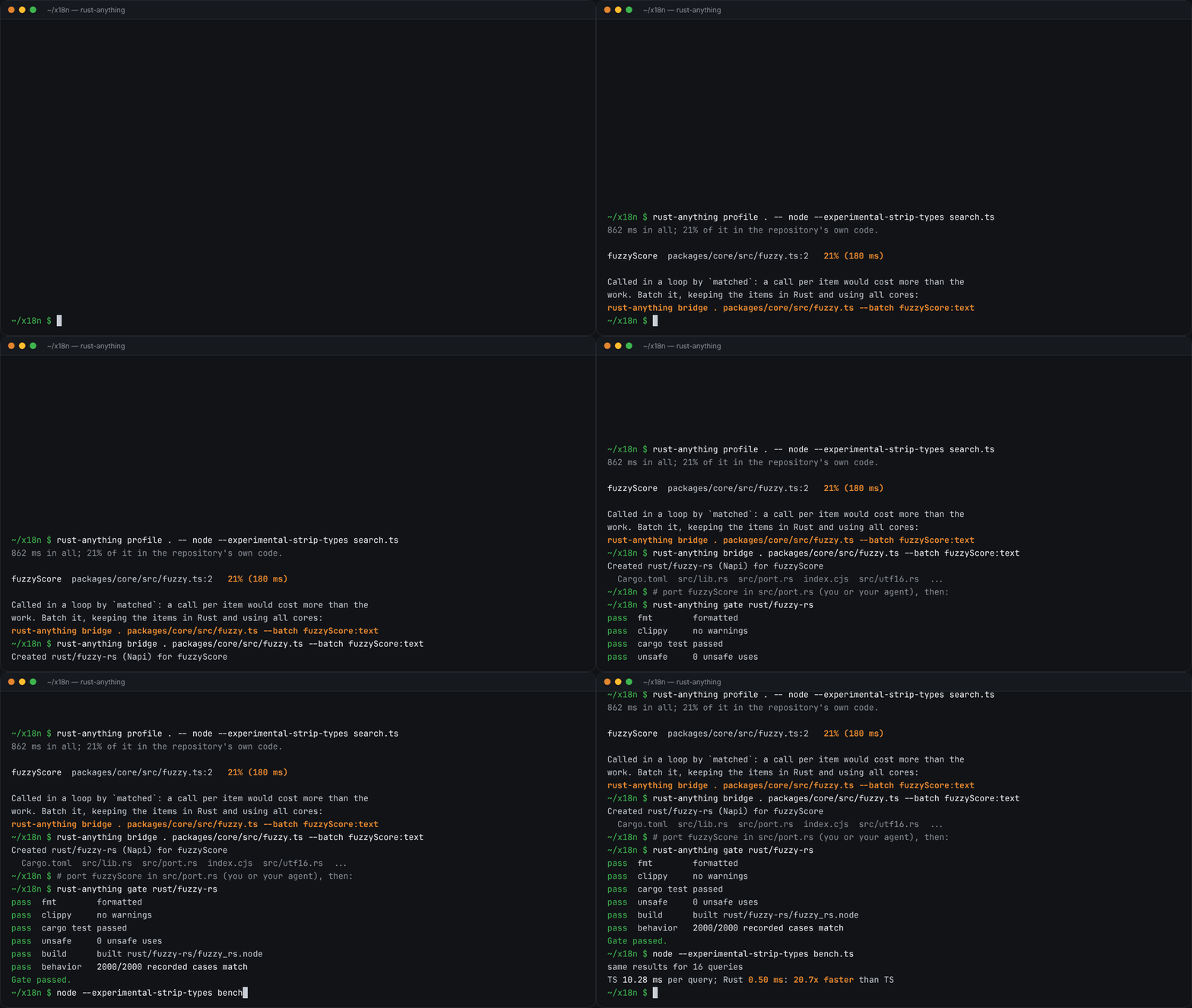
rust-anything, an MIT-licensed command-line tool that moves a Node.js, Python, C, Go, Ruby or Java app to Rust one piece at a time and checks each piece against recordings of the originalrust-anything, Node.js·Python·C·Go·Ruby·Java 앱을 한 조각씩 Rust로 옮기며 조각마다 원래 코드의 기록과 맞춰 보는 MIT License 명령줄 도구
Checked확인일
Image: rust-anything README.그림: rust-anything README.
sketchsketch
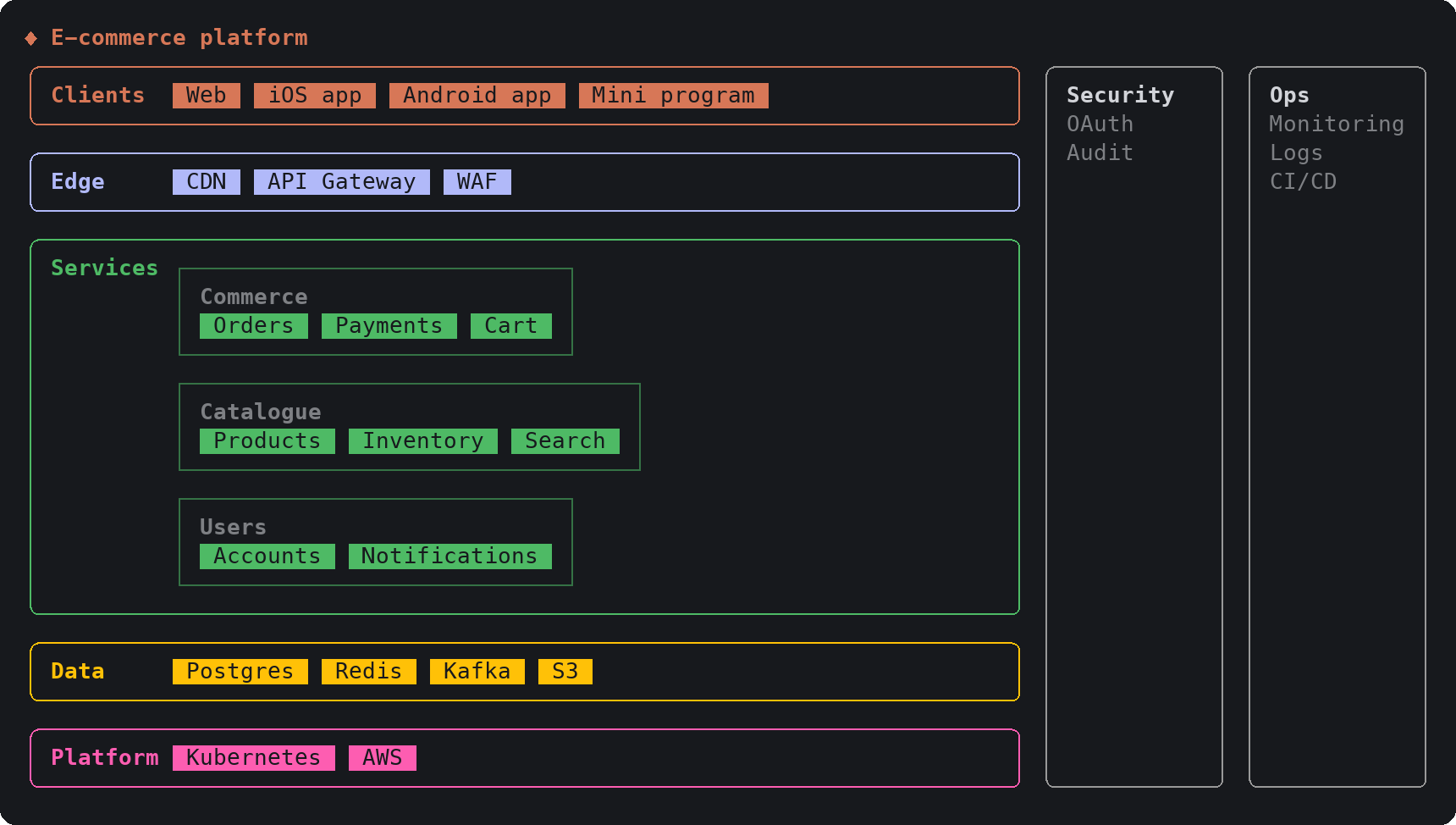
sketch, an MIT-licensed Claude Code plugin that answers with diagrams, roadmaps, wireframes and chart cards in the terminal instead of paragraphssketch, Claude Code의 답을 문단 대신 터미널 안 구조도와 로드맵, 화면 틀, 차트 카드로 그려 주는 MIT 플러그인
Checked확인일
Image: sketch README.그림: sketch README.
SketchCraftSketchCraft
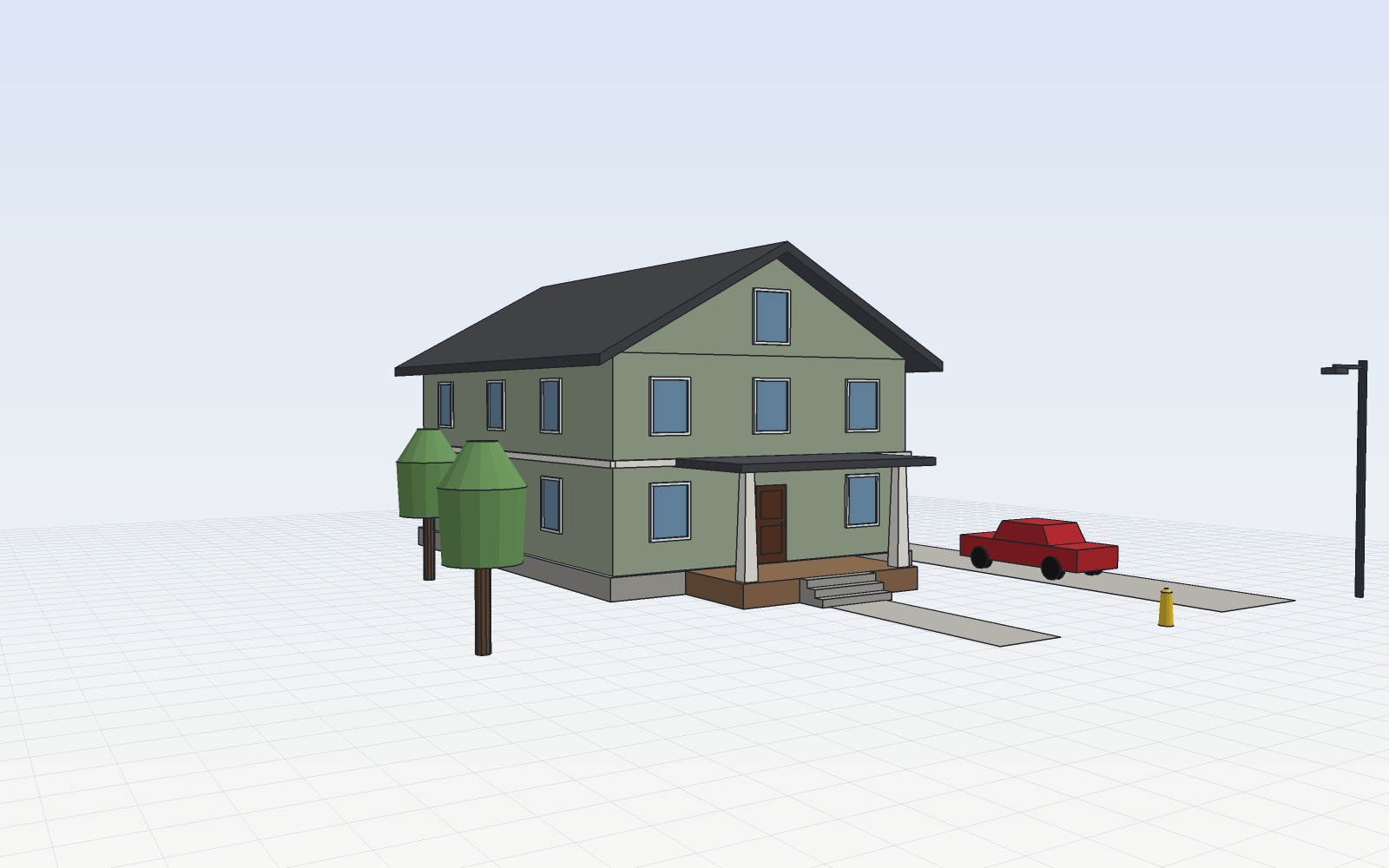
SketchCraft, a free MIT-licensed 3D modeler for houses, rooms and furniture that AI agents can also drive over MCP, limited to a workspace folderSketchCraft, 윤곽을 그려 끌어올리는 무료 MIT 3D 모델러, AI 에이전트도 작업 폴더 안에서 MCP로 같은 모델을 고친다
Checked확인일
Image: SketchCraft README.그림: SketchCraft README.