HREN


Twinseat, an MIT VS Code extension for macOS and Linux that runs work and personal Claude Code accounts in separate windows, in 0.3.0 PreviewTwinseat, VS Code 창마다 업무용과 개인용 Claude Code 계정을 따로 붙이는 macOS와 Linux용 MIT 확장의 0.3.0 Preview
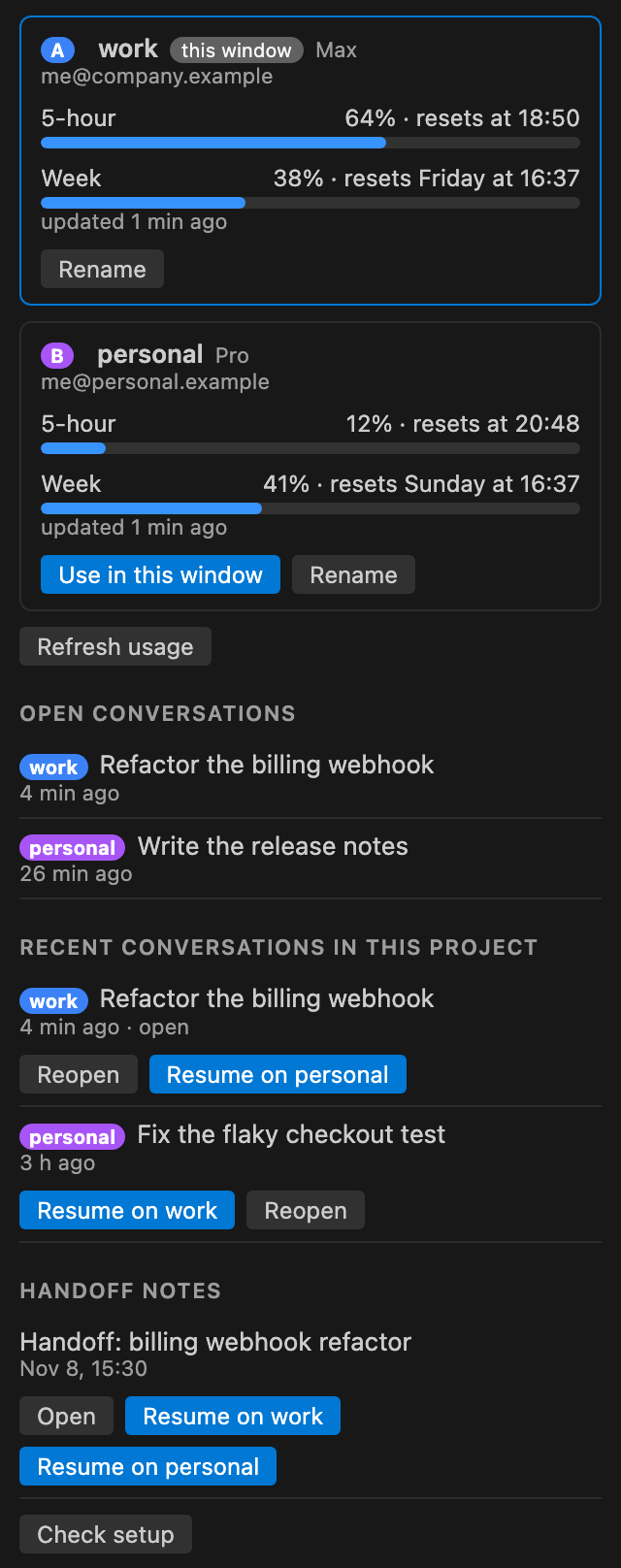
Twinseat is an MIT VS Code extension that gives each window its own work or personal Claude Code account and shows both accounts' usage in one panel, and 0.3.0 is a Preview. It needs VS Code 1.94 or later with the Claude Code extension, two Claude accounts and macOS or Linux, and Windows is not supported. Each account signs in through Claude Code's claude auth login, a conversation started by /clear follows the window's account when reopened, and each account keeps its own plan and limits with usage never pooled.Twinseat은 VS Code 창마다 업무용, 개인용 Claude Code 계정을 따로 붙이고 두 계정의 사용량을 한 패널에 보여 주는 MIT 확장이며, 0.3.0은 Preview입니다. VS Code 1.94 이상과 Claude Code 확장, Claude 계정 둘, macOS나 Linux가 있어야 하고 Windows는 지원하지 않습니다. 로그인은 계정마다 Claude Code의 claude auth login으로 하고, /clear로 시작한 대화는 다시 열 때 창의 계정을 따르며, 계정마다 제 요금제와 한도를 그대로 쓰고 사용량을 합치지 않습니다.
- Checked확인일
Twinseat is an MIT-licensed open-source VS Code extension that gives each VS Code window its own Claude Code account, so work and personal accounts run side by side, and the current version, 0.3.0, is a Preview. VS Code installs it from the Marketplace, Cursor, Windsurf and VSCodium from Open VSX, and other editors from the .vsix in Releases; it has not yet been tried in the Open VSX editors. It needs VS Code 1.94 or later with Anthropic's Claude Code extension, two Claude accounts that can use Claude Code, and macOS or Linux. Windows is not supported, and Twinseat stays inactive there and says so. Linux is tested in CI but not yet tried on a Linux desktop, and remote windows such as Remote SSH, WSL and dev containers are not tested.Twinseat은 VS Code 창마다 Claude Code 계정을 따로 붙여 업무용과 개인용 두 계정을 나란히 쓰게 하는 MIT 라이선스 오픈소스 확장이고, 지금 판인 0.3.0은 Preview입니다. VS Code는 Marketplace에서, Cursor, Windsurf, VSCodium은 Open VSX에서 깔고 그 밖의 편집기는 Releases의 .vsix를 쓰며, Open VSX 쪽 편집기에서는 아직 시험하지 않았습니다. VS Code 1.94 이상과 Anthropic의 Claude Code 확장, Claude Code를 쓸 수 있는 Claude 계정 둘, macOS나 Linux가 있어야 합니다. Windows는 지원하지 않아 그곳에서는 꺼진 채로 그렇다고 알립니다. Linux는 CI에서 시험하지만 Linux 데스크톱에서는 아직 시험 전이고, Remote SSH, WSL, dev container 같은 원격 창은 시험하지 않았습니다.
Each account signs in through Claude Code's own claude auth login, and the README says Twinseat never reads, stores or forwards login tokens. On macOS, Claude Code keeps the credentials in the keychain, one entry per folder; on Linux, they sit in the account's folder. First activation creates ~/.claude/comptes with the two account folders, the launcher, the registry and a launch log of time, account, mode and conversation ID with no content, and each account's .claude.json is seeded once from ~/.claude.json with UI flags, trusted projects and MCP server definitions, which may contain API keys, and written with mode 600. The editor's user settings get claudeCode.claudeProcessWrapper pointing to the launcher. Conversations reopen on the account they started on after a reload, a crash or a restart, but a conversation started by /clear is not in the registry and follows the window's account when reopened. There are exactly two accounts, and Twinseat adds no capacity: each account keeps its own plan and limits, and usage is never pooled or transferred. It is not affiliated with Anthropic, and because it relies on undocumented Claude Code behaviour, a nightly check catches a renamed one within a day of a release. The panel's Handoff notes need personal /relais and /reprendre commands that are not part of the repository; without them the section is hidden.로그인은 계정마다 Claude Code의 claude auth login으로 하고, README는 Twinseat이 로그인 토큰을 읽거나 저장하거나 넘기지 않는다고 적습니다. 자격 증명은 macOS에서는 Claude Code가 키체인에 폴더마다 한 항목씩 두고, Linux에서는 그 계정 폴더 안에 둡니다. 처음 켜면 ~/.claude/comptes에 두 계정 폴더, 실행기, 기록부, 내용 없이 시각, 계정, 모드, 대화 ID를 적는 실행 기록이 생기고, 계정마다 .claude.json에 ~/.claude.json의 화면 설정, 믿는 프로젝트, API 키가 들 수 있는 MCP 서버 정의가 한 번 복사돼 권한 600으로 저장됩니다. 편집기 사용자 설정에는 claudeCode.claudeProcessWrapper가 실행기를 가리키게 들어갑니다. 대화는 창을 다시 불러오거나 멈추거나 다시 시작해도 시작한 계정에서 열리지만, /clear로 시작한 대화는 기록부에 없어 다시 열 때 창의 계정을 따릅니다. 계정은 꼭 둘이고 용량을 더하지 않아 계정마다 제 요금제와 한도를 지키며 사용량을 합치거나 옮기지 않습니다. Anthropic과는 관계가 없고, 문서에 없는 Claude Code 동작에 기대고 있어 밤마다 도는 점검이 릴리스 하루 안에 바뀐 이름을 잡습니다. 패널의 Handoff notes는 이 저장소에 없는 개인 /relais, /reprendre 명령이 있어야 하고, 없으면 그 부분이 숨겨집니다.
The account follows the project. Writing a twinseat.account value once in .vscode/settings.json makes every window opened on that project use that account, and the setting can be committed to the repository. A project without a pin reopens on the account last chosen for it. Both accounts can run at once, one window on work and another on personal, and one panel shows each account's 5-hour and weekly limits and reset times, figures that Claude Code fetches without sending a message.계정은 프로젝트를 따라갑니다. .vscode/settings.json에 twinseat.account 값을 한 번 적으면 그 프로젝트로 여는 창마다 그 계정을 쓰고, 이 설정은 저장소에 커밋해도 됩니다. 핀이 없는 프로젝트는 마지막에 고른 계정으로 다시 열립니다. 두 계정이 한 번에 돌아 한 창은 work, 다른 창은 personal로 쓰고, 두 계정의 5시간, 주간 한도와 초기화 시각은 한 패널에 보이며 그 수치는 메시지를 보내지 않고 Claude Code가 가져옵니다.
Setup starts with installing the extension and clicking Sign in on each of the two account cards in the panel, which runs claude auth login for that account, followed by clicking Enable or reloading the window. The accounts are then named with Rename, and Twinseat: Pin this project to the current account ties the project to the current account.시작은 확장을 깔고 패널의 두 계정 카드에서 Sign in을 눌러 계정마다 claude auth login을 돌린 뒤 Enable을 누르거나 창을 다시 불러오는 것입니다. 이어 Rename으로 이름을 붙이고 Twinseat: Pin this project to the current account로 프로젝트를 묶습니다.
There are limits. With a process wrapper set, Claude Code does not restore plan mode, so a conversation that ended in plan mode resumes in the default mode, and an answer cut short by a window reload is not resumed. Removal starts with Twinseat: Disable everything; deleting ~/.claude/comptes then signs both accounts out, and on macOS their keychain entries stay until deleted in Keychain Access.한계도 있습니다. 프로세스 래퍼를 걸면 Claude Code가 plan mode를 되살리지 않아 plan mode로 끝난 대화는 기본 모드로 이어지고, 창을 다시 불러오면 끊긴 답은 이어지지 않습니다. 지울 때는 Twinseat: Disable everything을 먼저 돌리고, ~/.claude/comptes를 지우면 두 계정이 로그아웃되며 macOS 키체인 항목은 Keychain Access에서 지울 때까지 남습니다.
Sources & references원문과 참고 자료
Keep reading더 읽기
All articles전체 글rust-anythingrust-anything
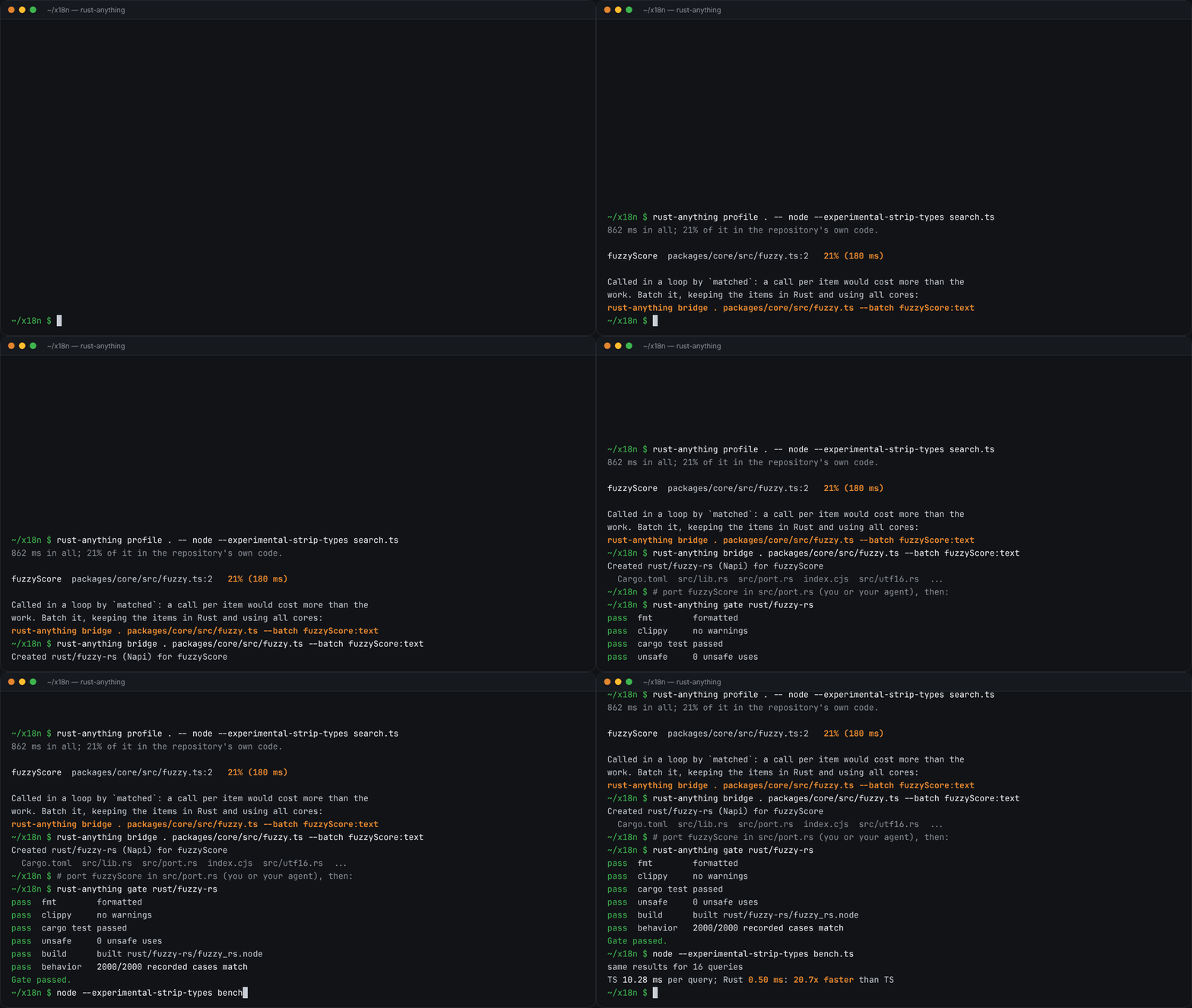
rust-anything, an MIT-licensed command-line tool that moves a Node.js, Python, C, Go, Ruby or Java app to Rust one piece at a time and checks each piece against recordings of the originalrust-anything, Node.js·Python·C·Go·Ruby·Java 앱을 한 조각씩 Rust로 옮기며 조각마다 원래 코드의 기록과 맞춰 보는 MIT License 명령줄 도구
Checked확인일
Image: rust-anything README.그림: rust-anything README.
sketchsketch
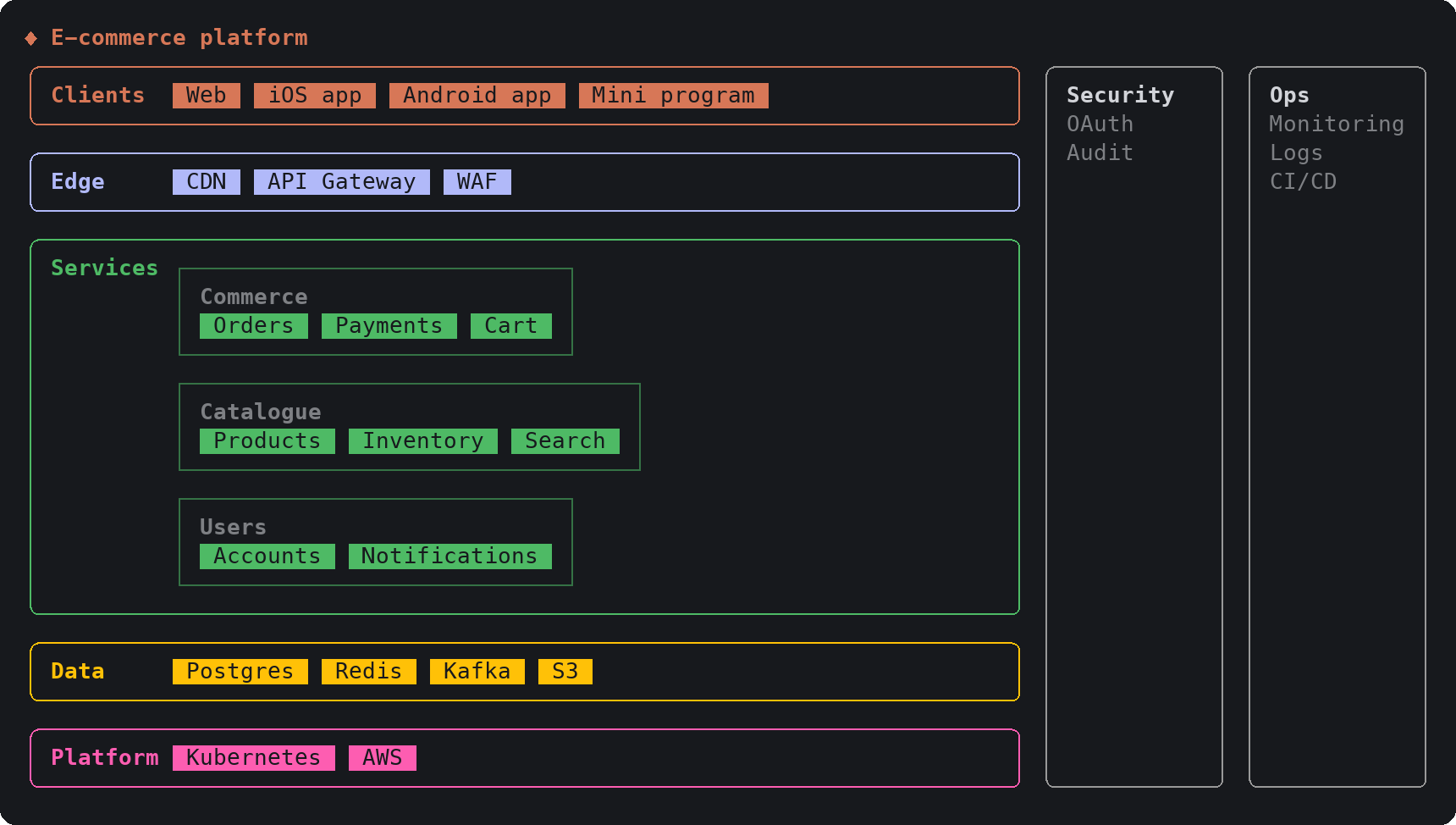
sketch, an MIT-licensed Claude Code plugin that answers with diagrams, roadmaps, wireframes and chart cards in the terminal instead of paragraphssketch, Claude Code의 답을 문단 대신 터미널 안 구조도와 로드맵, 화면 틀, 차트 카드로 그려 주는 MIT 플러그인
Checked확인일
Image: sketch README.그림: sketch README.
SketchCraftSketchCraft
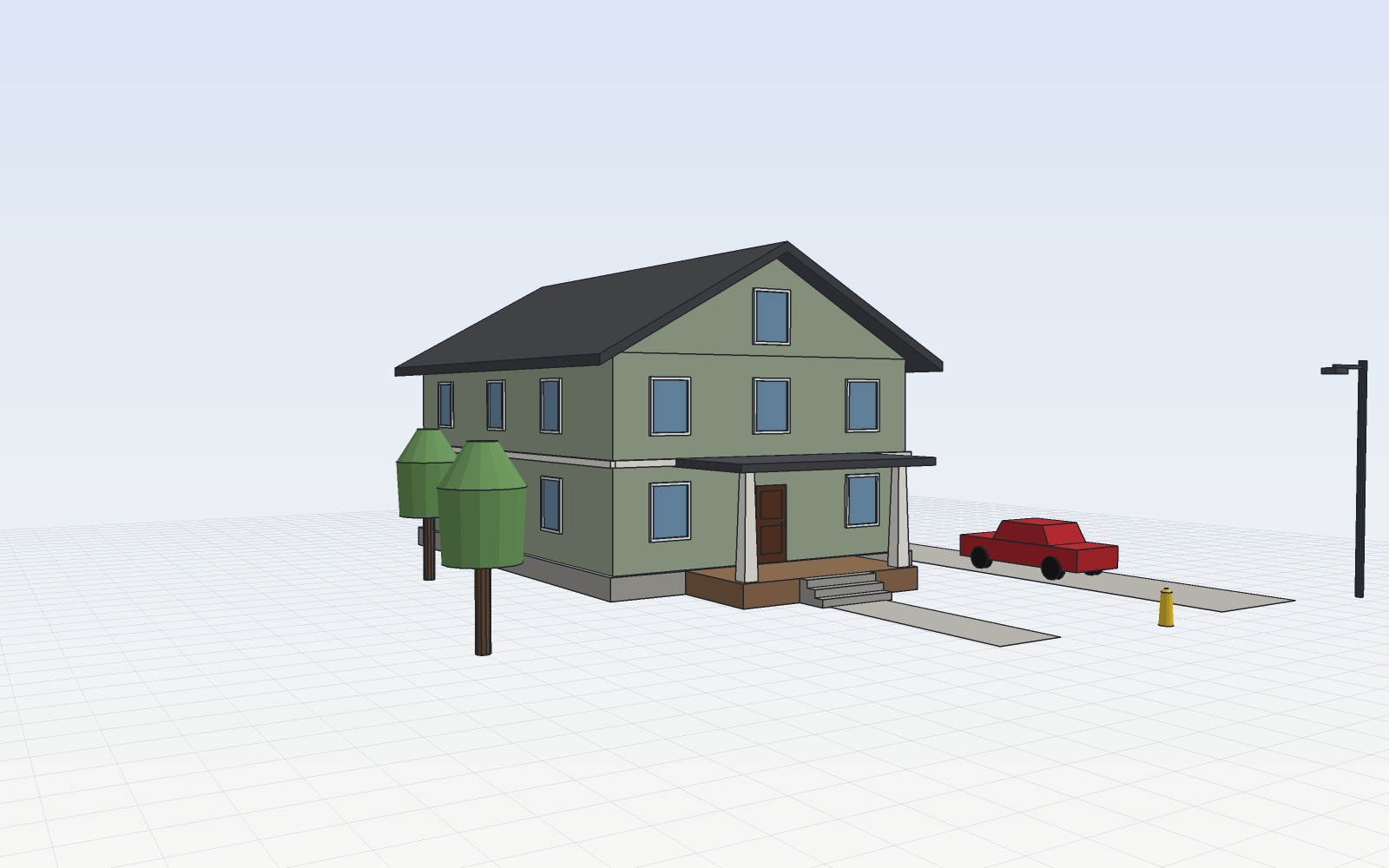
SketchCraft, a free MIT-licensed 3D modeler for houses, rooms and furniture that AI agents can also drive over MCP, limited to a workspace folderSketchCraft, 윤곽을 그려 끌어올리는 무료 MIT 3D 모델러, AI 에이전트도 작업 폴더 안에서 MCP로 같은 모델을 고친다
Checked확인일
Image: SketchCraft README.그림: SketchCraft README.